
How to Search Across Multiple Word Documents With AI Offline on Windows
Use three sample Word files to test search across documents, from exact wording to paraphrases. Inspect extracted headings, footnotes, tables, and source context.
The short answer: to search across multiple Word documents with AI offline, put the related .docx files in one local workspace, wait until their visible text is extracted and indexed, and begin with a Hybrid search across All documents. Use Exact phrase when you know the wording, Keyword for several important terms, Semantic when you remember the idea but not the language, and Hybrid when meaning and exact anchors both matter. Open the retained source text before relying on a result.
This is different from opening each file in Word and pressing Ctrl+F. It is also different from uploading a folder to a cloud chatbot. A local document index can retrieve passages from several files even when one says quarterly entitlement review and another says permissions must be revalidated every three months, all while keeping the documents and query on the Windows PC.
This walkthrough uses OriginPage and three downloadable fictional DOCX files. They contain ordinary headings, a numbered list, a footnote, a footer, a paraphrased rule, and a small risk-register table. The facts are known in advance, so you can reproduce the searches and recognize both correct results and extraction failures.
Download the three-DOCX search packFictional policy, handbook, and risk register · contains no real people or organizations Download| Question | Practical answer |
|---|---|
| Can AI search several Word documents at once? | Yes. Index the DOCX files in one workspace and search All documents, or narrow the result set to one file. |
| Can the complete workflow run offline? | Yes, when extraction, embeddings, retrieval, generation, and storage all run locally. OriginPage is designed around that boundary. |
| Which mode should I try first? | Hybrid. It combines matching words with related meaning and works well when you know some, but not all, of the document’s language. |
| Will DOCX results have Word page numbers? | No stable ones. Word pagination changes with fonts, margins, printer settings, and application versions. Verify the retained text and open the original file when layout matters. |
| Does OriginPage support old `.doc` files? | No. Its current Word support is for unencrypted, macro-free `.docx` files. |
What “AI search” adds to Word search
Word’s Find command is excellent when one document is open and you know the characters to type. Windows Search can help locate files, and improved Windows search can offer semantic file discovery on supported Copilot+ PCs. Microsoft 365 Copilot can use Word documents within Microsoft’s cloud and organizational content systems. These are useful tools, but they solve different problems.
The job in this article is narrower:
selected DOCX files on one Windows PC
  → local visible-text extraction
  → local keyword and semantic indexes
  → ranked passages across the collection
  → optional local grounded answer
  → retained source text for verification
The useful output is not merely a filename. It is a passage that preserves the document name and enough surrounding text to decide why it matched. AI contributes semantic retrieval, or the ability to find related meaning, while direct search keeps the evidence visible before a model turns it into prose.
Microsoft documents that Microsoft 365 Copilot’s semantic index works through Microsoft Graph and supported Microsoft 365 content. Its consumer file guidance says relevant Copilot workflows use files stored in OneDrive and that local paths are not supported. That can be a good cloud workflow when your organization permits it; it is not the same as a completely local DOCX pipeline. See Microsoft’s semantic-index documentation and supported file-format guidance.
Before you start
OriginPage is available from its official Microsoft Store listing for 64-bit Windows 11. The current DOCX source limit is 64 MiB per file, and a workspace can contain up to 100 documents. Check what OriginPage supports before importing a large or unusual collection.
Download and extract the ZIP above. It contains:
| Word document | What it tests | Known evidence |
|---|---|---|
| Access policy | Headings, numbered requirements, footer, footnote, and exact wording | quarterly entitlement review |
| Vendor handbook | Same concept expressed with different language | Permissions are revalidated every three months |
| Risk register | Table extraction and repeated access-review vocabulary | Mira Patel · 15 September 2026 · Open |
The names and organization are fictional. The corpus is intentionally small enough to inspect manually. Do not begin an evaluation with confidential client files: first learn whether the tool extracts, scopes, retrieves, and cites a safe document correctly.
Step 1: add the related DOCX files to one workspace
Create a dedicated workspace, select Add Documents, and choose all three .docx files. OriginPage creates managed local copies for processing and does not modify the originals.
Wait until every file says Ready. A document listed in the sidebar may still be extracting or indexing. Searching before the intended evidence set is Ready produces an incomplete result even if the query itself is perfect.
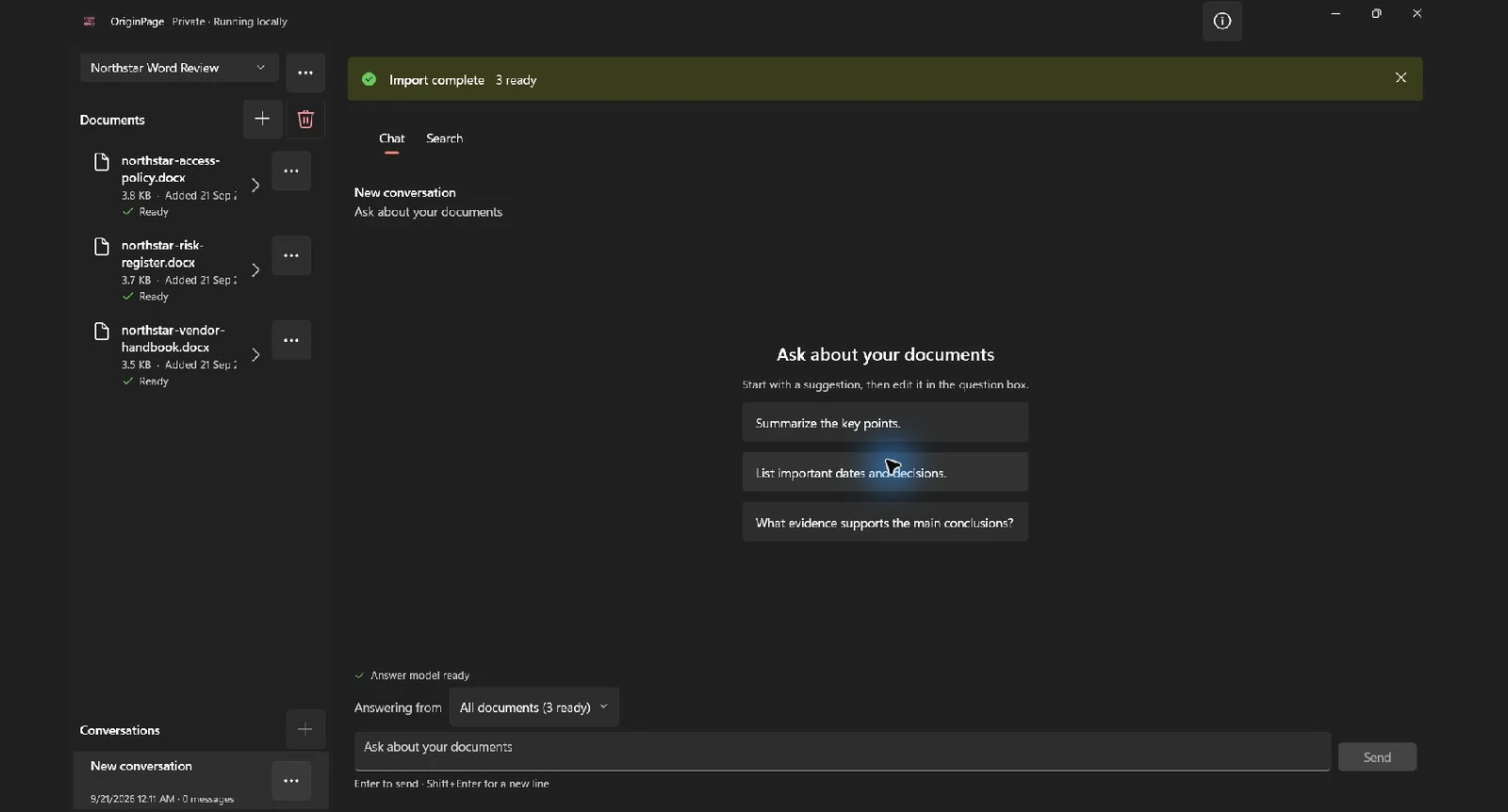
Keep workspaces deliberate. A folder dump containing several clients, editions, or projects can produce relevant-looking results from the wrong context. Group the files that are genuinely allowed to answer the same question, then use document scope for narrower checks.
Step 2: inspect what became searchable
Open Document details before testing the index. In the access policy, the retained text should include the title, headings, exact review-cycle sentence, numbered requirements, footer, and footnote. In the risk register, table cells should appear in reading order with row values separated visibly.
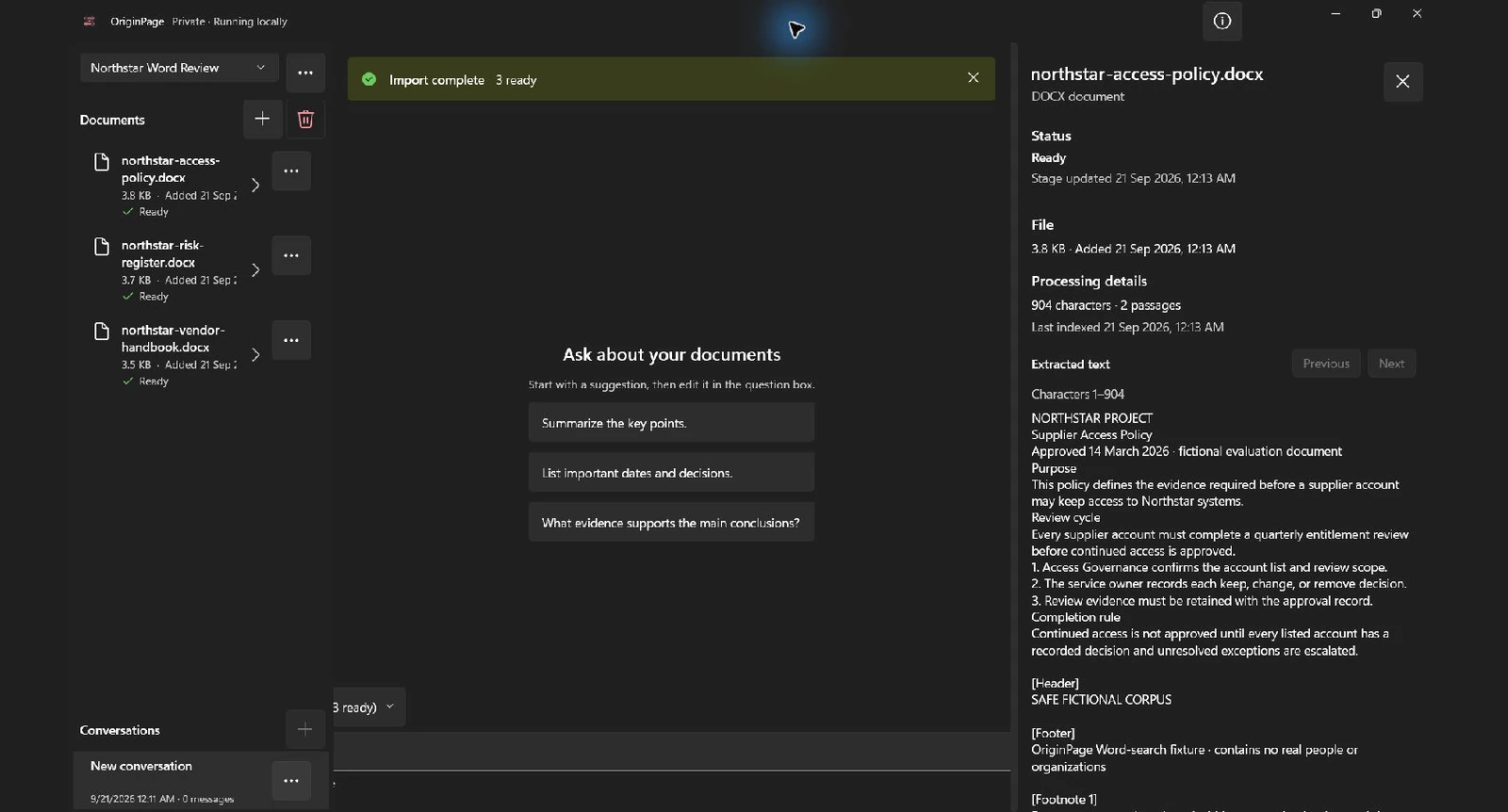
This check separates extraction from retrieval. If quarterly entitlement review is missing here, changing search modes cannot restore it. If the table associates Mira Patel with the wrong row after extraction, a fluent answer may repeat that error convincingly.
OriginPage extracts supported visible WordprocessingML text. It does not reproduce Word’s complete rendered layout. Treat the retained representation as searchable evidence, then return to the original DOCX when formatting, tracked changes, embedded objects, or table geometry affects the decision.
Step 3: start with Hybrid search across All documents
Open Search, leave the document selector at All documents, choose Hybrid, and enter:
vendor access review deadlineThis query combines broad concepts with an exact anchor. A useful result set should surface the policy’s review requirement, the handbook’s revalidation language, and the risk register’s owner and deadline, even though the three documents do not repeat one identical sentence.
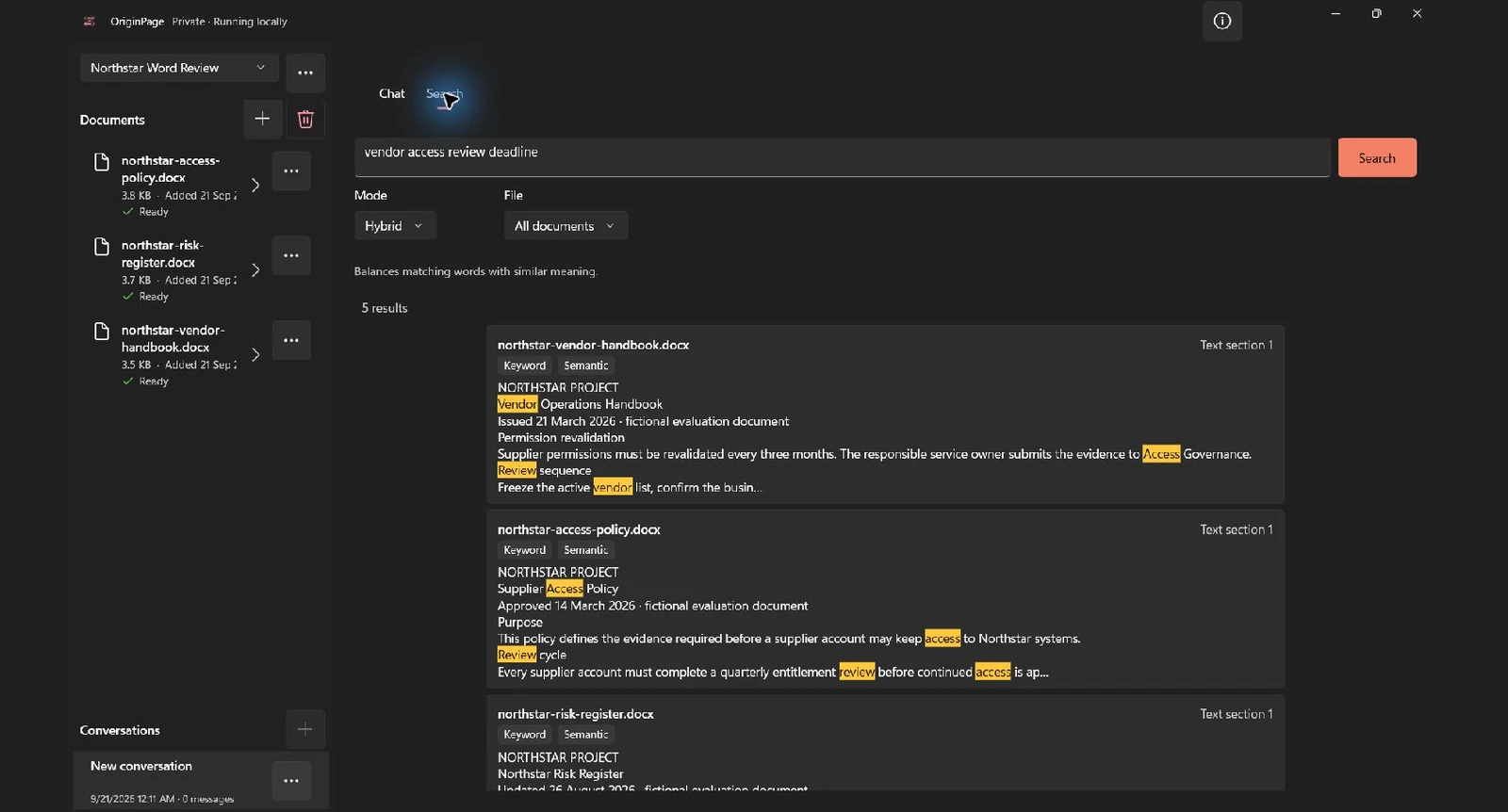
Avoid vague one-word searches such as review. That word appears in several contexts and gives the ranker little help. Add a supplier, person, date, obligation, or uncommon phrase. Search is retrieval, not mind reading; precise context improves the result without requiring a long prompt.
Step 4: choose the mode that matches what you remember
The four modes answer different questions:
| Mode | Use it when | Example |
|---|---|---|
| Exact phrase | You know the precise wording, name, code, or quotation. | quarterly entitlement review |
| Keyword | Several literal terms matter, but their order does not. | Mira access September Open |
| Semantic | You remember the idea but not the author’s vocabulary. | who checks supplier permissions every three months |
| Hybrid | You want concept matching strengthened by known anchors. | vendor access review deadline |
Confirm known wording with Exact phrase
Switch to Exact phrase and search:
quarterly entitlement reviewThe access policy should be the direct match. This mode is appropriate for policy language, defined terms, identifiers, names, and quotations where word order matters.
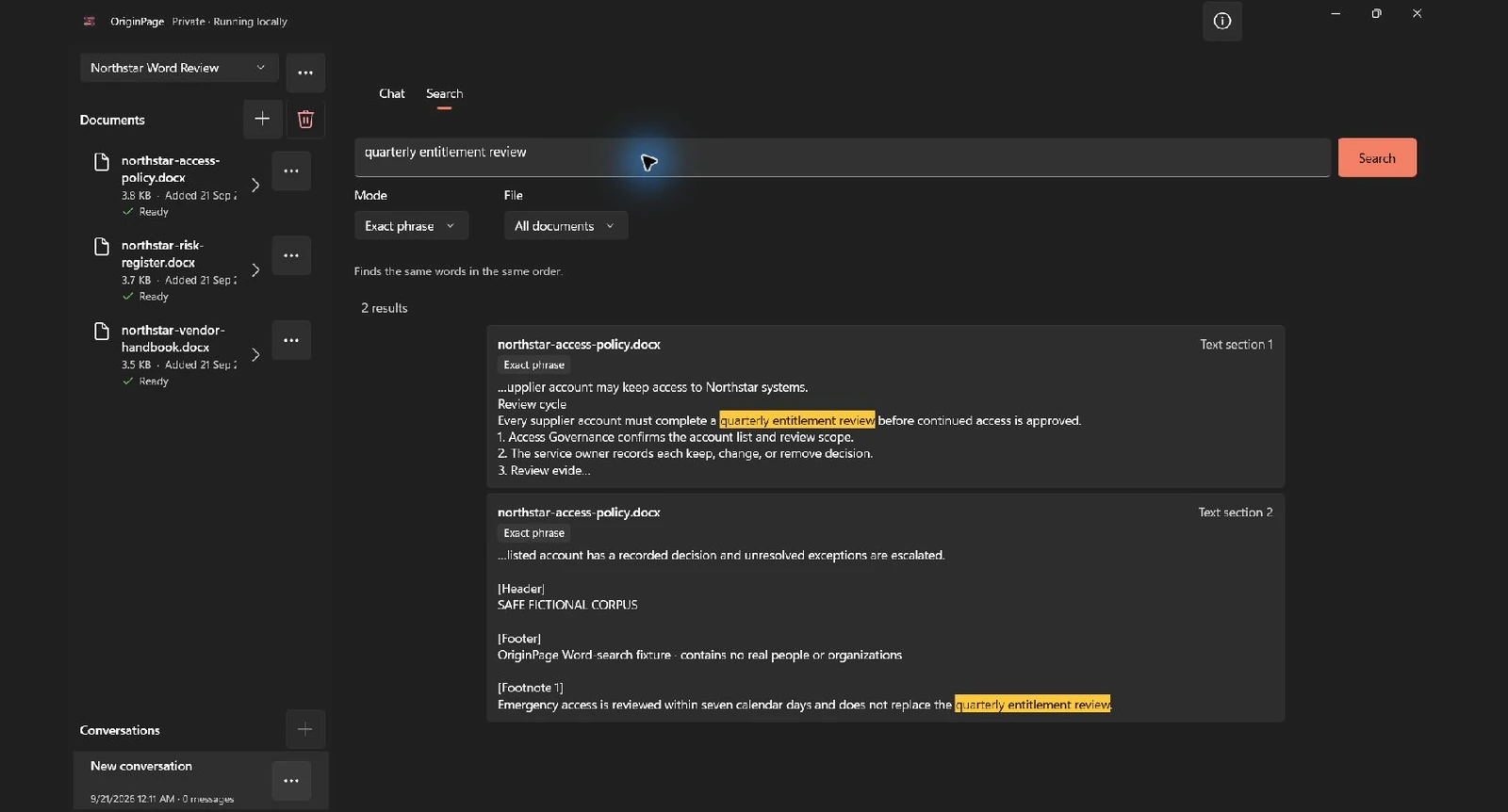
Exact search should not be expected to find the handbook sentence Supplier permissions must be revalidated every three months. The idea is equivalent for this fictional test, but the characters are different.
Find alternate language with Semantic search
Now choose Semantic and search:
who checks supplier permissions every three monthsThe handbook should rank because it discusses revalidating supplier permissions and the responsible service owner, even though the query does not reproduce its full sentence.
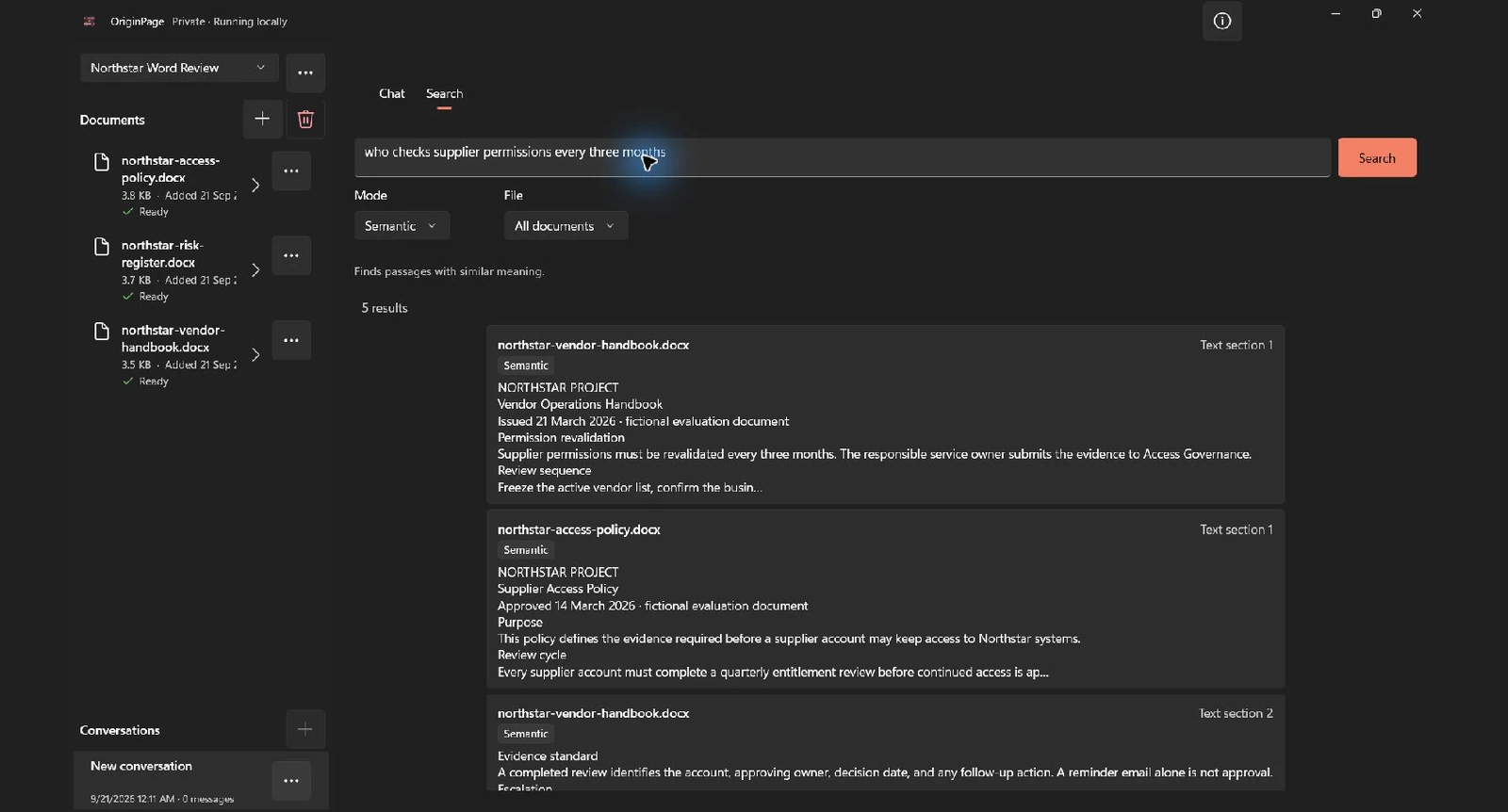
Semantic similarity is not proof of equivalence. A result can discuss the right topic but describe an exception, historical rule, draft proposal, or different population. Read the surrounding heading and passage before treating two sentences as the same requirement.
Step 5: narrow the result to one Word document
An all-document search answers “where does this collection discuss the topic?” A document filter answers “what does this particular source say?” Change the selector to northstar-risk-register.docx and search:
Mira supplier access status deadline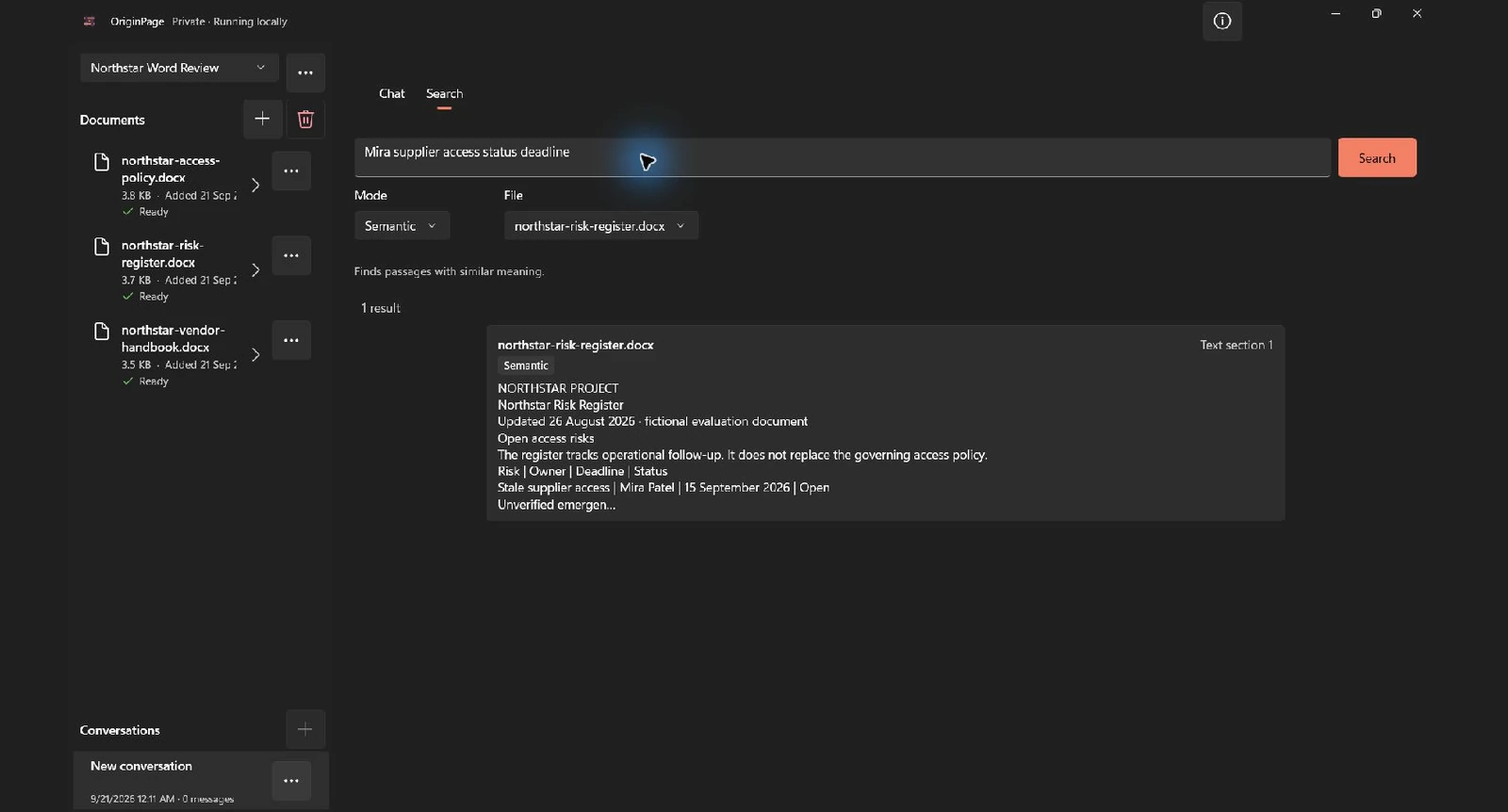
DOCX documents do not expose the stable page filtering that PDFs do. A Word page boundary depends on the renderer, font availability, margins, paper size, and printer settings. OriginPage therefore preserves the document and retained text location rather than inventing a dependable Word page number.
Step 6: use a grounded answer only after finding the evidence
Direct Search is often the end of the job. If you need a consolidated result, switch to Chat, confirm Answering from includes the intended three documents, and ask:
Compare the supplier access review frequency, responsible owner, deadline, and current status across these documents.
The test answer should distinguish what each source establishes:
- The access policy says
quarterly entitlement review. - The handbook restates the cadence as every three months.
- The risk register assigns the stale supplier-access item to Mira Patel.
- Its deadline is 15 September 2026 and its status is Open.
- The documents do not establish that Mira owns the governing policy itself.
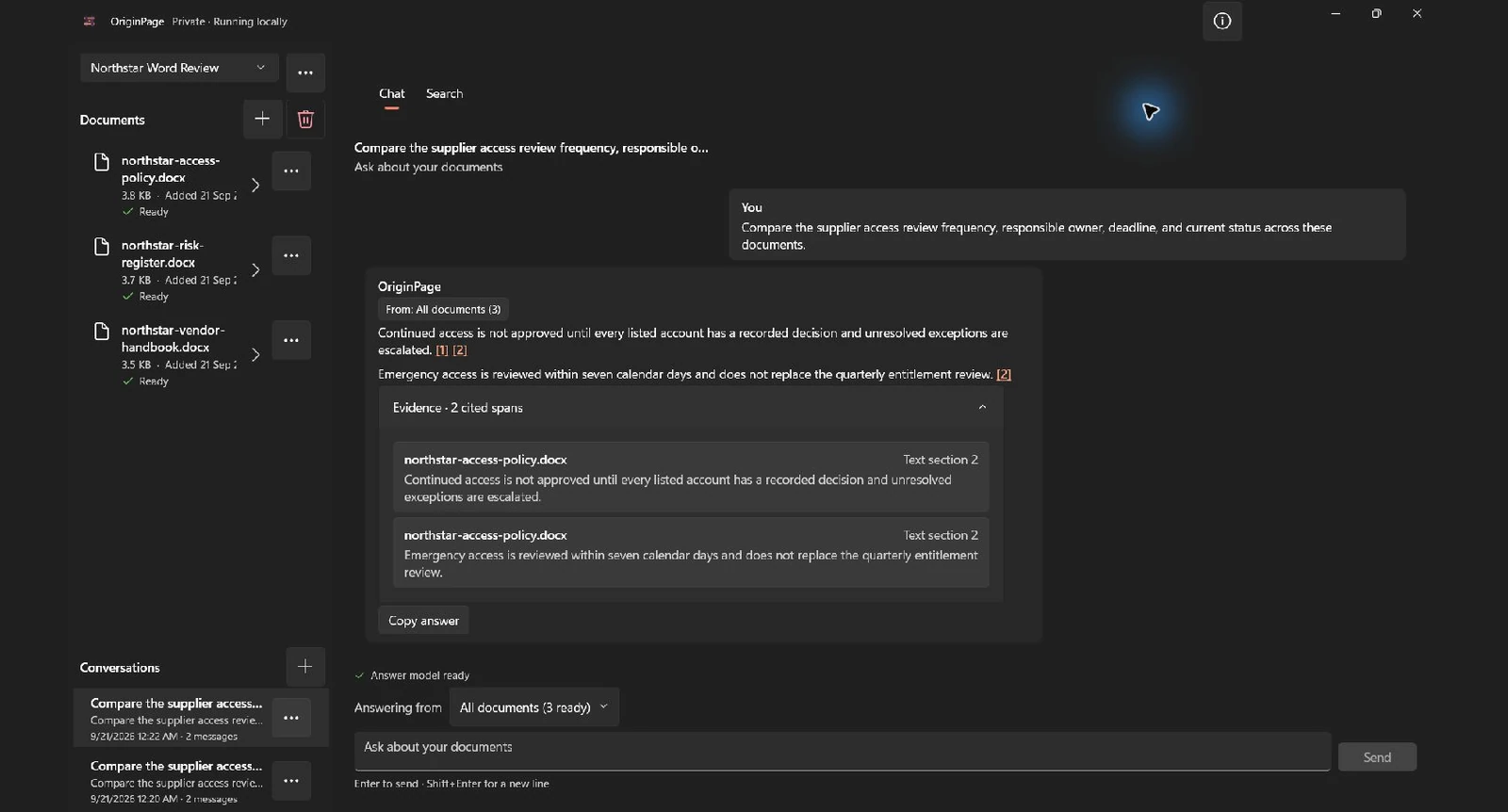
This run did not meet the answer checklist above. The response described approval decisions and the seven-day emergency-review footnote, but omitted the handbook’s wording and the risk-register row. All three files were in scope. Direct Search had located the missing evidence, so this is a concrete example of incomplete answer coverage despite successful retrieval in a separate search.
That last distinction is why a polished table is not enough. Retrieval can surface relevant facts while generation joins them incorrectly. Ask for narrow fields, preserve filenames, and treat an insufficient-evidence statement as a valid result rather than a failure to be prompted away.
Step 7: open the retained source context
Select a search result or answer source to open its retained context. For the risk register, inspect the row containing the risk, owner, deadline, and status together. For the policy, check whether the footnote modifies or merely supplements the quarterly rule.
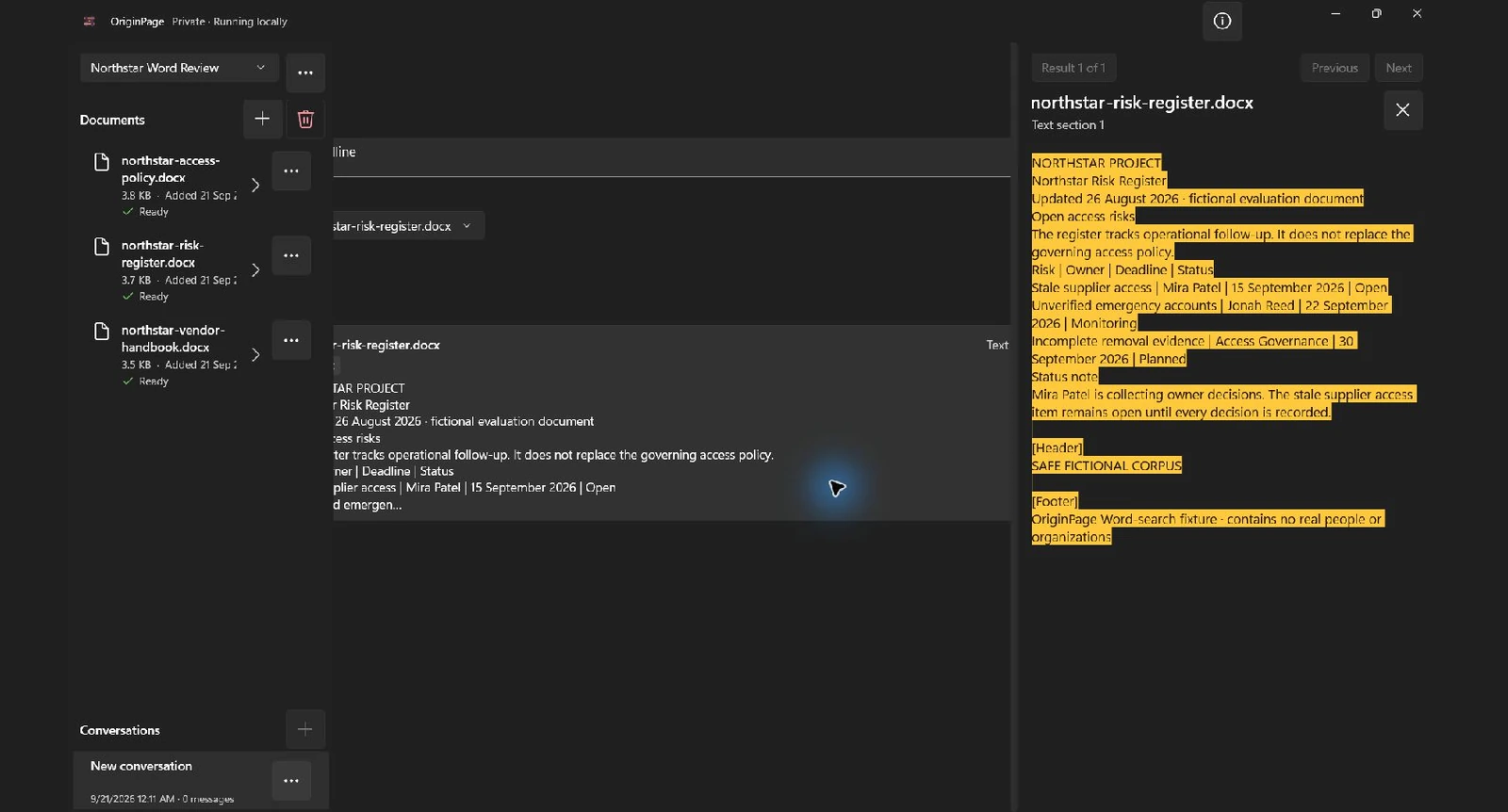
When a table is important, open the original DOCX as well. Linear text can preserve the cell values while weakening the visual relationship between a multi-level header and a nested or merged cell. OriginPage helps locate the evidence; it does not turn every Word layout into a normalized database.
When Word Find, Windows Search, or Copilot is the better tool
Use the least powerful tool that completes the job:
| Tool | Choose it when | Main boundary |
|---|---|---|
| Word Find | You know the wording and are searching one open document | Literal search inside that file |
| Windows or File Explorer Search | You primarily need to locate a file by name, metadata, or indexed content | System search behavior depends on configuration and hardware |
| Improved Windows search | You have supported Copilot+ hardware and need system-wide semantic file discovery | Designed to find files, not provide OriginPage’s bounded evidence workflow |
| Microsoft 365 Copilot | Your files live in approved Microsoft 365 storage and cloud processing, collaboration, and organizational context are useful | Microsoft 365 service and license boundary |
| OriginPage Direct Search | You need offline passage retrieval across a chosen PDF, DOCX, and TXT collection | Local managed workspace and retained source text |
| OriginPage grounded answer | You need a local synthesis whose factual claims remain linked to evidence | Selected Ready documents and local model limits |
If Ctrl+F already finds the exact clause, use it. The separate guide Why Ctrl+F Sometimes Beats AI explains where literal, keyword, semantic, Hybrid, and generated answers fit.
DOCX limitations that matter
Searching Word text is not the same as rendering all of Microsoft Word. OriginPage’s current contract is intentionally narrower:
- Supported Word input is unencrypted, macro-free
.docx, not legacy.docor templates. - Password-protected and encrypted Word files are rejected.
- Macro-enabled packages are rejected rather than executed.
- Supported visible main text, headers, footers, footnotes, endnotes, lists, and table cells can be extracted.
- Deleted revision text and comments are not treated as ordinary visible evidence.
- Image-only text inside a DOCX does not receive the reviewed PDF OCR workflow.
- Embedded objects and complete visual layout are not reproduced.
- Complex, merged, or nested table relationships may not survive linearization.
- A DOCX passage does not receive a stable rendered Word page number.
- Search can miss relevant passages, and semantic similarity can retrieve a passage that is topical but not dispositive.
For a material decision, compare the retained text with the original Word document. Check headings, qualifiers, footnotes, table headers, current revision state, and whether the file is authoritative. Local processing is a data-path property, not a promise that every conclusion is correct.
Common problems
The Word document appears, but search finds nothing
Confirm that it says Ready and belongs to the active workspace. Open Document details and search the retained text for a known phrase. Clear document filters, shorten the query, and try Hybrid. If the expected words were never extracted, fix or convert the source rather than repeatedly rephrasing the query.
Exact phrase misses visible text
Formatting can divide visually continuous text into separate runs, and punctuation or non-breaking hyphens may differ from what you typed. Try the rarest words in Keyword mode, inspect retained text, and copy the exact retained wording for confirmation.
Semantic results are too broad
Add one literal anchor such as a person, project, date, or product name, then switch to Hybrid. Restrict the search to one document when testing what a particular source says.
A table result looks scrambled
Open the original DOCX. Verify the column header, row label, merged cells, and any notes beneath the table. Do not ask generated prose to reconstruct a relationship that extraction did not preserve.
The answer combines the right facts incorrectly
Open every contributing source. Ask smaller questions for cadence, owner, deadline, and status. Distinguish ownership of a risk item from ownership of the policy or action. If the documents do not establish the relationship, record it as unknown.
FAQ
Can Windows search inside multiple Word documents?
Yes, when file-content indexing is enabled for the relevant locations and formats. Traditional Windows search is useful for locating files and literal content. A local document assistant adds bounded semantic passage retrieval and, optionally, a source-grounded answer workflow.
Can I search DOCX files without uploading them?
Yes. Use software whose DOCX extraction, embeddings, index, retrieval, answer model, and persistence all run on the PC. Verify the complete data path rather than assuming an installed desktop interface is offline.
Can semantic search find different wording?
That is its purpose. In this corpus, it can connect quarterly entitlement review with permissions must be revalidated every three months. You still need to inspect the context to determine whether the passages are genuinely equivalent.
Can local AI search tables in Word documents?
It can search table text that the extractor preserves. Simple rows usually work better than merged, nested, visually complex tables. Always verify important row and column relationships in the original DOCX.
Why does a Word result not show a page number?
DOCX is a flow document rather than a fixed-page format. Pagination changes with Word version, fonts, margins, printer, and paper settings. A stable page claim would be misleading.
Can I search Word and PDF files together?
Yes. OriginPage workspaces can contain Ready PDF, DOCX, and TXT documents. PDF results can retain PDF page positions; Word and text sources use their retained text context.
Does offline Word search need a GPU?
Direct local search can run without a dedicated GPU. Hardware affects indexing and semantic-search speed, while local answer generation has larger memory and compute needs. An SSD and 16 GB of RAM are a practical baseline for the intended workflow.
Repeatable checklist
- Put only related documents in the workspace.
- Wait until every intended DOCX says Ready.
- Inspect retained text before judging search quality.
- Begin with Hybrid across All documents.
- Use Exact phrase for known clauses, names, and identifiers.
- Use Semantic for alternate language, then verify context.
- Filter to one document when authority or version matters.
- Ask a grounded question only after locating the relevant passages.
- Open every material source and return to the original DOCX for layout-sensitive evidence.
- Test a question the documents cannot answer and confirm the tool does not guess.
That is the practical difference between “AI can open a Word file” and a reviewable offline search workflow. Search helps you find exact and related language across the collection. Scope, retained text, and source inspection help you decide whether the result deserves to be trusted.
Preserve the source location when sharing a finding
Record the DOCX filename, heading, quoted wording, and version you checked. Word page numbers can change with fonts, margins, printer settings, and edits, so a retained text location is not a stable rendered page reference. Reopen the original document before circulating a decision based on a table, footnote, or revision.
Figure 7 shows the unedited response from the live application. Its citations support a narrower answer than the question requested. Record missing fields explicitly instead of treating the presence of citations as proof that a comparison is complete.
Method note
These eight screenshots were captured on 21 September 2026 from the locally installed OriginPage 1.0.35.0 candidate on 64-bit Windows 11. The published DOCX files were imported through the Windows file picker into Northstar Word Review and reached Ready. The policy reported 904 extracted characters and two passages. Hybrid and Semantic returned five passages each, Exact phrase returned two policy passages, and the filtered risk-register search returned one. No answer was inserted or scripted.
The first comparison request closed the app. After reopening it, we repeated the identical question in a new conversation with All documents (3) selected. That retry completed with two statements citing policy text section 2 only; it did not complete the cross-document comparison. The failure capture is retained with the source masters. Opening the source inspector also clips part of the main pane in this candidate; Figure 8 preserves that observed layout. These are workflow observations, not a model-quality benchmark.
No personal or customer data appears in the fixtures or captures. The screenshots document the captured OriginPage 1.0.35.0 candidate and may differ from the current Store release. Product wording and limits can change, so compare this article with the current OriginPage guide, capability contract, and privacy boundary.
For fixed-page documents, read How to Search Across Multiple PDFs With AI. For version and policy conflicts, use How to Find Contradictions Across Multiple Documents.
Try the reproducible Word-document searchThree safe DOCX files with known headings, paraphrases, footnotes, and table facts DownloadTry OriginPage free for seven days through Microsoft Store to use this workflow on Windows 11. A one-time purchase is required to continue after the trial.