
Why Ctrl+F Sometimes Beats AI and When It Doesn’t
A practical guide to choosing exact phrase, keyword, semantic, hybrid search, or generated answers for contracts and other long documents.
The short answer: Ctrl+F is often the best tool when you know the exact word, number, identifier, or quoted phrase. AI search becomes useful when you know the idea but not the document’s wording, when terminology varies across files, or when you need to combine several passages. The safest workflow is not “replace search with chat.” It is to move from the most deterministic method to the least deterministic method required by the task.
That usually means:
Exact phrase → keyword → semantic → hybrid → generated answerEach step adds flexibility. It can also add ambiguity. A generated answer may save time, but it is a poor substitute for an exact search when the job is to locate INV-2026-0417, confirm whether a contract says calendar days, or find every occurrence of a defined term.
This guide uses the fictional Harborview agreement pack introduced in our contract-comparison walkthrough. You can download the files, run the same queries, and know what the source actually contains.
| Task | Best starting tool | Why |
|---|---|---|
| Find an invoice number, name, date, or exact quote | Ctrl+F or Exact phrase | Fast, literal, predictable, and easy to reproduce |
| Find several known words in any order | Keyword | Handles term combinations without requiring one exact phrase |
| Find an idea expressed with different vocabulary | Semantic | Can retrieve conceptually related wording |
| Use exact anchors while allowing paraphrases | Hybrid | Balances lexical and semantic evidence |
| Create a timeline, comparison, or concise synthesis | Generated answer after search | Combines passages, but requires source verification |
Download the search test documents
Use the same three safe files throughout the exercises:
The base agreement uses phrases such as without undue delay, confirmed security incident, and fees paid or payable. The amendment changes several concepts and sometimes changes their vocabulary as well. The memo describes outdated practices using operational language. That combination lets us test literal retrieval, paraphrase retrieval, and cross-document synthesis separately.
Why Ctrl+F is underrated
Ctrl+F has four qualities that are easy to overlook in an AI product:
- Its behavior is legible. It looks for the characters you entered, subject to the viewer’s matching rules.
- Its failure is informative. No match means the exact character sequence was not found in the searchable text; it does not mean that the concept is absent.
- It does not generate prose. There is no risk that retrieval and writing become confused.
- It is quick to reproduce. A colleague can run the same literal search and inspect the same occurrence.
For known-item retrieval, these are advantages rather than limitations. If you need section 7, the name Priya Shah, the date 27 June 2026, or the phrase thirty (30) calendar days, semantic similarity is unnecessary.
Ctrl+F also helps diagnose the document. If a visibly present phrase cannot be found, the problem may be extraction, OCR, character encoding, hyphenation, or a raster-only page. Asking a language model to compensate can hide that the evidence layer is broken.
When Ctrl+F wins outright
Exact identifiers
Use literal search for invoice numbers, policy codes, account IDs, case citations, serial numbers, clause labels, and uncommon names. Similarity is not identity. A semantic result near the requested identifier can be actively misleading.
Exact quotations
When verifying whether a sentence appears in the document, search a distinctive five-to-eight-word fragment. If punctuation or line breaks interfere, shorten it carefully and inspect every occurrence.
Numbers and units
Search the number and its unit together: 60 calendar days, 99.5 percent, or 48 hours. A generated answer can normalize wording, but the source controls.
Negations and defined language
Terms such as not, unless, except, and only often carry more meaning than the topic noun. Exact search makes them visible. Semantic search may retrieve a related passage while underweighting the negation.
Exhaustive occurrence checks in one document
If the goal is to inspect every use of Customer Data in a short agreement, Ctrl+F’s next-match loop is often clearer than a ranked result list. Ranking intentionally prioritizes some matches over others; exhaustive review requires knowing the denominator.
The point where Ctrl+F fails
Literal search fails when the source expresses your idea in language you did not predict.
Suppose you search the Harborview documents for:
data breach reporting deadlineThe agreement instead says confirmed security incident and notify Customer ... no later than seventy-two hours after confirmation. The amendment says suspected or confirmed security incident and initial written notice ... within forty-eight hours after discovery. The concept is present, but none of the documents needs to contain the exact phrase data breach reporting deadline.
Other common mismatches include:
cancelversusterminate;money owedversusundisputed invoice;uptimeversusmonthly availability;keep the dataversuspost-termination export window;- acronyms versus expanded names;
- British and American spelling;
- singular versus plural or inflected forms; and
- business vocabulary that differs between legal, operational, and technical teams.
This is where keyword, semantic, and hybrid retrieval earn their place.
Four search modes, four different promises
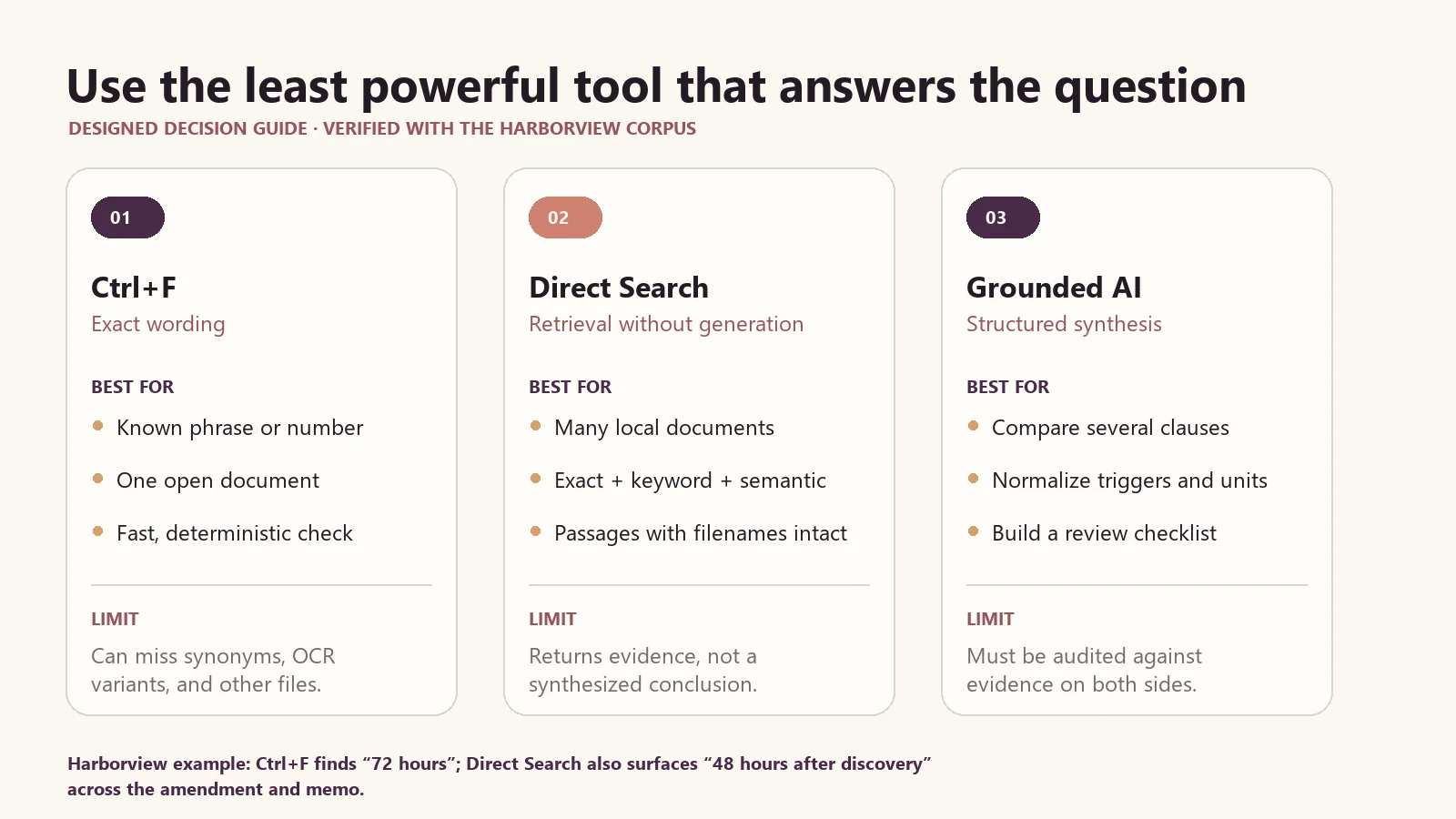
The practical choice is not “search or AI.” It is a ladder: start with literal lookup, move to retrieval when vocabulary or document count expands, and use synthesis only when the task actually requires combining evidence.
Exact phrase
Exact phrase is the closest equivalent to a deliberate Ctrl+F query across an indexed collection. Use it when order and adjacency matter:
fees paid or payable
without undue delay
to the extent of the conflict
It is strong evidence that the indexed text contains the phrase. It is not proof that the phrase appears only once, that the surrounding clause governs, or that OCR preserved the visible page correctly.
Keyword
Keyword search rewards known terms without requiring one exact sequence:
invoice dispute ten business days
termination convenience written notice
liability fraud confidentiality
This is useful when you remember the vocabulary but not the sentence. It is also effective for names and several anchors distributed within one passage.
Semantic
Semantic search looks for similar meaning rather than only shared tokens. Try:
how quickly must the supplier alert the customer when data may be exposed
how long can the customer retrieve information after the relationship ends
what is the maximum ordinary financial exposure
Those questions do not copy the contract’s language. A useful semantic index should retrieve the incident-notice, export-window, and limitation-of-liability passages. But similarity is probabilistic: a result can be conceptually related without answering the precise question.
Hybrid
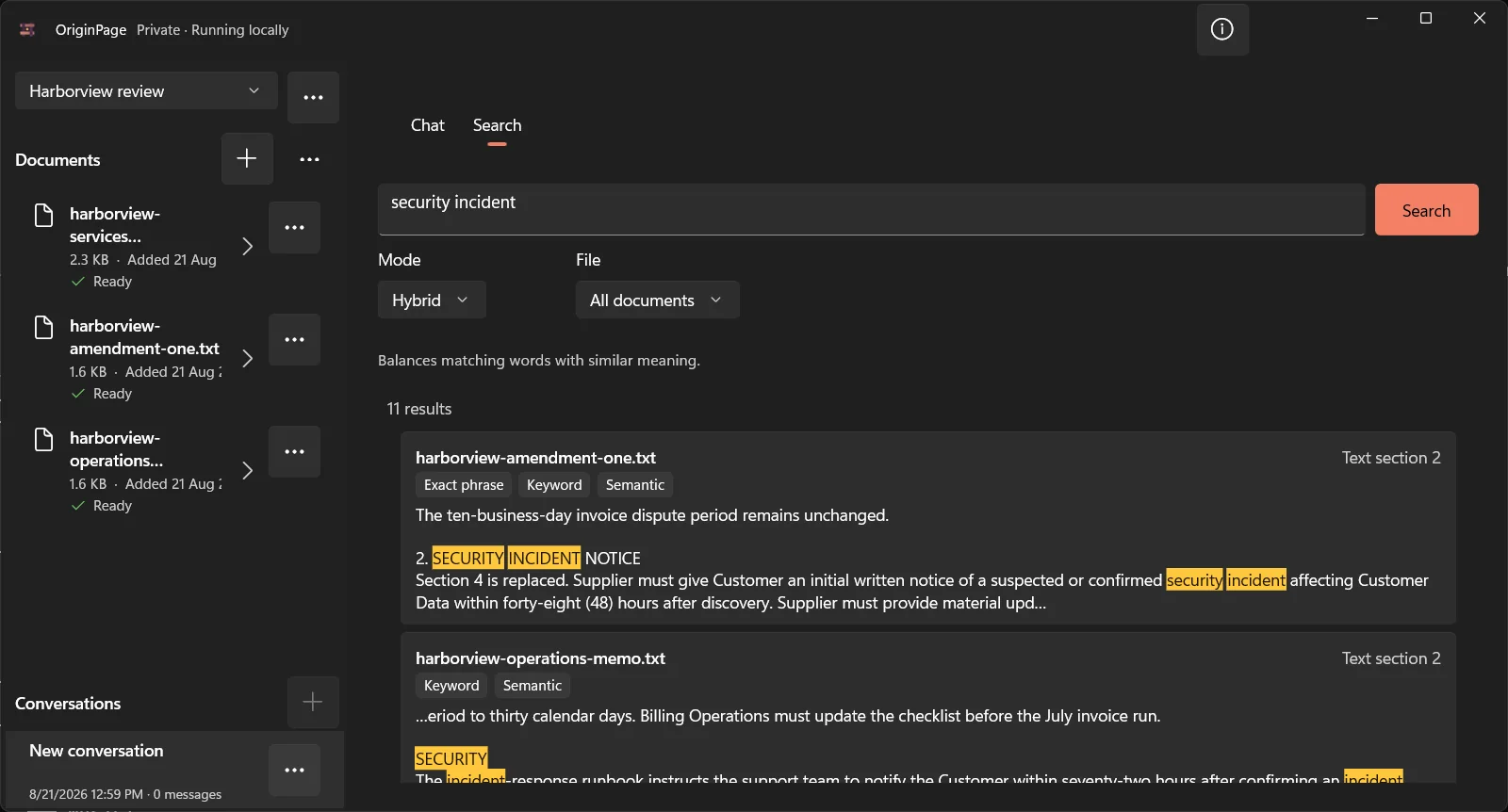
Hybrid search combines literal and semantic signals. It is a good default when a query includes an exact anchor plus a paraphrase:
Customer Data export after the contract ends
security incident 48 hours alert requirement
Section 7 ending the agreement for convenience
This real Hybrid query retrieves related passages from the exact Harborview corpus while preserving each filename and text-section location.
A practical search ladder
Instead of choosing one mode forever, escalate only when the simpler method stops answering the question.
1. Start with the unique literal
Search the date, section number, defined term, quoted fragment, or identifier. Inspect all occurrences.
2. Relax into keywords
Remove filler words, preserve the important nouns and numbers, and allow flexible ordering.
3. Describe the concept semantically
Use ordinary language when you do not know the document’s terminology. Keep the query narrow enough that relevance can be judged.
4. Combine anchors and meaning
Use Hybrid when a known party, product, date, or defined term should constrain a conceptual search.
5. Generate only after finding the source pool
Ask for synthesis when the job genuinely requires combining passages. Keep the eligible files explicit and verify the resulting claims.
This ladder prevents a common waste pattern: repeatedly rewriting a giant prompt when the real issue is that the relevant page was never extracted, the wrong documents were eligible, or one literal search would have found the answer immediately.
The same question, asked five ways
Consider the Harborview convenience-termination provision.
| Method | Example input | What it is good for | Main risk |
|---|---|---|---|
| Ctrl+F | thirty (30) calendar days |
Confirming the base language | Misses the amendment unless you search it too |
| Exact phrase | terminate for convenience |
Finding the same phrase across files | May return both current and superseded text without authority judgment |
| Keyword | termination convenience sixty notice |
Locating the amended passage | Query terms can still appear in unrelated context |
| Semantic | how much warning is needed to end the contract without breach |
Bridging unfamiliar wording | A similar passage about material breach may rank |
| Generated answer | What is the current notice period and what changed? |
Combining base and amendment | Can merge, omit, or overstate unless citations are checked |
No row is universally “smartest.” Each makes a different promise. The correct choice depends on whether you are locating, exploring, comparing, or explaining.
Search before chat
Direct Search returns passages without asking a language model to write an answer. That makes it valuable for three jobs:
Discovery
Find which documents discuss the topic before deciding what to ask.
Diagnosis
Determine whether a miss comes from extraction, scope, vocabulary, or retrieval.
Verification
Check a generated answer using a method that is independent of its prose.
Once retrieval finds candidate passages, normalize the values and triggers before asking AI to summarize them. This designed evidence table makes the difference between a character change and a substantive change explicit.
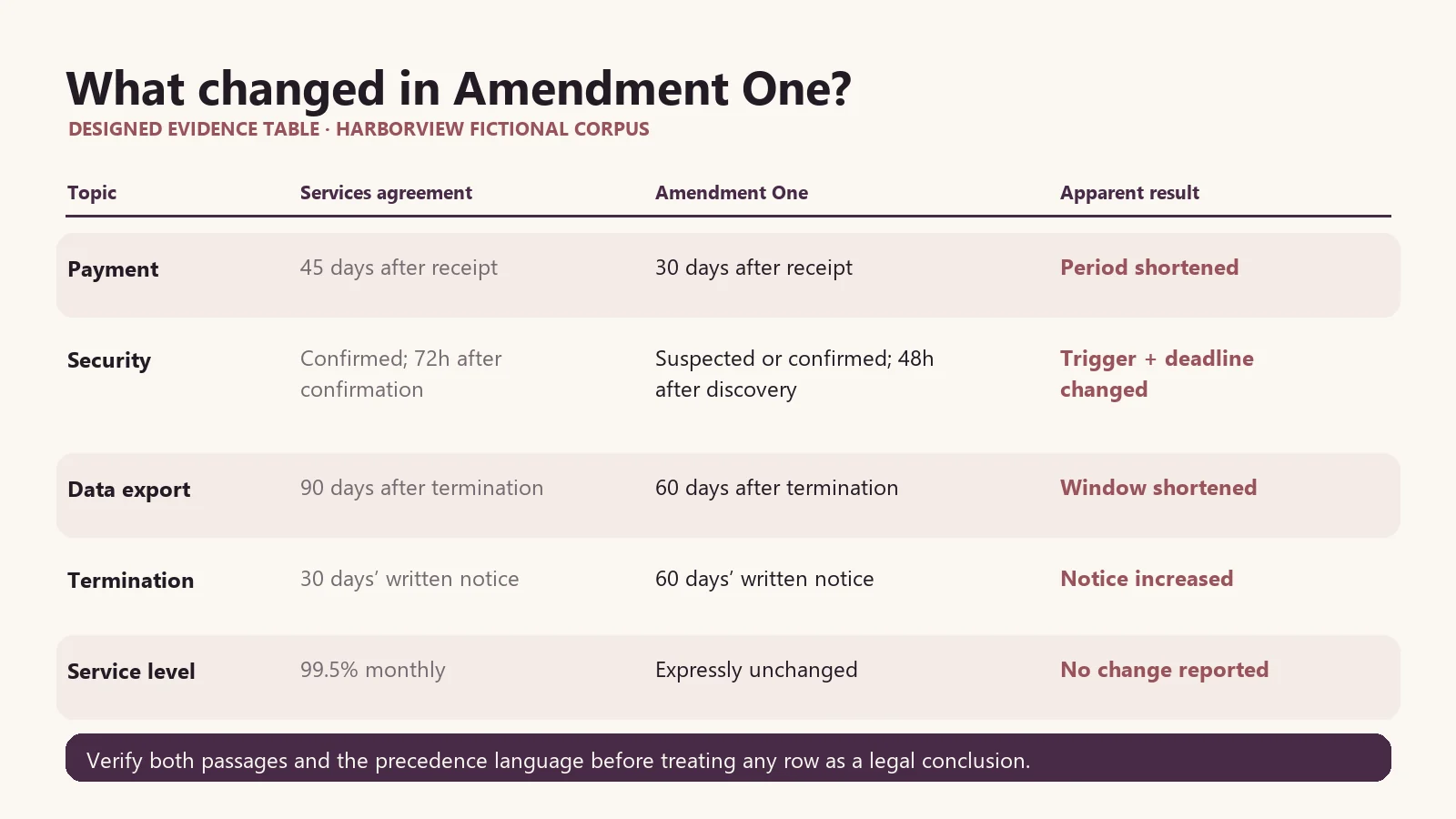
For a contract comparison, run searches for each expected topic before requesting a table. If search cannot locate the two competing provisions, a fluent generated answer is not a remedy. Check extraction, OCR, eligibility, and your query terms first.
File and page filters are part of search reasoning
A broad collection search answers “where does this idea appear?” A file filter answers “what does this particular record say?” Those are different questions.
If an agreement and amendment both contain thirty days, filter each source and inspect the role of the number. In one it may be a deletion period; in the other it may be payment. A collection-wide keyword hit does not establish that two passages refer to the same obligation.
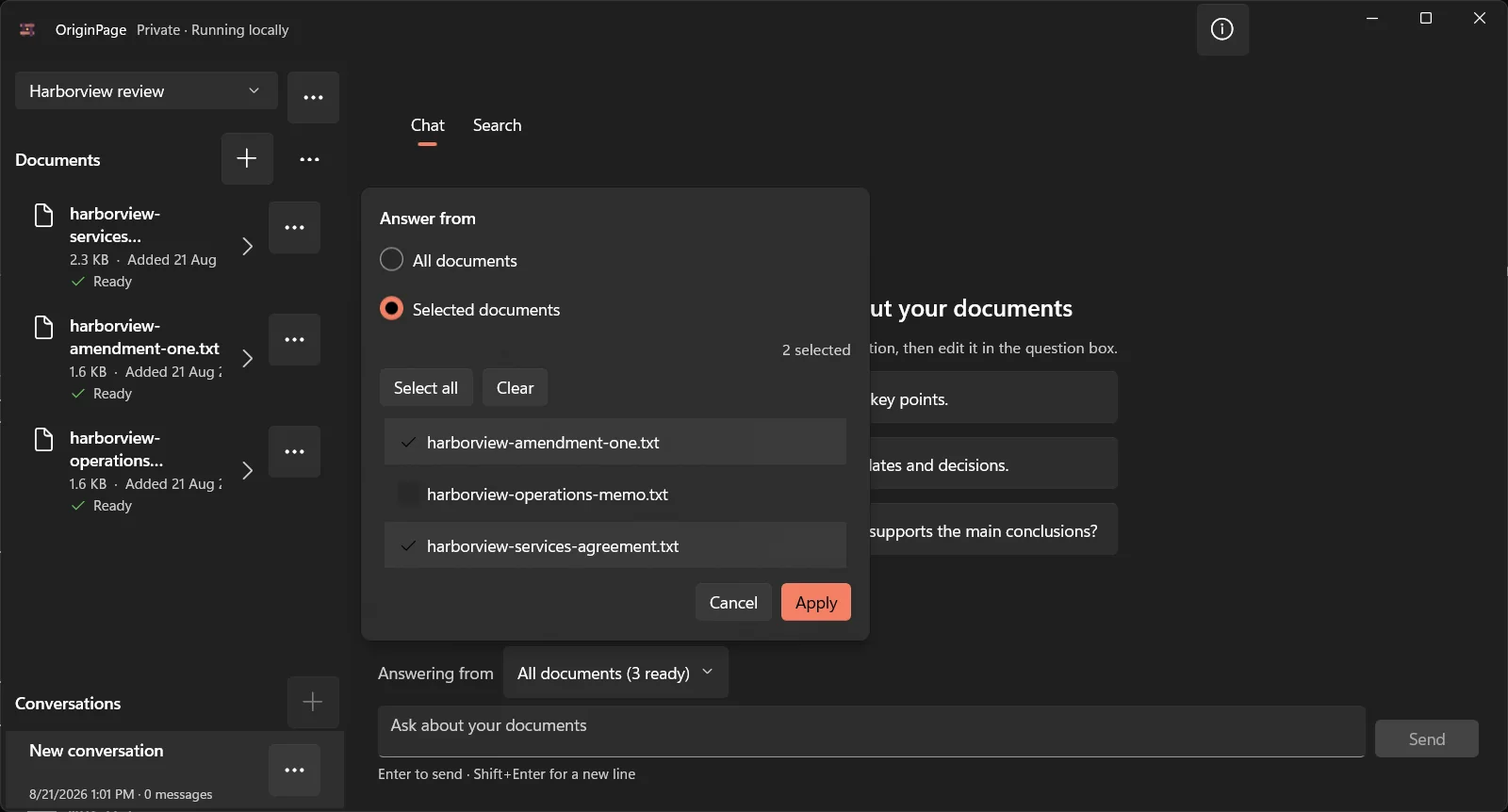
Page filters help with large reports, appendices, or exhibits. They can also hide the governing exception on another page. Use them to reduce noise after you understand the document’s structure, not to manufacture a desired answer.
Why AI search still needs source context
A highlighted result can be relevant and still be wrong for your purpose. Open the passage and ask:
- Is the statement current, proposed, rejected, or historical?
- Does a heading label it as a draft or example?
- Is the number a deadline, cap, threshold, or review period?
- Does
not,except, orsubject toreverse or qualify it? - Is the passage quoting an untrusted instruction rather than adopting it?
- Does a nearby sentence supersede it?
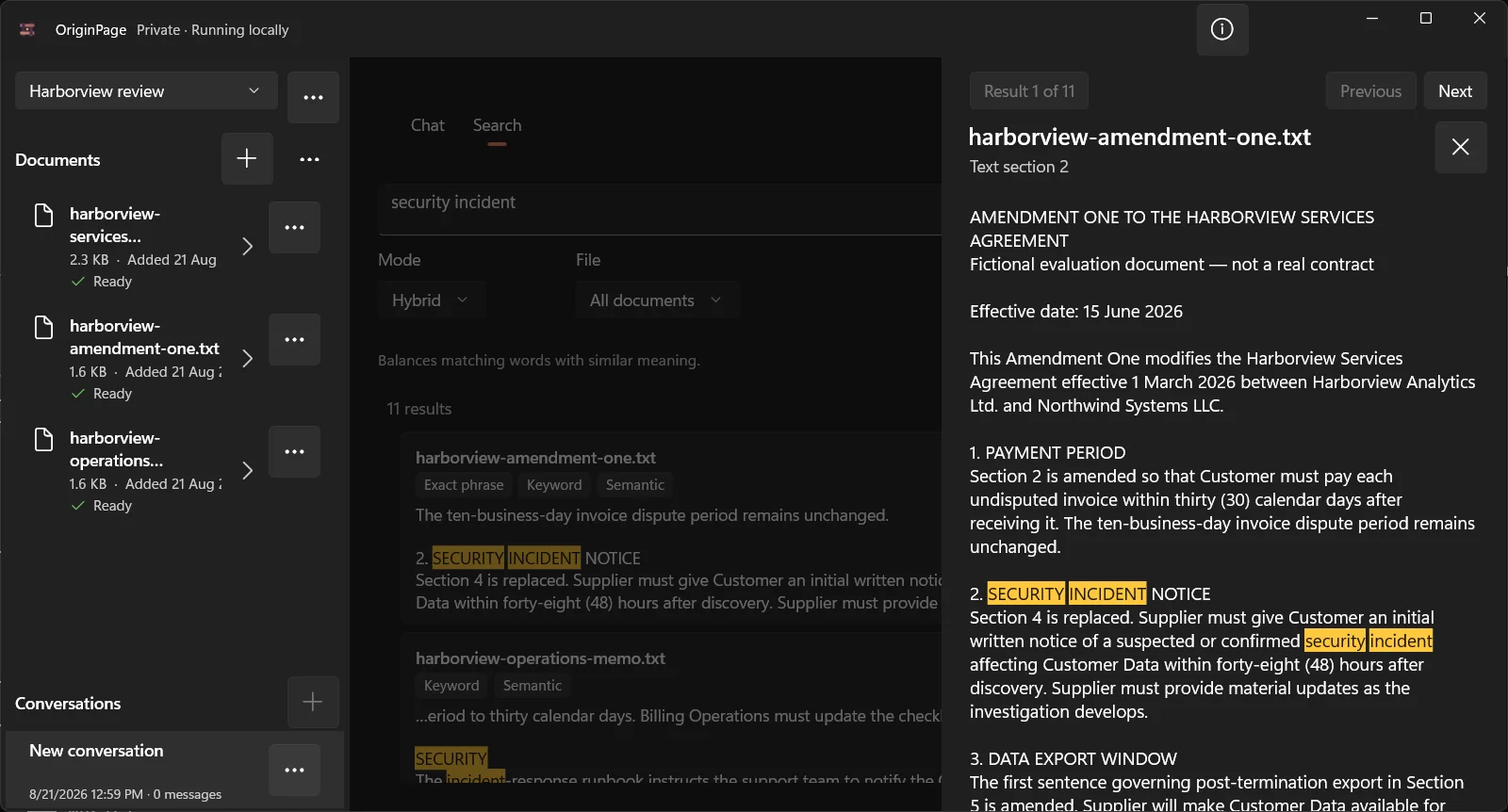
OriginPage opens a saved result in its retained context rather than leaving it as a detached snippet.
Common search mistakes
Treating no Ctrl+F match as proof of absence
The concept may use different wording, the text may be split by layout, or the page may require OCR. Record the literal miss, then try keywords and inspect extraction.
Treating a semantic match as an answer
Semantic search returns related passages, not adjudicated conclusions. Read the source and check the operative details.
Searching all matters at once
Similar agreements can contaminate results. Isolate workspaces and choose eligible files deliberately.
Searching only nouns
termination notice is weaker than termination convenience sixty calendar days. Add a party, trigger, number, or uncommon term.
Ignoring the denominator
A ranked list of five results does not prove there were only five matches. If exhaustive occurrence review matters, use literal search and document-by-document inspection.
Asking chat to diagnose extraction
If known visible text is missing, inspect the extracted representation. A model cannot reason reliably over characters that never entered the index.
A decision guide you can reuse
Use Ctrl+F or Exact phrase when:
- you know the exact characters;
- identity matters more than similarity;
- you need every literal occurrence;
- you are checking a quote, number, defined term, or identifier; or
- you are diagnosing extraction.
Use Keyword when:
- several known terms matter;
- word order varies;
- names and numbers should anchor the result; or
- an exact phrase is too brittle.
Use Semantic when:
- you know the concept but not the vocabulary;
- several teams use different terminology;
- you are exploring an unfamiliar collection; or
- ordinary-language questions should lead to technical or legal wording.
Use Hybrid when:
- the query contains both exact anchors and conceptual language;
- you want a strong default for discovery; or
- pure keyword and pure semantic searches each miss useful passages.
Use a generated answer when:
- the task requires comparison, synthesis, chronology, or structured explanation;
- the eligible document set is explicit;
- the relevant passages can be inspected; and
- a person will verify material claims.
Check the search space before accepting a miss
A literal search usually covers the text made available by the viewer or index, not every visible mark on the original page. Try the distinctive part of a hyphenated identifier, inspect OCR substitutions, and confirm that the intended file is included. If the original clearly contains the term but extraction does not, fix the evidence layer or read that section directly. Switching to semantic search does not restore missing source text.
Method note
The Harborview queries are reproducible examples derived from the synthetic files published with the site. Figures 2, 4, and 5 were captured from OriginPage 1.0.23.0 on Windows 11 on 21 August 2026 using those exact files; Figures 1 and 3 are explicitly designed teaching graphics based on their text. No real or confidential documents were used.
Next, read How to Find Contradictions Across Multiple Documents for the case where search succeeds but the sources disagree. For complete offline walkthroughs, see How to Search Across Multiple PDFs With AI and How to Search Across Multiple Word Documents With AI.
Try OriginPage free for seven days through Microsoft Store if you want direct local search and source-checkable answers without configuring models or cloud providers. A one-time purchase is required to continue after the trial.