
How to Compare Two Contracts With AI Without Uploading Them
A practical, evidence-first workflow for comparing an agreement and amendment locally, finding changed clauses, and verifying every difference against the source.
The short answer: to compare two contracts with AI without uploading them, keep extraction, search, retrieval, and answer generation on your computer; identify which document controls; ask for a clause-by-clause change table; and open the source passage behind every reported difference. Do not ask only for a summary. A useful comparison must distinguish changed terms, unchanged terms, additions, omissions, and unresolved conflicts.
This guide uses a fictional services agreement and amendment. The documents contain no real people, companies, or legal obligations, so you can use them to test a local document tool safely. They also include an answer key: payment changes from 45 to 30 days, incident notice changes from 72 hours after confirmation to 48 hours after discovery, the export window changes from 90 to 60 days, and convenience-termination notice changes from 30 to 60 days.
AI can accelerate the first pass. It cannot decide legal effect for you, establish that a signature is valid, or replace qualified review. The safe role for the software is narrower: find candidate differences, preserve document authority and scope, and take you back to the exact language quickly.
| Question | Practical answer |
|---|---|
| Can contracts be compared without uploading them? | Yes, if text extraction, OCR, indexing, retrieval, and generation all run locally and there is no cloud fallback. |
| Should both documents be summarized together? | Not initially. Establish each document’s identity and authority first, then request a structured comparison. |
| What should every reported change include? | Topic, old term, new term, effective date, governing source, and exact supporting passages. |
| Can AI determine which contract controls? | It can surface precedence language and dates, but a qualified reviewer must decide legal effect. |
| Is a citation enough? | No. Open it and verify that the passage supports the particular old or new term, including exceptions and triggers. |
Download the fictional contract pack
The Harborview pack separates three kinds of records that document tools often blur together:
- a base agreement that states the original obligations;
- a later amendment that expressly changes four provisions; and
- an operations memo that describes stale internal procedures but says it is not a governing contract.
| File | Role | What it tests |
|---|---|---|
| Services Agreement | Base contract, effective 1 March 2026 | Original payment, security, export, liability, and termination terms |
| Amendment One | Later modification, effective 15 June 2026 | Four express changes plus a list of unchanged provisions |
| Operations Memo | Non-governing internal record | Stale instructions, implementation gaps, and record authority |
The files are plain text so the exercise tests comparison rather than PDF layout. In real work, the inputs may be PDF or DOCX. If a PDF contains scanned pages, finish OCR review and check names, numbers, dates, negations, and section references before comparing anything. AI cannot retrieve language that extraction never captured correctly.
What a defensible contract comparison contains
A redline answers one question: how did the characters change between two files? An evidence-first comparison answers a larger set:
- Which records were eligible for review?
- Which record appears to be the base agreement?
- Which later record purports to modify it?
- What changed expressly?
- What remained unchanged?
- Are operational documents consistent with the governing language?
- What could not be established from the supplied documents?
That distinction matters. A word-level diff may show that 45 became 30, but it may not explain that the invoice-dispute period stayed at ten business days. A generated summary may say the payment period became shorter while missing the exact trigger: receipt of an undisputed invoice. The comparison is useful only when each conclusion stays attached to its conditions.
Use a table with fields you can verify:
| Topic | Base agreement | Later amendment | Apparent result | Evidence to open |
|---|---|---|---|---|
| Payment | 45 calendar days after receipt | 30 calendar days after receipt | Expressly changed | Agreement §2; Amendment §1 |
| Security notice | Confirmed incident, within 72 hours after confirmation | Suspected or confirmed incident, within 48 hours after discovery | Trigger and deadline changed | Agreement §4; Amendment §2 |
| Data export | 90 days after termination | 60 days after termination | Export window shortened | Agreement §5; Amendment §3 |
| Convenience termination | 30 calendar days’ written notice | 60 calendar days’ written notice | Notice period increased | Agreement §7; Amendment §4 |
| Service level | 99.5% monthly availability | Expressly unchanged | No reported change | Agreement §3; Amendment §5 |
| Liability cap | Prior 12 months’ fees, with exclusions | Expressly unchanged | No reported change | Agreement §6; Amendment §5 |
The phrase apparent result is deliberate. The supplied text indicates what the documents say, not whether they were executed properly, remain in force, or are affected by another record outside the corpus.
Step 1: create a matter-specific workspace
Keep the comparison isolated from unrelated clients, counterparties, projects, or contract versions. A separate workspace reduces accidental retrieval from a similarly named agreement and makes the eligible evidence set easier to explain later.
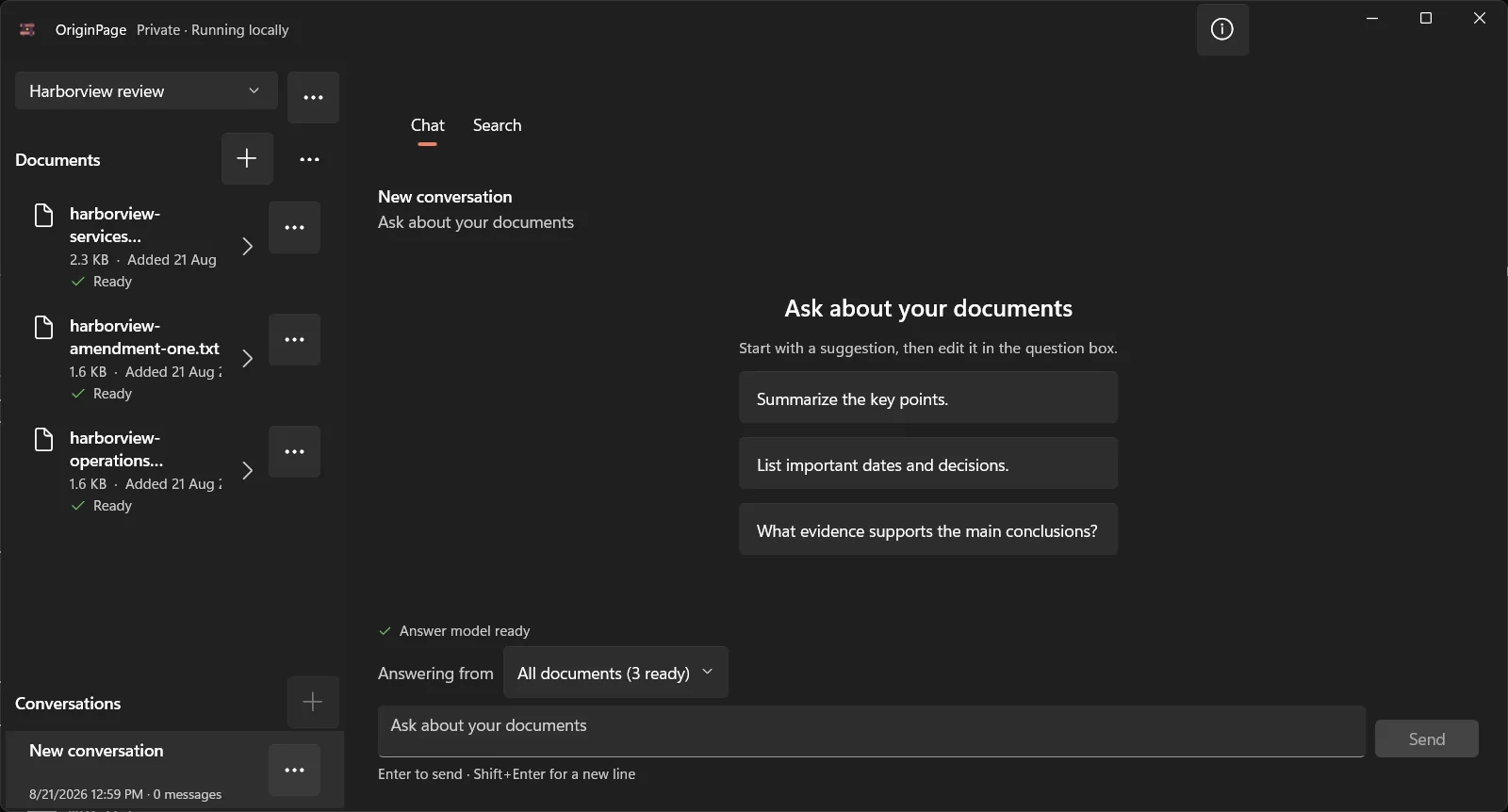
Add only the base agreement and amendment for the first pass. Wait until both say Ready. A visible filename is not proof that its contents were extracted and indexed. Open document details and inspect the retained text, particularly around the provisions you expect to compare.
This capture shows the dedicated Harborview review workspace with all three fictional files visibly Ready. For the first comparison pass, use only the agreement and amendment; the memo remains available for the later implementation-gap check.
Keep drafts out unless comparing drafts is the task. If an executed agreement, unsigned amendment, negotiation draft, and implementation memo all sit in one evidence pool, semantic relevance can outrank legal authority. Retrieval systems answer “which passage resembles the query?” They do not inherently answer “which instrument governs?”
Step 2: inspect identity, dates, and precedence before substance
Start with facts that control the rest of the workflow:
- exact title of each document;
- parties named in each document;
- effective and signature dates;
- agreement or schedule being amended;
- amendment number;
- order-of-precedence language; and
- statements about unchanged terms.
For the Harborview pack, Amendment One identifies the 1 March agreement, has a later effective date, and says it controls to the extent of a conflict. The base agreement contains compatible precedence language. That is evidence of intended relationship, not proof of execution.
Ask a narrow first question:
Identify each eligible document by title, effective date, and stated relationship to the other document. Quote no more than necessary. Do not decide enforceability. Cite every statement.If the answer cannot establish the relationship, stop. Do not proceed to a merged “current terms” table based on filenames or upload order.
Step 3: use direct search to build a clause map
Search before generation. Run anchors that are likely to occur in both instruments:
payment invoice thirty forty-five
security incident discovery confirmation
data export termination sixty ninety
terminate convenience written notice
limitation liability twelve months
service level 99.5 availability
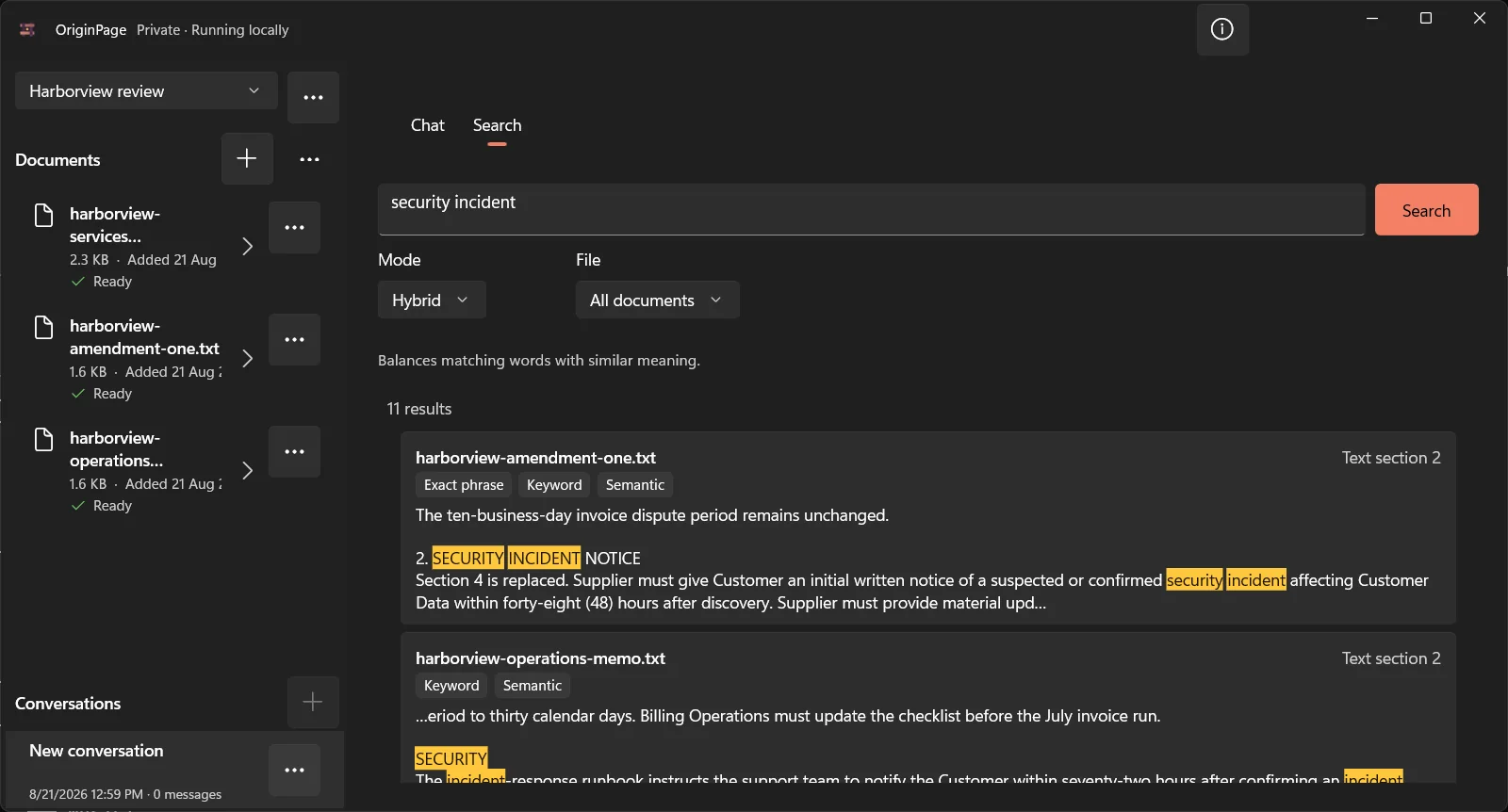
Exact and keyword search are especially valuable for numbers, defined terms, section labels, and phrases such as to the extent of the conflict. Semantic search helps when one document calls something security incident notice and another uses incident-response notification.
Filter results to one document when you need to establish what that record says independently. Then return to all documents to locate competing language. This real Hybrid search shows the amendment, operations memo, and base agreement returning different security-incident language in one inspectable result set.
Build a provisional clause map as you go. Include sections that appear unchanged. A comparison that reports only differences can create a false impression that omitted topics were reviewed and matched. Mark each topic as changed, unchanged, absent from one record, unclear, or not reviewed.
Step 4: freeze the question scope
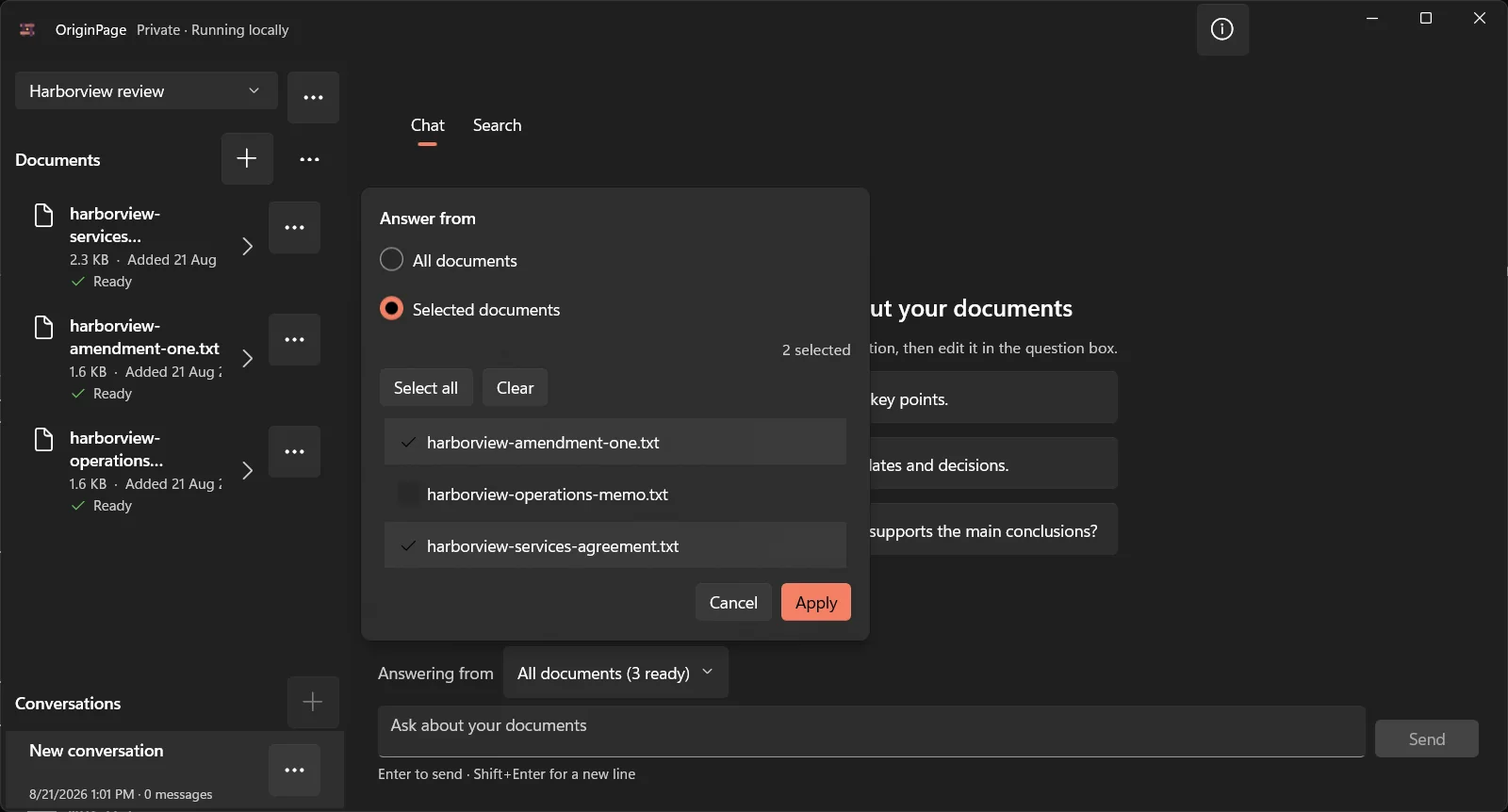
For the first generated comparison, select only the agreement and Amendment One. Leave the operations memo out. This forces the answer to compare the two instruments rather than borrowing a clearer but non-governing explanation from the memo.
OriginPage retains the eligible document set with the question. That record matters because the same prompt can produce a different answer after a draft, policy, or implementation note enters the workspace.
Use separate questions for separate authority sets:
- agreement plus amendment: contractual comparison;
- agreement alone: original position;
- amendment alone: express modifications;
- agreement, amendment, and operations memo: implementation-gap analysis.
Do not use a single all-document answer for all four jobs.
Step 5: ask for a structured change table
A useful prompt names the output fields and instructs the model not to fill gaps:
Compare the Harborview Services Agreement with Amendment One.

Create a table with: topic, original term, amended term, what changed,
effective date, and supporting source for both sides.

Cover payment, security incidents, data export, termination, service level,
liability, and cure period. Write “not changed by the amendment” only when
the supplied text supports that conclusion. Write “not established” when
the documents do not provide enough evidence. Do not infer enforceability.
The output shape prevents several common failures. Requiring both sources discourages one-sided changes. Naming expected topics reveals omissions. Not established gives the model a legitimate alternative to guessing. Separating original and amended language makes it harder to blur the two into one fluent paragraph.
If the first answer is long, do not immediately ask it to be shorter. First check whether every row is supported. Compression can come after verification.
Step 6: audit every material claim
Generated citations are navigation aids, not a correctness certificate. Expand the evidence and check:
- Does the old term come from the base agreement?
- Does the new term come from the amendment?
- Does the passage include the trigger, unit, exception, and deadline?
- Does the amendment replace the whole clause or only one sentence?
- Did the answer preserve what remains unchanged?
- Did a nearby heading change the meaning?
Before accepting a generated comparison, write down the expected old term, new term, and change type. The designed table below is derived directly from the downloadable Harborview text files; it is a review aid, not an application screenshot or a legal conclusion.
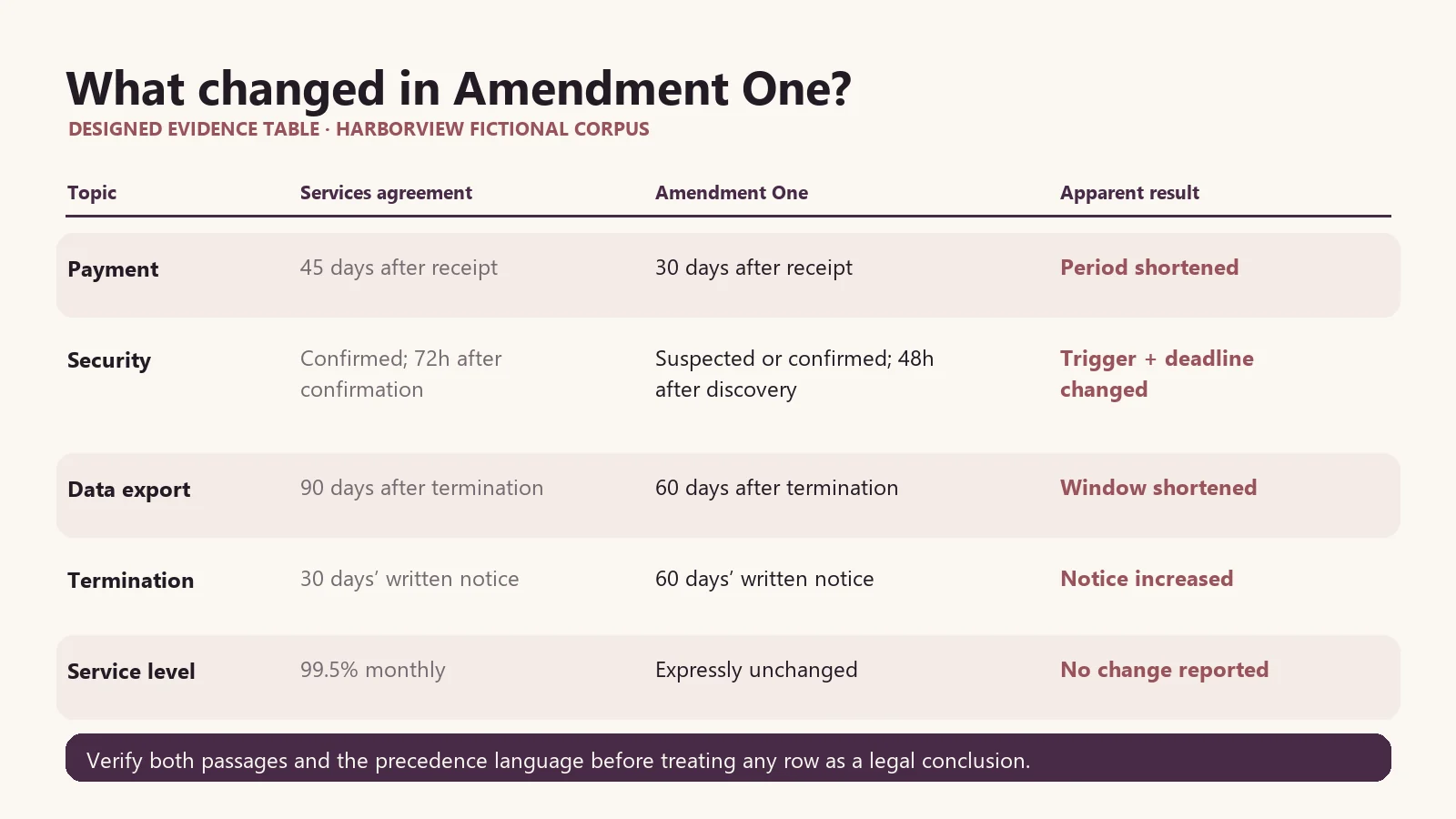
For the Harborview incident clause, the change is not merely 72 to 48. The trigger changes from a confirmed incident after confirmation to a suspected or confirmed incident after discovery. A comparison that reports only the shorter deadline misses the operationally important difference.
For data export, Amendment One changes the export window but preserves deletion within 30 days after that window. A model may collapse those into “data is deleted after 60 days,” which is not what the fixture says. This is why conditions and sequencing must remain visible.
Step 7: open the full source context
A retained span should lead back to enough surrounding text to interpret it. Read the heading, preceding definition, following exception, and any precedence statement. The screenshot below shows a cited passage opened in the source context panel.
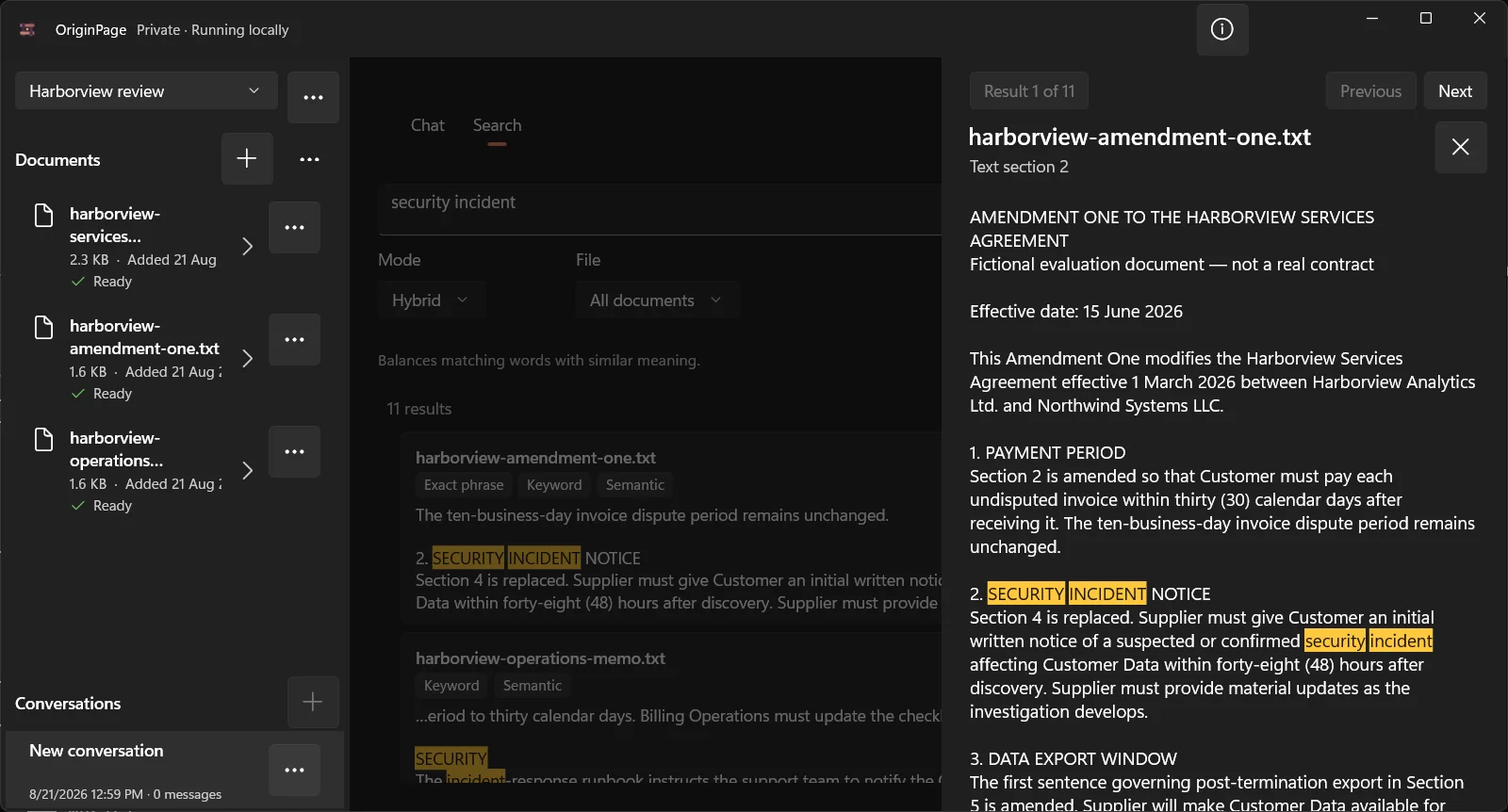
This step is particularly important for:
unless,except,provided that, andsubject to;- business days versus calendar days;
- discovery, occurrence, confirmation, receipt, or notice triggers;
- caps with carve-outs;
- obligations limited to a party, region, product, or data class; and
- provisions incorporated from a schedule or external policy.
If the important condition falls outside the saved passage, return to the original document. Evidence tools reduce navigation time; they do not define the legally sufficient reading window.
Step 8: add the operations memo as a separate test
After establishing the contractual comparison, include the Harborview Operations Memo and ask a different question:
Compare the operations memo with the apparent current terms in the Agreement
and Amendment One. List each operational instruction that is consistent,
outdated, or unsupported. Do not treat the memo as a contract. Cite the memo
and the relevant governing language for every row.
The expected findings are:
- billing still uses the obsolete 45-day period;
- the security runbook still uses the obsolete trigger and 72-hour deadline;
- the customer-success playbook still promises the obsolete 90-day export window;
- the termination summary correctly uses 60 days; and
- the service-level and liability summaries remain consistent.
This second pass demonstrates why document comparison is not always “contract A versus contract B.” The real risk may be the gap between governing text and the procedures people still follow.
Common ways AI contract comparisons fail
It merges old and new terms
The answer says “payment is due within 30 or 45 days” without resolving that the amendment expressly changes the period. Require separate old and new columns and ask for precedence evidence.
It reports numbers without triggers
48 hours is incomplete without after discovery and the suspected-or-confirmed scope. Audit the whole operative sentence.
It treats relevance as authority
An internal memo may explain a rule more clearly than the signed amendment and therefore rank highly. Keep non-governing records outside the initial comparison scope.
It mistakes silence for agreement
If the amendment does not mention a topic, that alone may not prove the base provision remains effective. In this fixture, Amendment §5 expressly identifies several unchanged terms. In real documents, ask a qualified reviewer how to interpret silence.
It ignores missing schedules or incorporated material
The agreement may refer to schedules, statements of work, policies, or exhibits that are absent. A trustworthy answer should name the missing dependency rather than pretending the corpus is complete.
It overstates execution and enforceability
Text extraction cannot verify identity, authority, signatures, delivery, governing law, subsequent amendments, waiver, or enforceability. Keep those conclusions out of the prompt unless the necessary evidence and professional review exist.
Keeping the comparison private
“Desktop app” and “private” are not sufficient descriptions. Trace the complete path:
contract files
  → extraction or OCR
  → searchable text and embeddings
  → retrieved clauses
  → generated comparison
  → saved conversation and evidence
For an offline workflow, each content-bearing step should remain on the approved device. Check whether the product uses hosted OCR, remote embeddings, cloud generation, content telemetry, crash uploads, synced storage, or a cloud fallback. Also consider the operating environment: disk encryption, Windows account access, backups, endpoint monitoring, and synced folders sit outside the document app’s own claims.
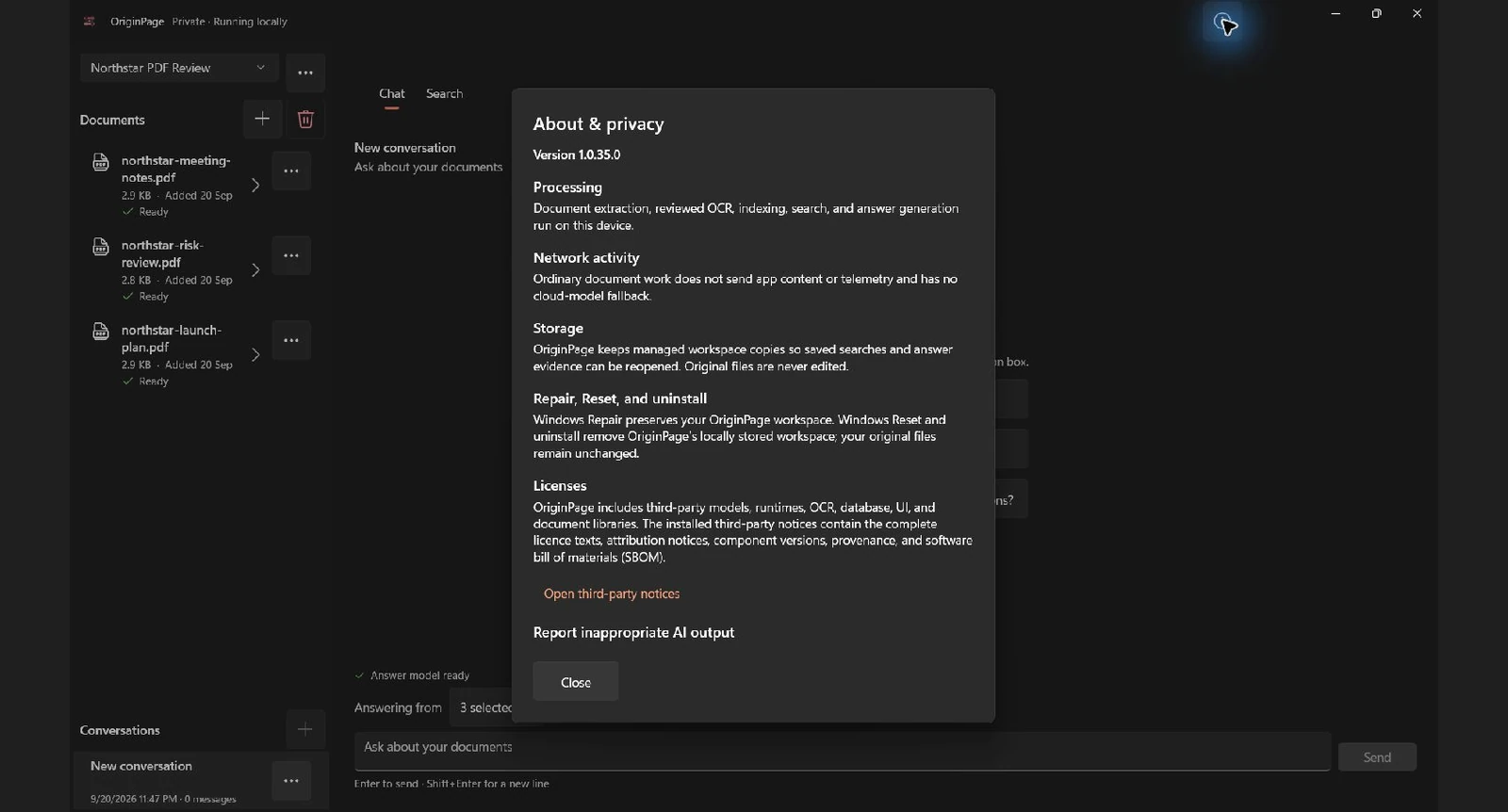
OriginPage’s captured privacy panel states the local boundary for ordinary document work. High-assurance use should still be verified against the installed Store package and organizational controls.
A repeatable contract-comparison checklist
- Put the matter in an isolated workspace.
- Add only the intended agreement and amendment first.
- Confirm every document is Ready.
- Inspect extracted text around dates, amounts, negations, and section references.
- Record titles, parties, dates, amendment relationships, and precedence language.
- Search known clause anchors before generating a comparison.
- Freeze the question scope to the two instruments.
- Request old term, new term, change, effective date, and both sources.
- Require
not establishedinstead of inference. - Verify every material row against the exact passages.
- Check triggers, exceptions, units, and unchanged text.
- Add policies or operating records only in a separate consistency review.
- Record missing schedules, drafts, or later amendments.
- Let a qualified reviewer decide legal effect and next action.
Preserve the comparison boundary in the handoff
When sharing a comparison, include both document names and versions, the clauses compared, and any schedules you did not review. Identify whether each row is unchanged, amended, newly added, or unresolved. A comparison of selected instruments does not establish that no other executed amendment exists. Confirm completeness against the authorized contract inventory before relying on the result.
Method note
The Harborview documents were written as a synthetic, confidentiality-safe teaching corpus on 19 August 2026. The answer key was derived directly from those files, not from an unreported model benchmark. Figures 1–3 and 5 were captured from OriginPage 1.0.23.0 on Windows 11 on 21 August 2026 using that exact corpus; Figure 4 is explicitly designed from the same source text. No real contract or customer data was used or uploaded.
Continue with Why Ctrl+F Sometimes Beats AI and When It Doesn’t to choose the right retrieval method, then use How to Find Contradictions Across Multiple Documents when governing language and operational records disagree. For the underlying evidence model, read A Citation Is Not Enough.
Try OriginPage free for seven days through Microsoft Store to see whether private, source-checkable document work fits your workflow. A one-time purchase is required to continue after the trial.