
Chat with documents locally on Windows without Docker or Ollama
A practical OriginPage setup guide for local PDF, TXT, and DOCX questions: check extraction, choose sources, inspect evidence, and troubleshoot missing answers.
You can ask questions about local documents without setting up a container, a model server, or an API key. OriginPage packages its document workflow and supported models in a Windows application. You still need to check what it extracted and whether the answer’s evidence supports the claim.
Other desktop tools also offer local setup without Docker. This guide explains OriginPage’s workflow; the desktop comparison covers alternatives and their configuration choices.
Before importing files
Check the current Windows and format requirements and install through the Microsoft Store listing. Installation and updates can need connectivity. Local document processing is a separate capability; the app does not disconnect the rest of Windows.
Start with a non-sensitive PDF, TXT, or DOCX whose answer you already know. OriginPage is not a general spreadsheet, email-archive, or presentation reader. Converting a file to PDF may lose formulas, metadata, comments, or structure, so preserve the original separately.
Follow one question through the app
- Create a workspace for the task and add the practice document.
- Wait for Ready, then inspect its extracted text. Ready indicates ingestion state, not perfect extraction.
- If a scanned PDF needs OCR review, compare the recognized words, numbers, and negations with the page before approving them.
- Open Direct Search and look for a distinctive term from the expected answer.
- Open the result in source context and read the surrounding qualification.
- Set Question Scope to the intended document or documents and ask one narrow question.
- Expand the evidence and check each important claim against its source.
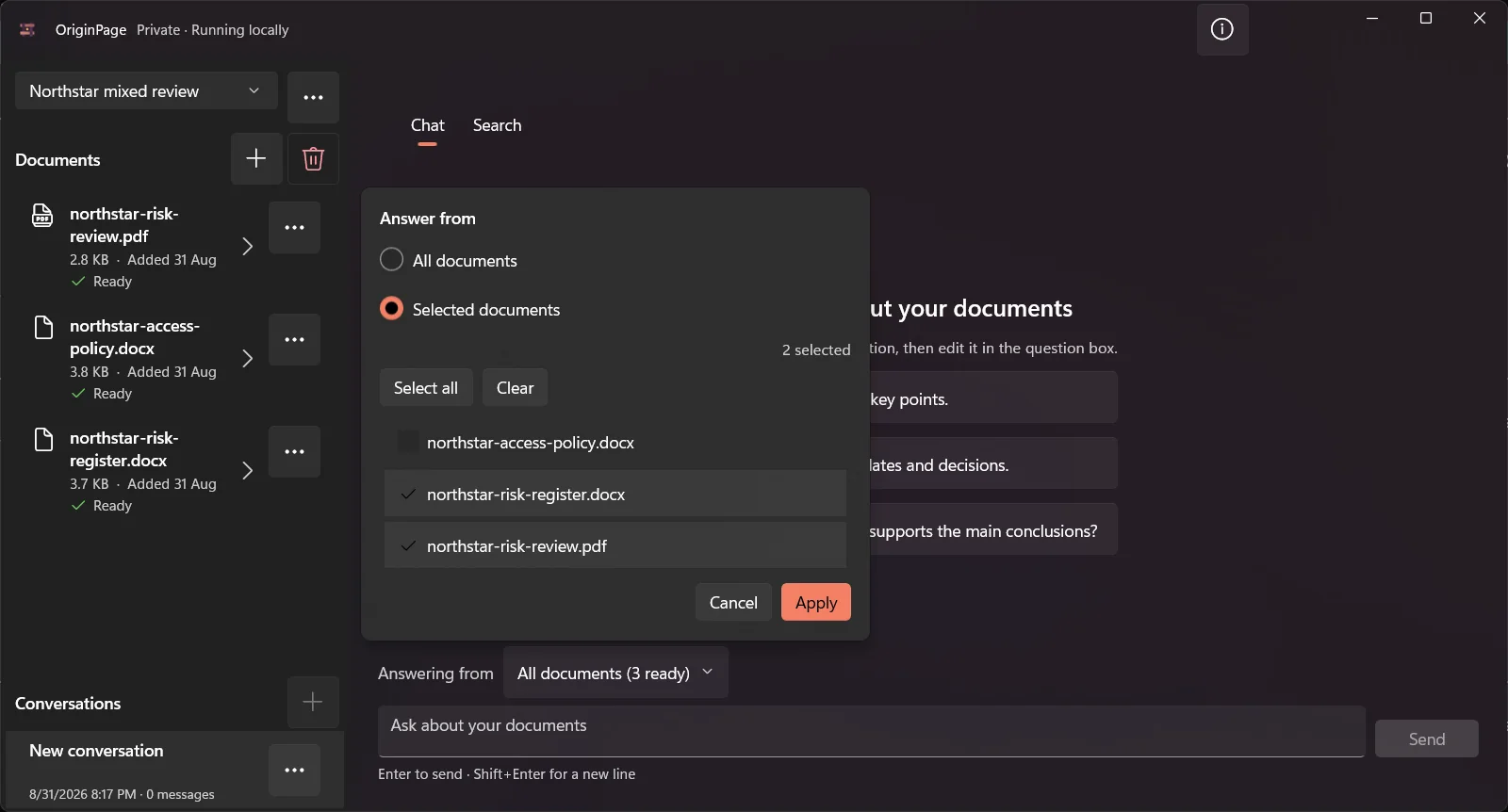
For a first question, use a structure such as:
In the selected policy, who approves temporary access, how long may it last, and what exceptions are stated? Cite the supporting passages. If a detail is not supported, say so.
That request defines an output to inspect. It does not force the model to discover every exception. Use Direct Search for the relevant terms even when the answer sounds complete.
When the answer is missing or surprising
| Symptom | First check |
|---|---|
| The document cannot be selected | Confirm the format and ingestion state |
| A known phrase is absent | Inspect extraction and any pending OCR review |
| A different policy appears | Check workspace, selected documents, and file versions |
| The answer overlooks an exception | Search its wording and inspect the surrounding passage |
| A claim has an irrelevant citation | Treat the claim as unverified and narrow the question |
For DOCX, source context refers to retained text rather than stable Word page numbers. Comments, deleted tracked revisions, and legacy .doc or macro-enabled .docm files are outside the supported workflow. Do not infer that material was reviewed just because the visible document opened elsewhere.
Decide whether the packaged workflow fits
OriginPage fits a task where you want a consistent local reader and supported models. A configurable model host may fit better if you need to choose arbitrary models, expose an API, or manage shared services. Neither option removes the need for source checking.
Once the practice question works, repeat it with the network disconnected if offline use is a requirement, recording the installed version and observed result. That checks your setup; a screenshot alone is not evidence of a network boundary. For a longer walkthrough, follow offline PDF chat or Word document search.