
Local Document AI for Confidential Documents: A Practical Threat Model
Map what local document AI protects, what risks remain on the Windows device, and which controls matter before working with confidential files.
Local document AI can remove one important exposure path: sending files, extracted text, prompts, retrieved passages, and answers to a third-party AI service during ordinary use.
It does not remove every confidentiality risk. The Windows account, device, backups, administrators, malware, physical access, and the user’s own handling decisions still matter.
A useful threat model asks three questions:
- What information needs protection?
- Which exposure paths does local processing remove or reduce?
- Which risks and controls remain on the device?
This article applies that model to OriginPage. It is a product-boundary explanation, not legal, security, or compliance advice.
Define the protected information first
The sensitive material may include more than the original PDF or Word file. A document workflow can create or retain:
- a managed copy of the source;
- extracted or OCR-recognized text;
- search indexes and embeddings;
- questions and prompts;
- passages retrieved for an answer;
- generated answers and summaries;
- saved evidence spans;
- filenames, locations, and other metadata; and
- Conversation history derived from several Documents.
A confidentiality decision should cover this full set. Protecting the original file while sending its text or a revealing prompt elsewhere does not preserve the intended boundary.
Identify the rule that governs the work
Before choosing a tool, translate policy into a concrete data-path requirement.
- Is third-party AI processing prohibited, permitted under contract, or subject to approval?
- May a managed local copy be created?
- Are particular Windows accounts, devices, or storage locations required?
- Must data be encrypted at rest?
- How long may files, derived data, and Conversations remain?
- Who may review or export the result?
If third-party AI upload is prohibited, model-training language does not change that rule. If approved hosted processing is allowed, a cloud service may offer collaboration, mobile access, broader sources, or stronger hosted models that a local application does not.
The dated article Does NotebookLM Work Offline? keeps the current Gemini Notebook processing and privacy references in one place.
What local processing removes
OriginPage performs extraction, reviewed English OCR, indexing, search, retrieval, answer generation, and Conversation storage locally. It has no cloud-model fallback or account-dependent document workflow.
That removes the ordinary need to transmit document content to OriginPage or another AI provider for those operations.
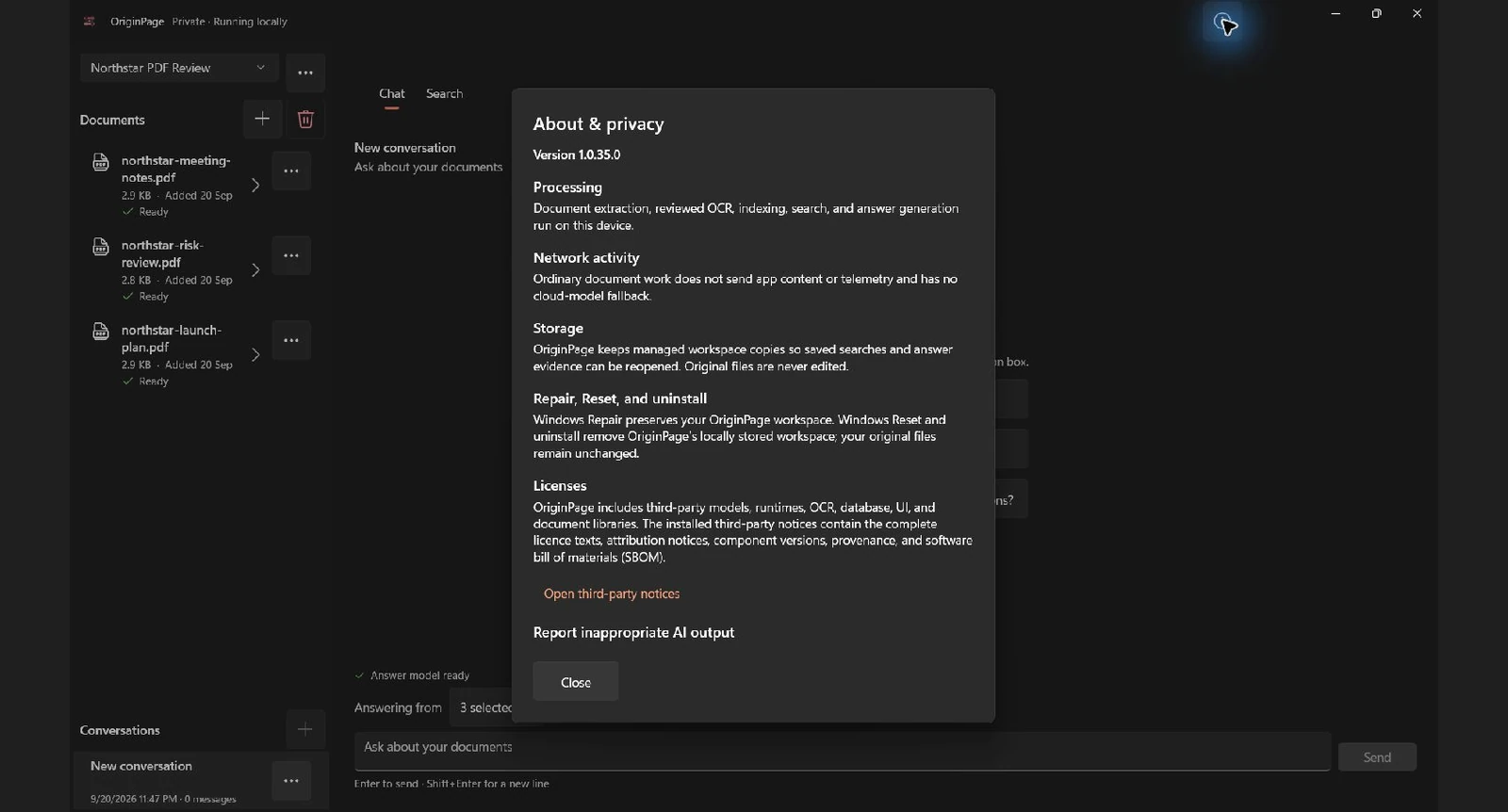
This architectural control reduces exposure to an AI provider, provider-side retention, accidental submission under the wrong cloud account, and a network dependency during document work.
It does not prove the device is secure or that using the files is authorized.
What remains on the Windows device
Local processing concentrates responsibility on the endpoint. Relevant threats include:
- another person using an unlocked or shared Windows account;
- administrators or software with permission to read local data;
- malware, remote-access tools, or endpoint compromise;
- unapproved backup and synchronization software;
- physical theft of an unencrypted device;
- copying answers or passages into email, chat, or another AI service;
- retaining Documents or Conversations longer than policy allows; and
- trusting incorrect OCR or a plausible but unsupported answer.
No application can neutralize all of these from inside its own process. Use an appropriate Windows account, disk encryption, endpoint protection, update policy, physical controls, backup policy, and retention procedure when the documents warrant them.
Inspect extracted and recognized text
Confidentiality and correctness are separate. Keeping OCR local does not make OCR accurate.
OriginPage exposes extracted text and requires review for scanned pages that need OCR. Approve a page only after checking sensitive literals such as names, dates, amounts, account identifiers, clause numbers, and negations. Exclude a page if the recognized text is not trustworthy enough to become evidence.
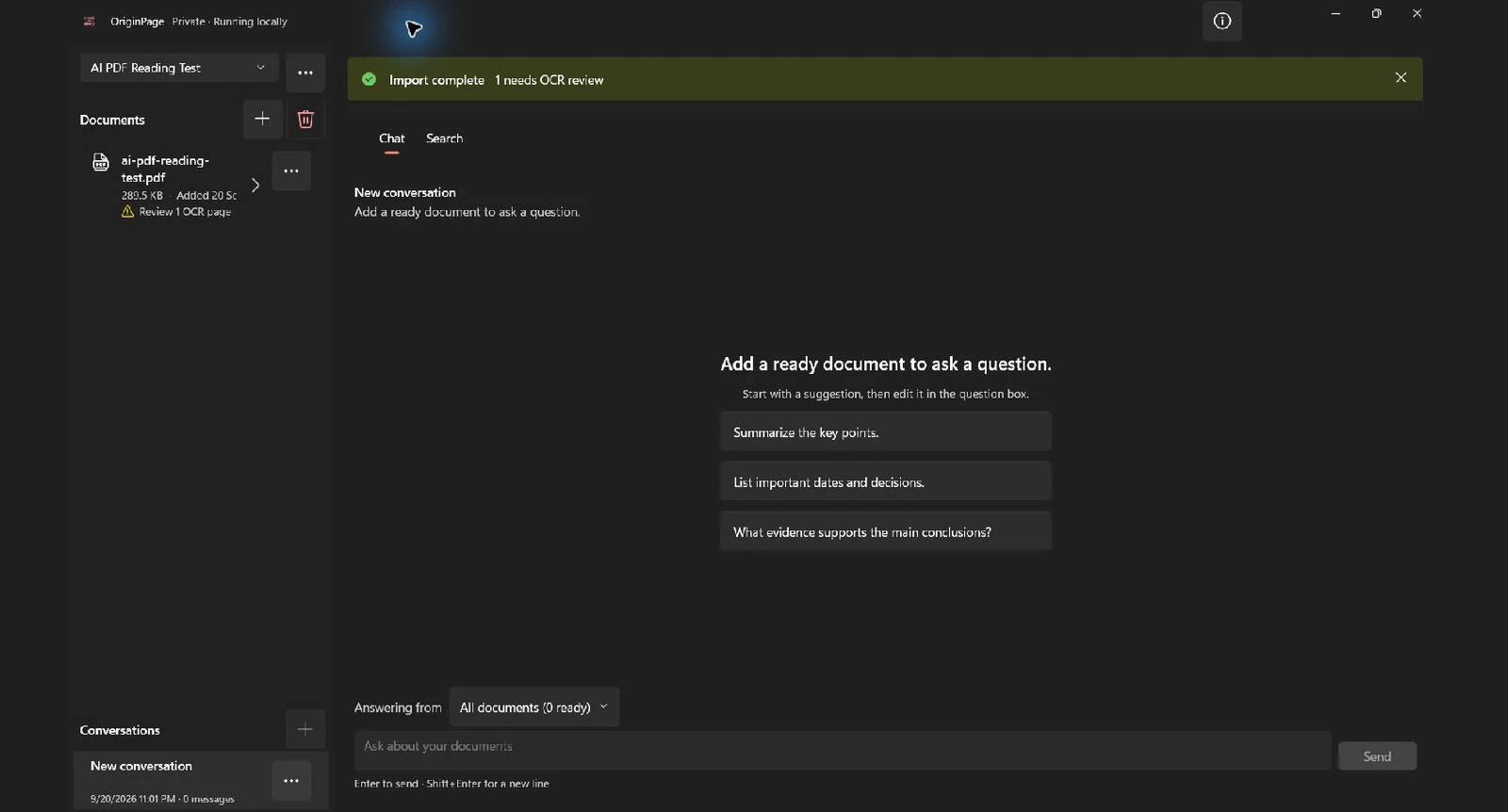
Ready means the ingestion workflow is complete. It does not certify that every character matches the page. The PDF-reading test provides a reproducible way to check extraction quality.
Limit which documents may answer
A confidential Workspace can contain material from different matters, versions, or authority levels. OriginPage lets the user select the Documents eligible for each question and saves that scope with the answer.
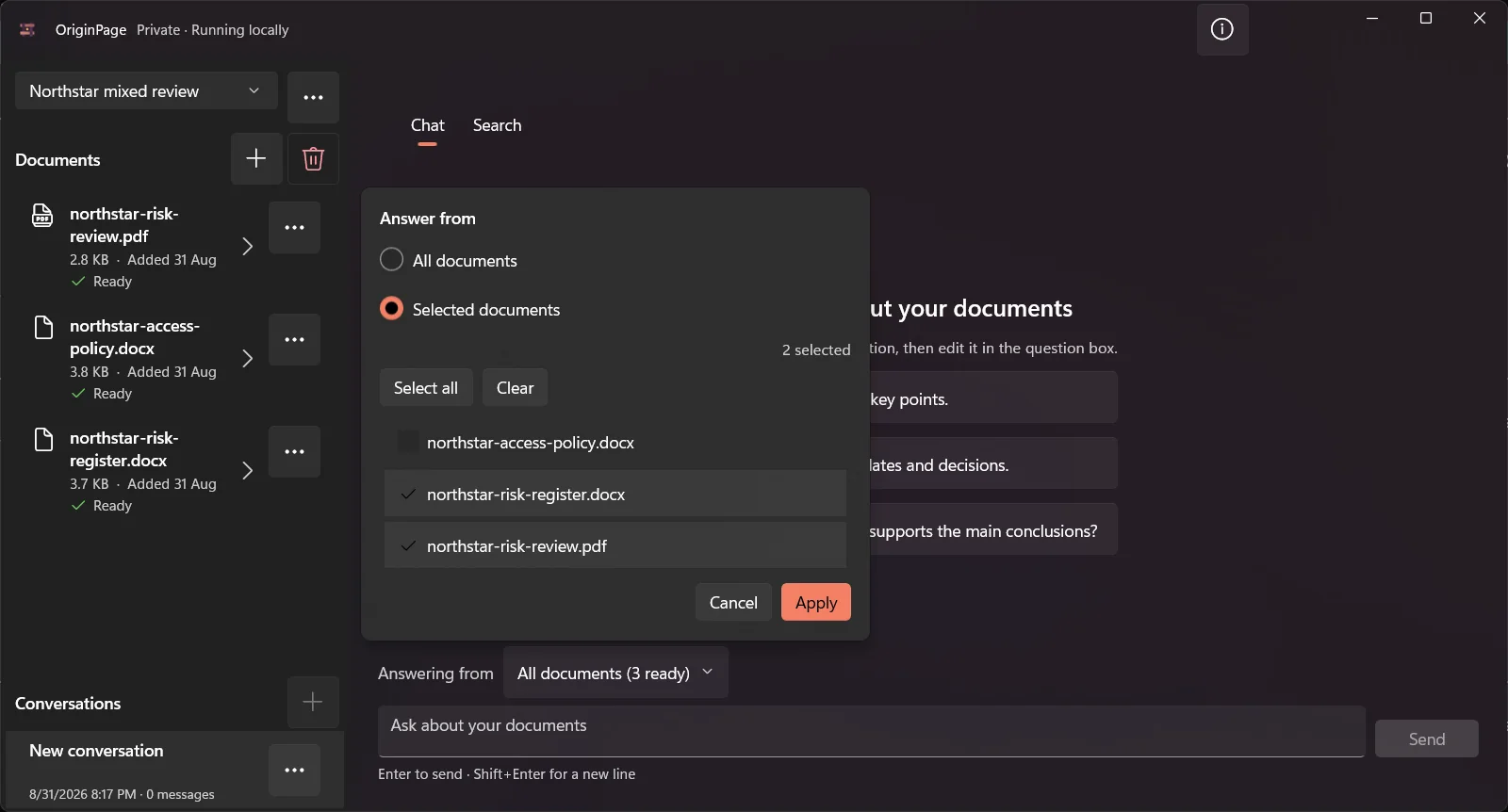
Scope is a useful control, not an access-control system. Someone who can open the Workspace may still be able to change the selection or read another Document. Use separate Workspaces and appropriate Windows accounts when matters need stronger separation.
Verify material claims against evidence
A fluent summary can still omit an exception, merge two sources, or treat a draft as final. OriginPage links supported claims to retained passages so the reviewer can inspect the filename, location, exact text, and nearby context.
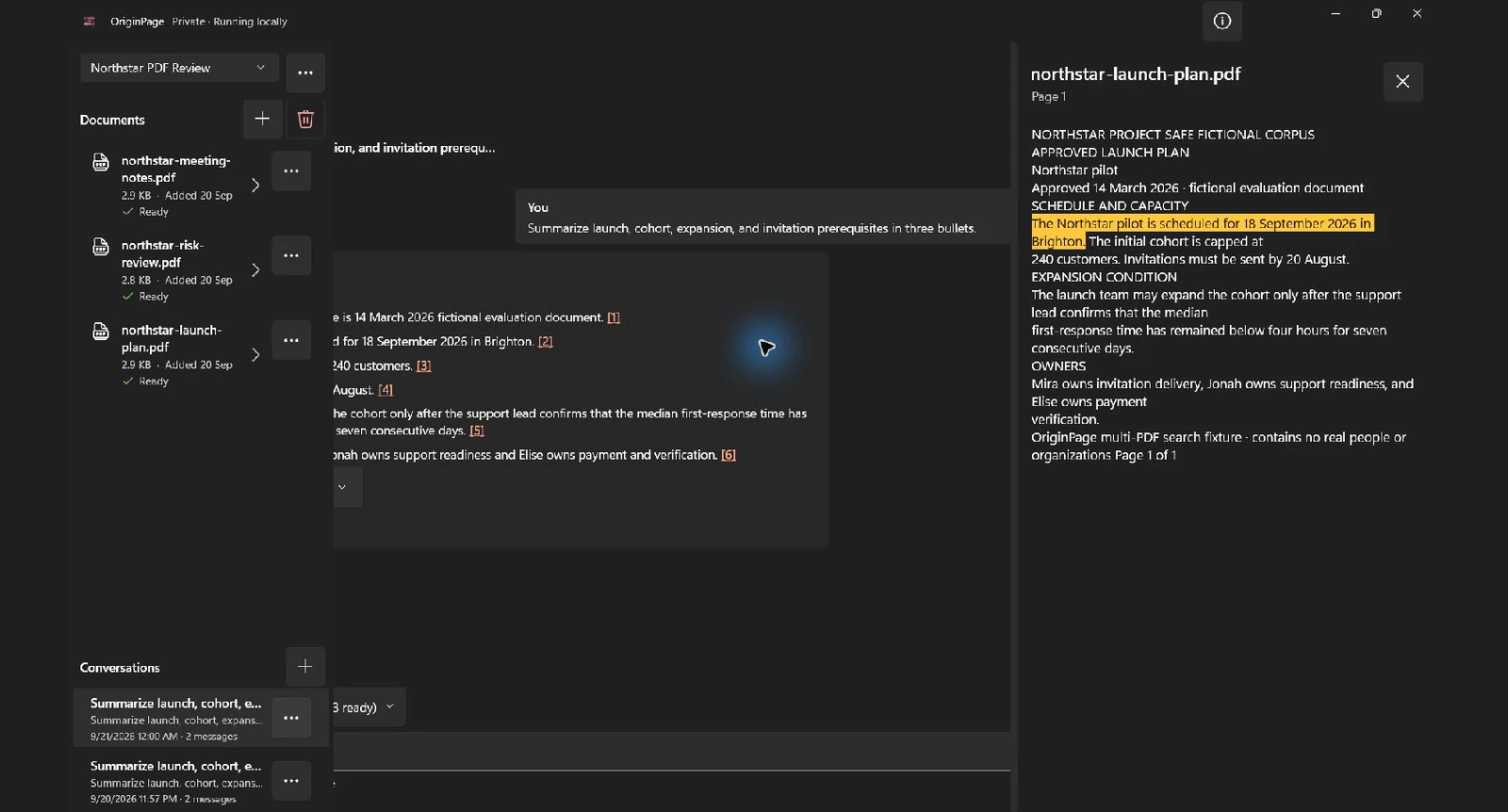
For each consequential claim:
- open the cited passage;
- confirm it supports the whole claim;
- check the document’s authority and version;
- search for contradictory language; and
- treat missing evidence as a reason to investigate, not permission to guess.
Plan removal before importing
OriginPage retains a managed local copy and derived document data so Workspaces remain usable after restart. When a Document is removed, OriginPage removes that managed copy and its processed data while leaving the original Source File untouched.
Conversation history is separate because one answer may derive from multiple Documents. Removing one Document does not silently rewrite a saved Conversation.
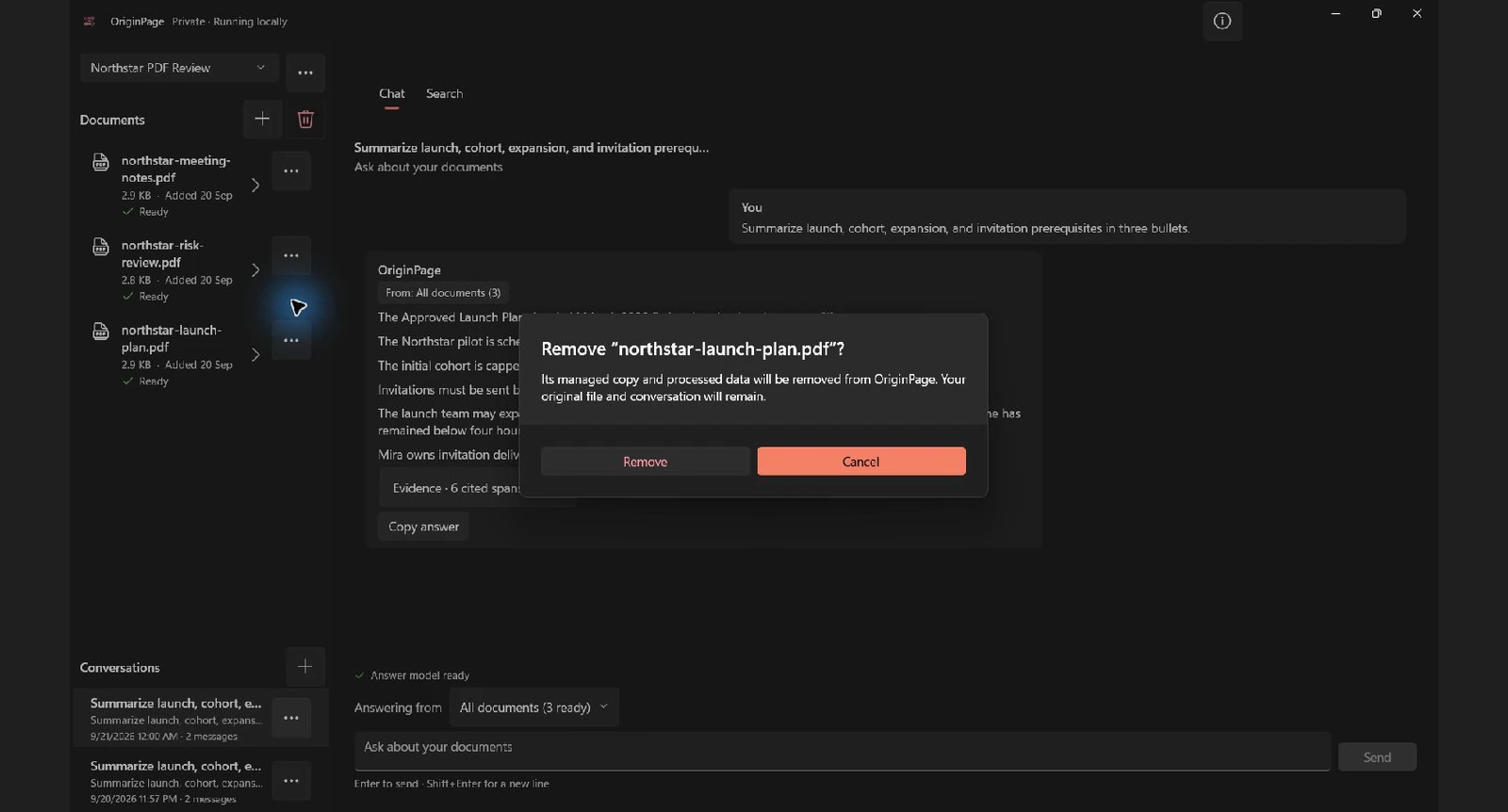
Application removal cannot erase external backups, exported text, screenshots, copied answers, or other files created outside OriginPage. Include those locations in the retention plan.
Separate application boundaries from security boundaries
OriginPage is a full-trust Windows application with App, Core, and Inference processes. A workspace is a storage and retrieval boundary inside that application; it is not a sandbox or a distinct Windows security principal. Disk encryption and account separation must be configured through the device environment. Removing active application data is not forensic secure erasure.
The older OCR and answer screenshots use staged fixture states. They illustrate review controls, not successful OCR, generated-answer accuracy, or independent network qualification of the installed release.
A practical operating procedure
Before import:
- confirm the document is permitted on the device and in a local AI workflow;
- use an approved Windows account and storage location;
- check disk encryption, patching, endpoint protection, backups, and screen privacy;
- separate matters into appropriate Workspaces; and
- define how long Documents and Conversations may remain.
During review:
- resolve every OCR page deliberately;
- inspect critical extracted text;
- select the minimum necessary question scope;
- open every citation behind a material claim; and
- search for contradictory or superseding language.
After review:
- export or copy only what policy permits;
- remove Documents and Conversations according to the retention rule;
- handle the original Source Files separately; and
- account for backups, screenshots, and downstream copies.
Decide with the responsible reviewer
OriginPage may fit when local processing is required, Windows 11 is approved, its supported formats cover the work, and the organization accepts the endpoint controls and local model trade-offs.
It may not fit when work requires collaboration, mobile access, web research, a hosted frontier model, centralized cloud administration, or controls that OriginPage does not provide.
Review the precise OriginPage privacy boundary and current capability guide, then involve the responsible security, legal, privacy, or compliance owner. Product marketing is not approval.
Method note
This threat model was consolidated and checked on September 20, 2026 against OriginPage’s shipping v1 privacy statement and capability guide. Screenshots use fictional PDFs and DOCX files in disposable Windows 11 Workspaces. No real confidential data was used or uploaded.