
Does NotebookLM Work Offline?
NotebookLM, now Gemini Notebook, supports downloaded Audio Overviews for offline listening but not full offline source processing or notebook chat.
The short answer: NotebookLM, now called Gemini Notebook, does not provide full offline notebook chat or on-device document processing.
Google documents one limited offline feature: Audio Overviews can be downloaded in the mobile app and played without a connection. Creating a notebook, importing sources, asking new questions, generating answers, and producing new artifacts remain signed-in cloud-service workflows.
If “offline” means a document, question, retrieved passage, answer, and saved evidence must remain on one Windows PC, you need a local document application rather than a downloaded result from a cloud notebook.
NotebookLM became Gemini Notebook in July 2026
Google announced the rename on July 16, 2026. Gemini Notebook remains a standalone research product while becoming more connected to the Gemini app and Google Search.
This article uses Gemini Notebook for the current product and NotebookLM when answering the familiar search question. The rename did not introduce a complete offline mode.
What works offline?
Google’s mobile-app documentation says an Audio Overview can be downloaded while connected and played later without a connection.
Google does not currently document offline support for:
- creating a notebook;
- importing or synchronizing a source;
- indexing a new PDF or other source;
- asking a new question;
- generating a chat response or citation;
- creating a new Audio Overview; or
- running the broader research and artifact features.
So the precise answer is:
Gemini Notebook supports offline playback of previously downloaded Audio Overviews on mobile. Google does not document full offline source processing or notebook chat.
“NotebookLM cannot do anything offline” would ignore downloaded audio. “NotebookLM works offline” would imply much more than Google documents.
Offline playback is not offline document AI
Downloading a finished artifact changes where that artifact can be played. It does not change where the source was imported, indexed, analyzed, or used to generate it.
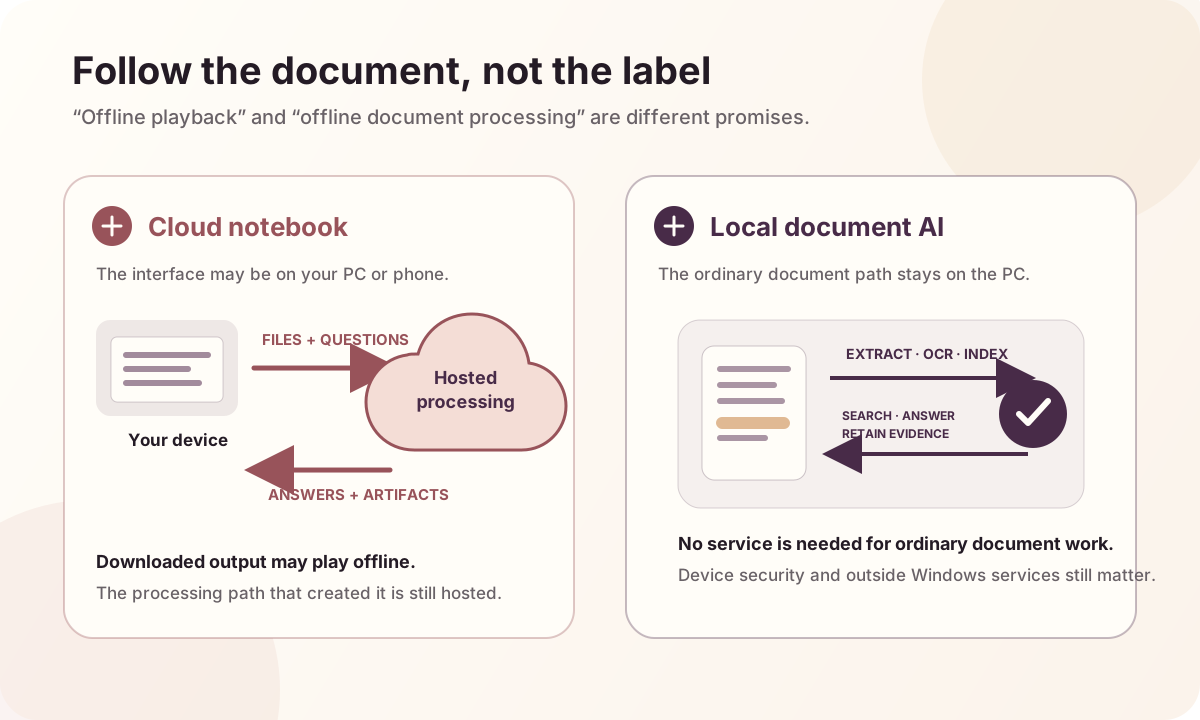
For sensitive or disconnected work, trace the whole path:
Source file
  → extraction or OCR
  → index and retrieval
  → question and selected passages
  → answer generation
  → saved conversation and evidence
If any required step depends on a hosted service, the workflow is not fully offline even if the source began on the PC or the finished output can be downloaded.
What does Google say about privacy and training?
Gemini Notebook is a hosted service with published privacy protections. It is not an on-device processing tool.
Google’s current Gemini Notebook privacy terms say notebook content is not used directly to train its foundational AI models unless a user provides feedback. For personal accounts, Google says feedback may include associated prompts, sources, uploads, and outputs, and that trained teams may review the feedback. Google documents additional protections for qualifying Workspace and Education users.
That does not support the claim that Google trains on every uploaded PDF. It also does not create a no-upload workflow: source content still has to be available to Google’s service for Gemini Notebook to process it.
The practical questions are:
- Is third-party cloud processing allowed for these documents?
- Which account terms apply?
- What content may accompany submitted feedback?
- Does the organization require on-device processing rather than contractual privacy protections?
What should a fully local alternative do?
A local Windows document assistant should keep the complete ordinary content path on the device:
- extract text and perform OCR locally;
- build search indexes and retrieval data locally;
- search without an internet connection;
- generate answers without a hosted model or cloud fallback;
- preserve the documents selected for each question;
- retain inspectable evidence for supported claims; and
- explain what is stored and removed.
OriginPage is available from Microsoft Store for that job. It processes PDF, DOCX, and TXT files on Windows 11, supports reviewed English OCR, offers direct search and scoped questions, and links supported claims to retained source passages.
For the product workflow and fit criteria, read A Private, Offline NotebookLM Alternative for Windows. For the underlying test, read What Local Document AI Actually Means.
Check a travel workflow before disconnecting
Download an Audio Overview while connected, then confirm that the specific item plays with connectivity disabled. If your task requires adding a file or asking a new question, test that task separately rather than inferring it from playback. Keep a local copy of the source material in an approved reader when uninterrupted reading matters. This is a preparation checklist, not a new hands-on Gemini Notebook test.
Frequently asked questions
Can I use NotebookLM on a plane?
You can listen to an Audio Overview that was downloaded in the mobile app before losing connectivity. Google does not document full offline notebook chat or source processing.
Can I download NotebookLM for Windows?
Google documents Gemini Notebook as a signed-in cloud experience rather than a Windows application that moves source processing onto the PC. Installing a browser shortcut does not make the processing local.
Does NotebookLM upload my PDFs?
A PDF added from the computer must be available to Google’s hosted service so it can become a notebook source. That differs from an application that extracts, indexes, retrieves, and generates entirely on the device.
Is NotebookLM safe for confidential documents?
That depends on the applicable policy, account terms, and risk decision. Published privacy protections are not the same as permission to send a confidential file to a third-party service. Consult the responsible security, legal, or compliance owner.
Where can I get OriginPage?
Try OriginPage free for seven days on Windows 11 through Microsoft Store. Review the current capability guide to check whether it fits your documents. A one-time purchase is required to continue after the trial.
Method and sources
This article was checked on September 20, 2026 against Google’s official rename announcement, product overview, mobile offline-audio documentation, and Gemini Notebook privacy terms. Product features and vendor terms can change; follow those primary sources for current details. No signed-in comparative answer-quality or speed benchmark was performed.