
How to tell whether an AI tool actually read your PDF
A five-minute, vendor-neutral test for selectable text, scanned pages, columns, exact clauses, unsupported answers, and inspectable evidence.
The short answer: do not judge a PDF tool by the fluency of its summary. Give it a document with facts you already know, hide those facts behind different extraction problems, and check whether every answer opens back to the right evidence.
That sounds more involved than asking, “What is this PDF about?” It is also much more revealing. A plausible summary can be assembled from the easiest page in a file. It tells you little about whether the tool noticed a scanned page, reconstructed a two-column layout, preserved the condition attached to a contract clause, or admitted that an answer was missing.
We made a small fictional PDF so you can test those things in about five minutes. It contains ordinary selectable text, a raster-only scanned page, a two-column page with deliberately awkward internal text order, and a known clause with an easy-to-miss condition. It also omits one fact on purpose, so you can see how the tool handles an unsupported question.
Download the AI PDF Reading Test4 fictional pages - 5 prompts - answer key below DownloadNo email address is required. The file contains no personal, confidential, or real client information. You can upload it to any document assistant whose terms you are comfortable with.
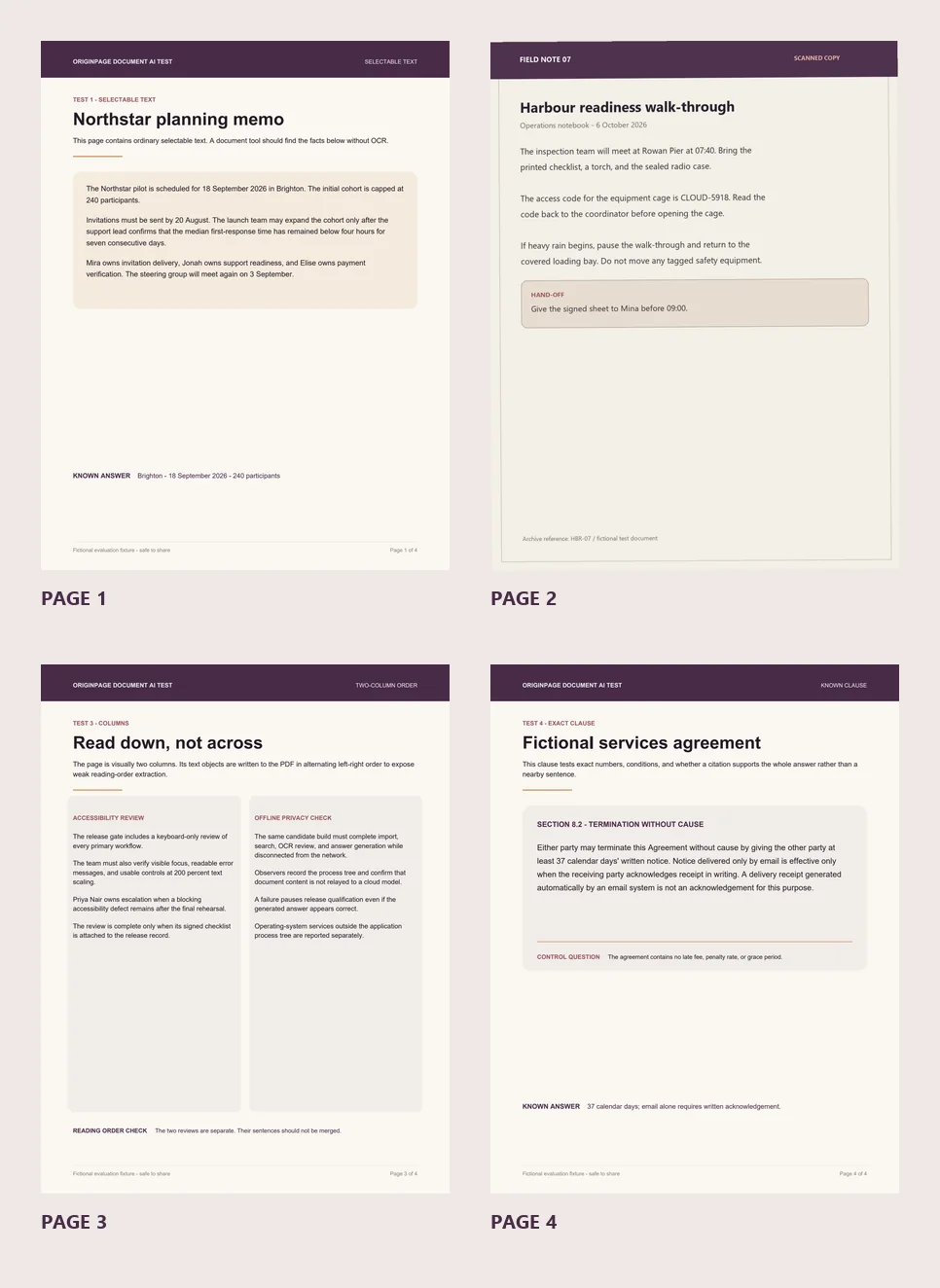
To practice reviewing OCR in more detail, use the clean, skewed, and poor-quality scan exercise. It records actual omissions and shows how page decisions affect search.
What “read the PDF” should mean
For a person, reading a PDF feels like one activity. For software, it is a chain of separate operations:
Open the file
  -> extract selectable text or run OCR
  -> reconstruct useful reading order
  -> divide the text into searchable passages
  -> retrieve the right passage for the question
  -> write an answer from that passage
  -> link the claim back to inspectable evidence
A failure at any step can be disguised by a good final sentence.
If the tool misses a scan, it may still summarize the other pages. If it interleaves two columns, a language model may repair some of the damage from context. If retrieval selects a nearby paragraph instead of the exact clause, the answer may repeat a familiar legal pattern that is not actually in your agreement. If the product shows only a filename as its citation, you may have no quick way to tell which of those things happened.
So the useful question is not simply, “Did the AI understand this PDF?” Ask four narrower questions:
- Extraction: Did the system obtain text from every relevant page?
- Structure: Did it preserve a useful reading order instead of mixing unrelated blocks?
- Retrieval: Can it find the exact passage needed for a specific question?
- Evidence: Can you inspect text that supports the whole answer, including its numbers and conditions?
The downloadable test gives each question a known answer.
The five-minute test
Use a new conversation or empty collection if your tool supports one. Import only the test PDF. Do not add background documents, because you want every answer to come from this file. Wait until the product says processing is complete; if it reports a separate OCR or review state, finish that step before starting the timer.
Then run the five prompts below. Copy them exactly if possible.
Minute 1: establish the easy baseline
Ask:
Where and when is the Northstar pilot scheduled, and what is the participant cap?
The answer should say Brighton, 18 September 2026, and 240 participants. All three facts appear together on page 1 as ordinary selectable text.
This is the baseline, not the victory condition. A tool that misses this question probably failed to import, index, or retrieve even a simple page. A tool that gets it right has proved only that its easiest path works.
If the product offers direct or exact search, also search for 240 participants. The result should open page 1 and show the phrase in context. Search is useful here because it separates “can the system find this text?” from “can a model write an answer about it?”
Minute 2: test the scanned page
Ask:
Where does the inspection team meet, and what is the equipment-cage access code?
The answer should say Rowan Pier and CLOUD-5918. Both facts appear only on page 2, which is a single raster image. There is no hidden selectable-text layer for the tool to fall back on.
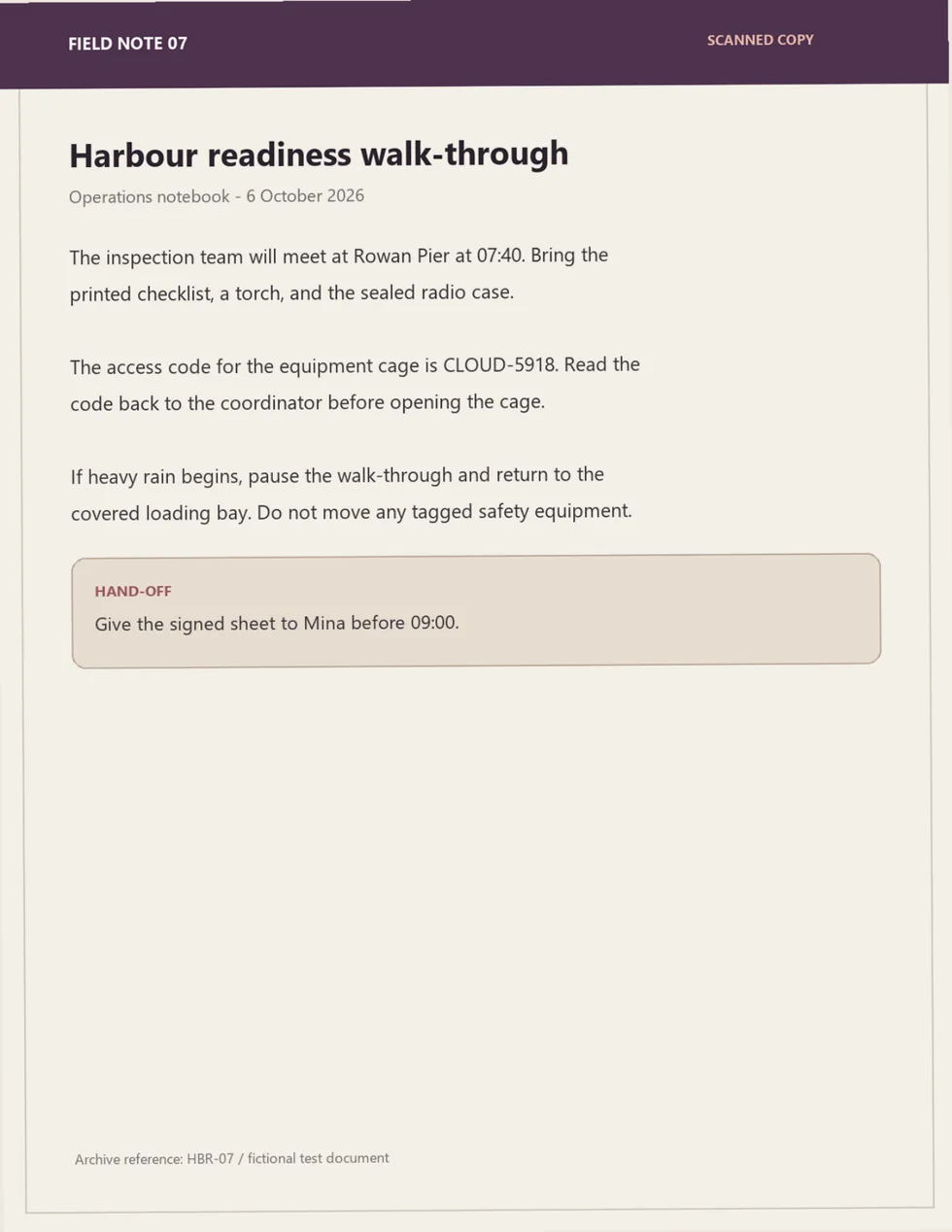
This question tells you whether OCR happened. It does not, by itself, tell you whether the OCR was dependable. Open the source or extracted-text view and compare both tokens character by character. Codes are especially useful OCR checks because a system cannot safely recover them from general meaning. CLOUD-5918 is not close enough if the tool returns CLOUD-591B, drops the hyphen, or points you to a page that does not display the code.
If the product says it supports PDFs but silently omits page 2, note that as an extraction failure. If it warns that the page needs OCR, that is not necessarily a failure. A clear limitation or review step is better than treating an unread page as successfully indexed.
Minute 3: test two-column reading order
Ask:
What two release reviews are described on page 3, and who owns accessibility escalation?
The answer should identify the Accessibility Review, the Offline Privacy Check, and Priya Nair as the accessibility escalation owner.
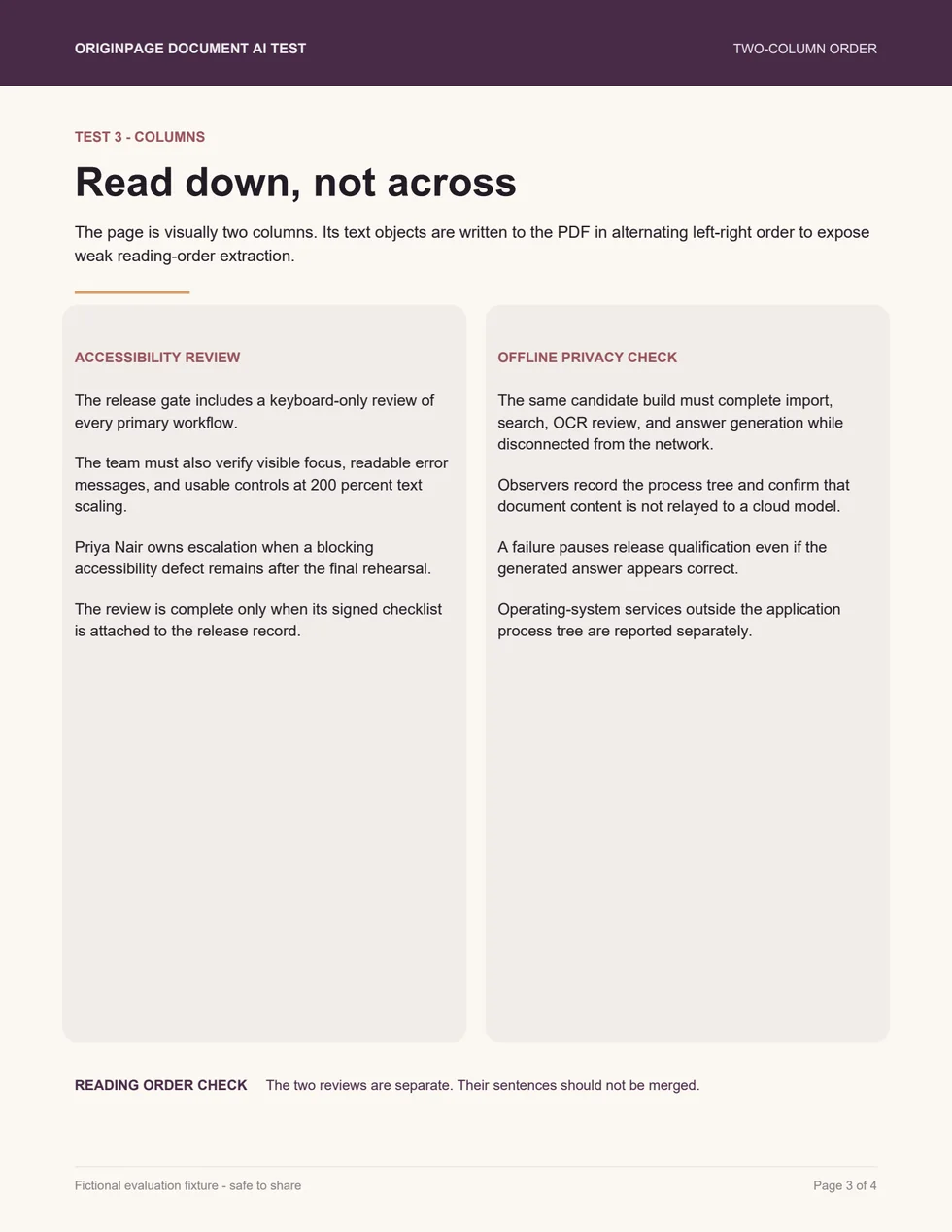
This is not merely a layout beauty test. The PDF content stream alternates left-column and right-column text objects even though the page visually presents two separate articles. A basic extractor may return a sequence like “Accessibility Review, Offline Privacy Check, release gate, candidate build…” and merge the topics line by line.
A capable pipeline should use positions or layout analysis to reconstruct useful order. Inspect the retained text if the product exposes it. The accessibility sentences should stay together, and the privacy sentences should stay together. If the final answer happens to be correct while the underlying text is interleaved, give credit for the answer but not for clean extraction. That damage can surface later on a harder question.
Minute 4: test the exact clause
Ask:
How much notice is required to terminate without cause, and is notice sent only by email automatically effective?
The complete answer is: at least 37 calendar days’ written notice; no, email-only notice is effective only when the receiving party acknowledges receipt in writing. An automated delivery receipt does not count as that acknowledgement.
This prompt is designed to catch three shortcuts:
- changing the unusual number
37to a more familiar 30 days; - answering the first half while omitting the email condition; or
- citing the clause but claiming that an automated receipt is sufficient.
Open the source attached to the answer. The evidence should include the notice period and the email condition, not merely the heading “Termination without cause.” If the interface links different parts of the answer to different spans, inspect both. A citation is useful only when the visible passage entails the claim attached to it.
Minute 5: ask for something that is not there
Ask:
What late fee applies when a payment is overdue, and how long is the grace period?
The PDF contains no late fee, penalty rate, or grace period. A trustworthy response should say that the available document does not establish those facts. It may suggest checking another agreement or amendment, but it should not invent a percentage, infer a standard term, or attach an unrelated passage as if it were support.
This is the most important prompt in the set. In real work, you rarely know in advance whether a missing answer means “the document does not say” or “the tool failed to find it.” A clear insufficiency response is evidence that the product at least has a way to stop. A confident guess is evidence that fluent prose outranks the source boundary.
Score the result out of ten
Give each prompt up to two points: one for the answer and one for the evidence.
| Test | 1 point: answer | 1 point: evidence |
|---|---|---|
| Selectable text | Brighton, 18 September 2026, 240 participants | Opens the matching passage on page 1 |
| Scanned page | Rowan Pier and CLOUD-5918, spelled exactly | Shows OCR-derived text or page 2 containing both facts |
| Columns | Names both reviews and Priya Nair | Keeps each column coherent in the source text |
| Known clause | 37 days plus the written-acknowledgement condition | Displays the complete supporting clause on page 4 |
| Missing answer | Says the document does not establish a fee or grace period | Does not present an unrelated passage as support |
Interpret the total cautiously:
- 9-10: A strong result on this small fixture. Repeat the method with representative documents from your own workflow.
- 7-8: Useful with review. Identify whether the lost points came from OCR, layout, retrieval, or weak evidence links.
- 4-6: The tool may work for simple searchable PDFs, but important page types or verification steps are unreliable.
- 0-3: Do not rely on its answers for this document class without a separate extraction and source-checking process.
The score is not a universal quality ranking. Four pages cannot measure every table, form, language, font, rotation, handwriting style, or malformed PDF you will encounter. Its purpose is to reveal where a product’s document pipeline ends and its language model begins.
Open the complete answer key
Prompt 1: Brighton; 18 September 2026; 240 participants. Source: page 1, first paragraph.
Prompt 2: Rowan Pier; CLOUD-5918. Source: page 2 scan, first and second body paragraphs.
Prompt 3: Accessibility Review and Offline Privacy Check; Priya Nair owns accessibility escalation. Source: page 3, left and right columns.
Prompt 4: At least 37 calendar days' written notice. Email-only notice becomes effective only after written acknowledgement by the recipient; an automatic delivery receipt does not count. Source: page 4, Section 8.2.
Prompt 5: Insufficient evidence. The PDF states no late fee, penalty rate, or grace period. A number supplied in response is unsupported.
Diagnose the failure, not just the score
The pattern of misses is more useful than the total.
Page 1 works, but page 2 fails
The tool probably extracted selectable PDF text but did not run OCR, did not finish OCR, or did not make OCR output searchable. Look for a page-level warning or processing status. If no warning appears, ask the vendor whether scanned pages are supported and whether OCR is automatic, optional, or externally hosted.
The scan is close, but the code is wrong
That is an OCR accuracy failure. It matters even if the overall answer sounds right. Names, policy numbers, account references, dates, and access codes often carry more risk than ordinary prose. Prefer products that let you inspect recognized text beside the page and correct, approve, or exclude unreliable OCR before it becomes evidence.
Page 3 produces a confused paragraph
That usually indicates reading-order damage. The system found the letters but lost the page’s structure. Try exact searches for Priya Nair and disconnected from the network. If each phrase is searchable but the answer mixes the two reviews, extraction succeeded partially while structure or retrieval failed.
The clause answer says 30 days
The model may be substituting a familiar pattern for the actual text, or retrieval may never have supplied the clause. Open the evidence before deciding which. A nearby citation that does not show 37 calendar days is not support for the answer.
The missing-answer prompt gets a confident fee
That is an evidence-boundary failure. Check whether the tool searched the web, used general model knowledge, included other files, or simply generated an unsupported completion. In a high-stakes workflow, you need a way to restrict the eligible documents and an explicit “not enough evidence” outcome.
What useful inspection looks like
The five prompts work with any tool, but the interface determines how quickly you can diagnose a miss. At minimum, look for three inspectable surfaces: the text the product retained, a direct way to search it, and a source view that opens the passage behind a result or claim.
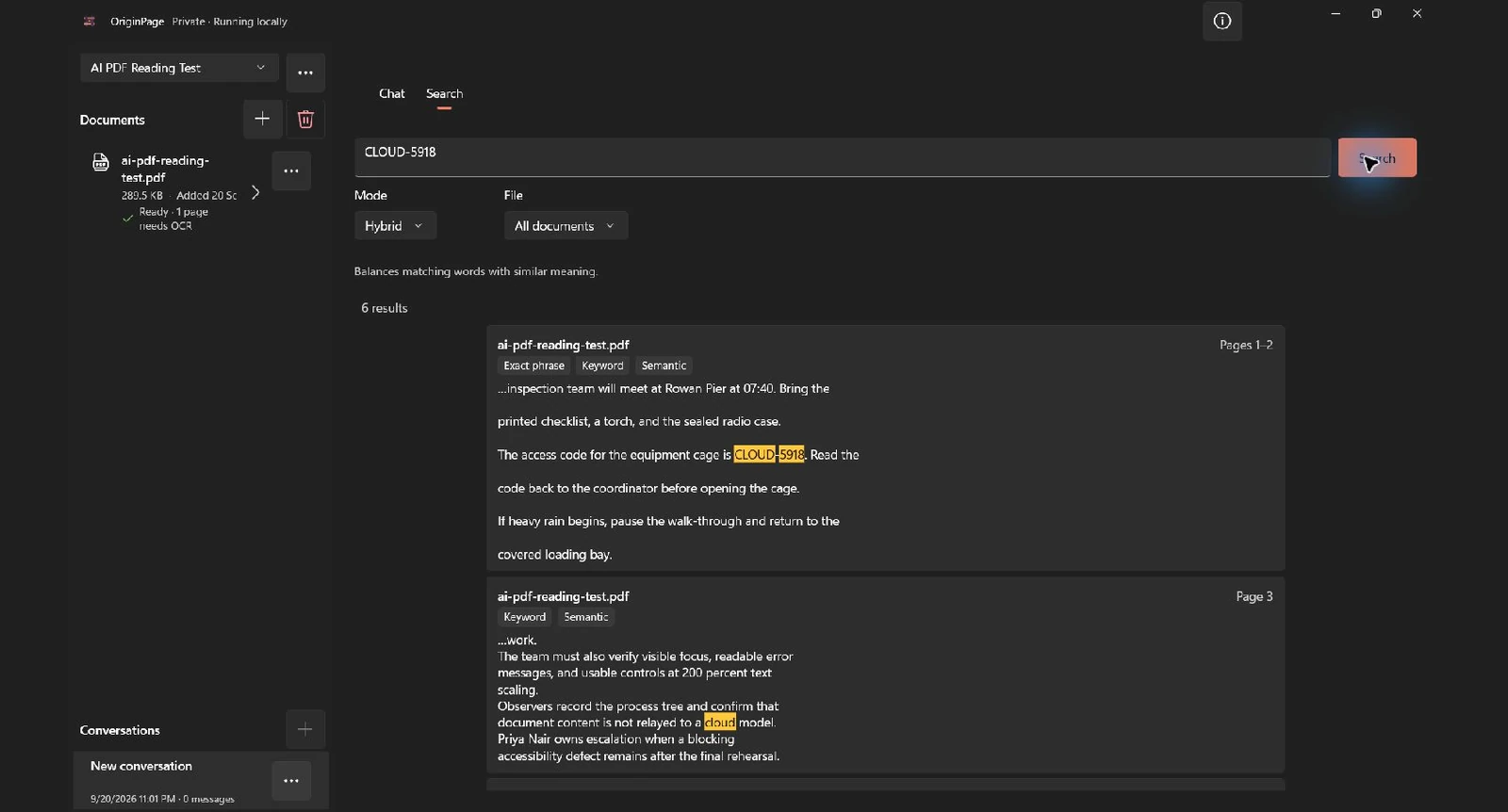
OriginPage, for example, exposes the retained text and index facts in Document details. The three app screenshots below were captured from OriginPage 1.0.35.0 after importing this download and reviewing its scanned page.
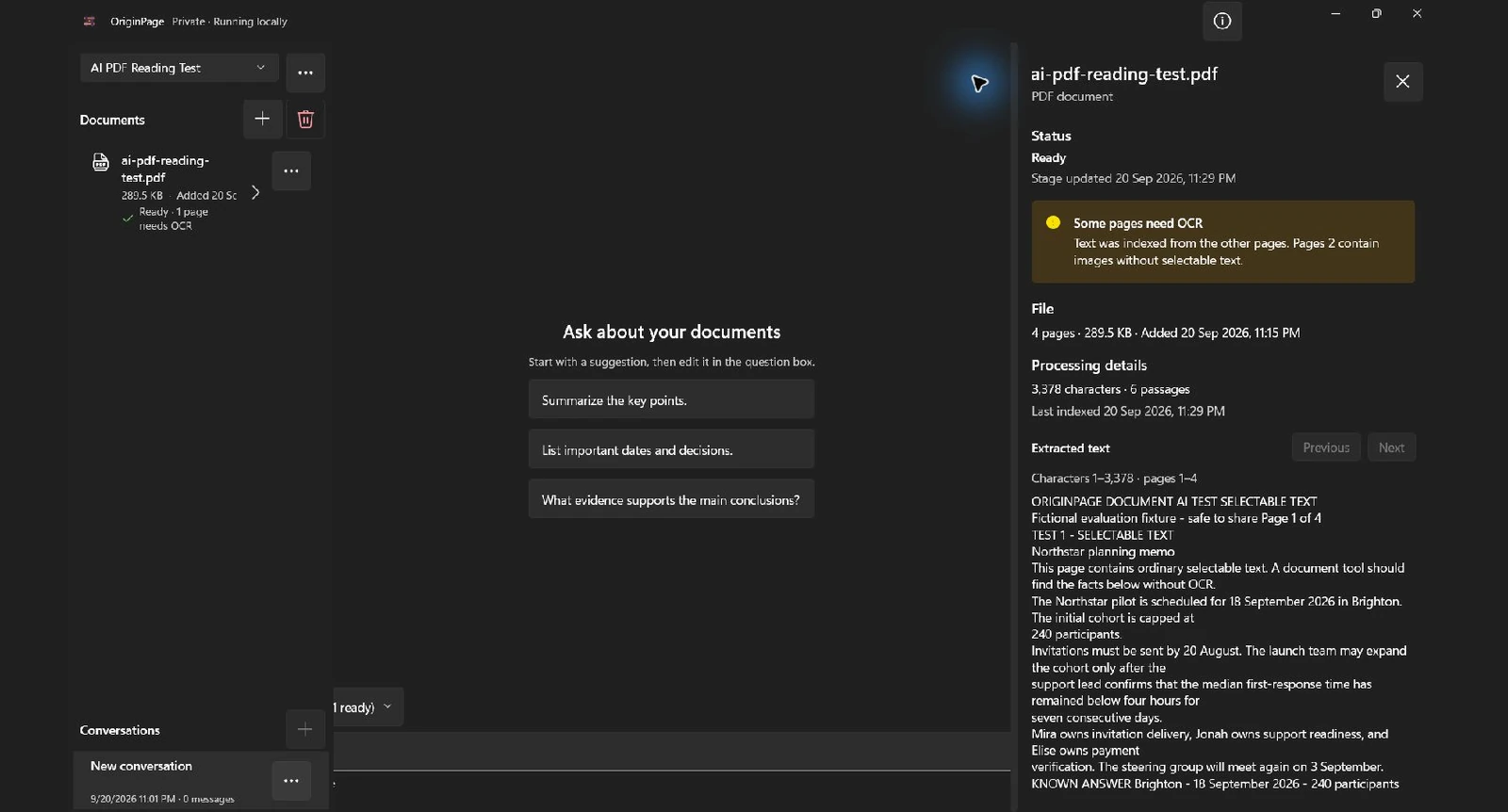
When you already know a phrase, direct search removes generation from the test. Search for the unusual token, inspect the result, and see whether the right page and surrounding words were indexed.
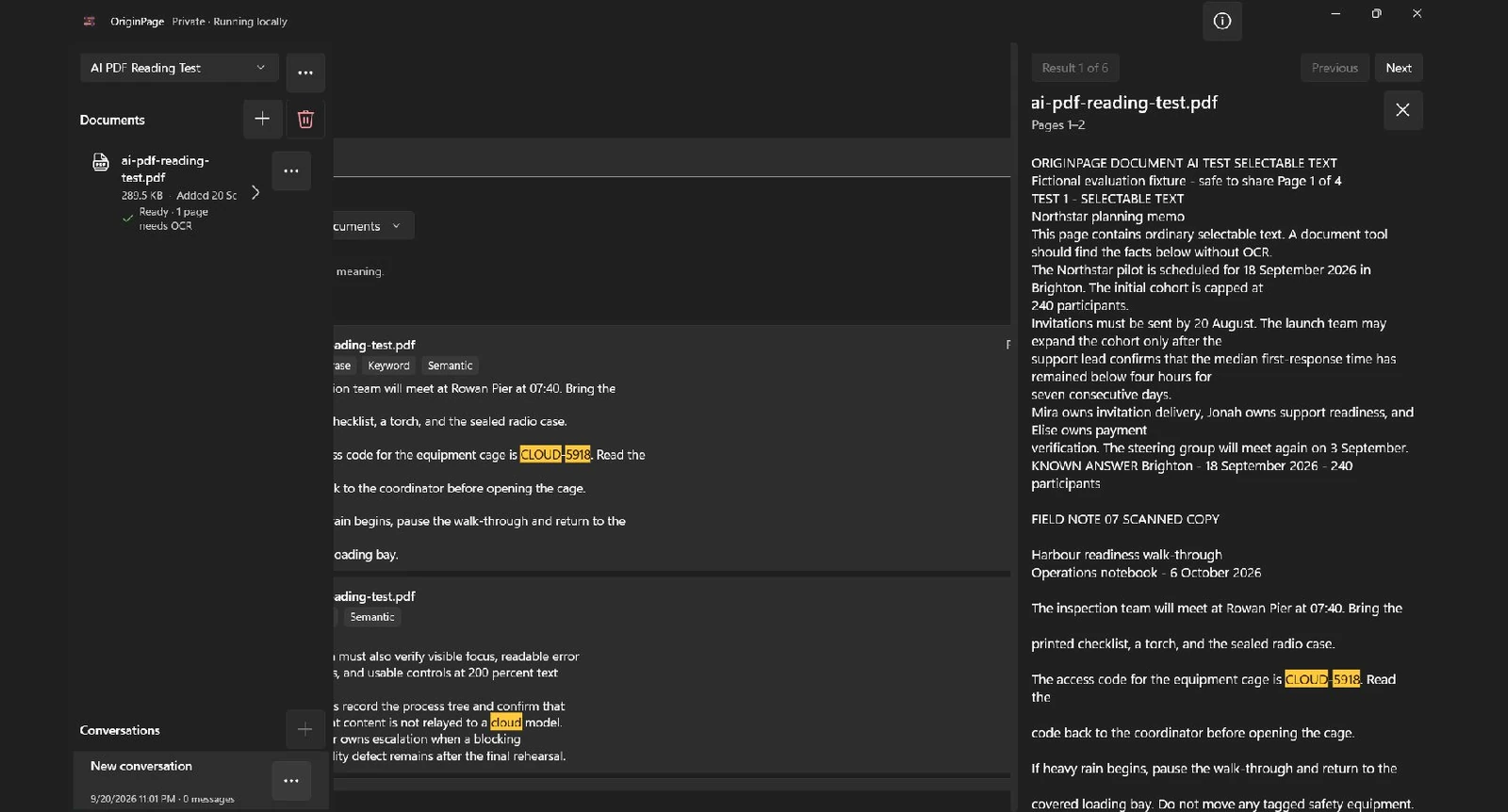
Finally, opening a result should reveal enough surrounding source text to evaluate the complete claim. A filename alone makes the user repeat the search manually; a useful source view takes them to the relevant retained passage.
OriginPage offers a seven-day free trial through Microsoft Store, with a one-time purchase required to continue. These screenshots demonstrate its inspection model; they are not comparative benchmark results. The current capability guide explains the product boundary, and A citation is not enough goes deeper on claim-level evidence.
Repeat the test with documents that resemble your work
A controlled fixture tells you where to look. Your own document mix determines whether a tool is suitable.
Choose non-sensitive or authorized examples containing the structures you actually depend on: footnotes, numbered clauses, tables split across pages, rotated appendices, faint scans, amendments, or multiple versions with conflicting dates. Write down five known answers before import. Include one answer that is deliberately absent. Then score correctness and evidence separately, just as you did here.
Do not upload confidential material merely to evaluate a tool. Read its data terms first. Find out where extraction, OCR, embeddings, retrieval, and answer generation run; what the service stores; and how deletion works. Our local document AI checklist explains how to follow that data path without relying on a vague “private AI” label.
Also repeat the test after meaningful product updates. OCR engines, parsers, retrieval settings, and model versions can change. Record the application version, test date, and settings so a later pass is comparable.
The standard to keep
An AI tool has not proved that it read your PDF merely because it returned a polished summary. It has earned limited trust when it can:
- find facts in ordinary text and scans;
- preserve the meaning of layouts such as columns;
- reproduce unusual numbers and conditions exactly;
- show the evidence supporting each material claim; and
- stop when the eligible document does not contain the answer.
Five minutes with a known-answer file will not certify a product. It will do something more practical: turn “it seems to work” into a set of observable results you can challenge, compare, and repeat.
Run the test in your current toolUse the prompts and ten-point scorecard above DownloadMethod note: The fixture and answer key are fictional and were created specifically to test extraction, OCR, reading order, retrieval, evidence inspection, and unsupported-answer behavior. They are not legal advice or a benchmark of competing products. The PDF was generated and checked on August 12, 2026.
Record a repeatable result
Keep the answer key separate from actual responses. Record the tool version, file, scope, OCR decisions, answers, and supporting passages. These app screenshots document a real import, OCR review and token search on September 20, 2026. They are not a completed five-prompt scorecard or comparative benchmark. OCR retained the expected code but also an extra stray line. During a separate chat attempt, the app closed and retained a generation-failure message; a shorter retry returned the correct 37-day notice period. A correct search result does not establish reliable answer generation.