
OriginPage vs GPT4All LocalDocs: collections, scope, and sources
A documentation-based comparison of folder collections in GPT4All LocalDocs and managed documents in OriginPage, with a common evaluation checklist.
GPT4All LocalDocs is worth evaluating when you want to bring a folder of documents into local model chat. OriginPage is worth evaluating when you prefer a fixed Windows reader with explicit document selection for each question. Neither approach removes the need to inspect the evidence.
What LocalDocs documents
GPT4All describes named collections connected to folders, an indexing progress indicator, and a Sources control under responses. LocalDocs retrieves text snippets using on-device embeddings and includes them in the model’s context. Its guide also notes that ready files can be used before the whole collection finishes. LocalDocs guide
That last point matters for evaluation: a partial collection can produce an incomplete answer even when the retrieved passages are relevant. Check readiness before comparing tools.
Compare collection selection with question scope
| Check | What to establish |
|---|---|
| Membership | Which files are actually in the active collection or Workspace? |
| Readiness | Has every file required for the comparison finished processing? |
| Eligibility | Which records can contribute to this particular question? |
| Evidence | Can you inspect the supporting text and its identity? |
| Change handling | What happens after a source file is edited or removed? |
OriginPage takes a fixed approach: PDF, TXT, and supported DOCX import on Windows 11 x64, reviewed English OCR for PDFs, four Direct Search modes, per-question document selection, and retained evidence passages. It does not provide cloud collaboration, model switching, a server API, or a general agent platform. See the capability guide and privacy boundary.
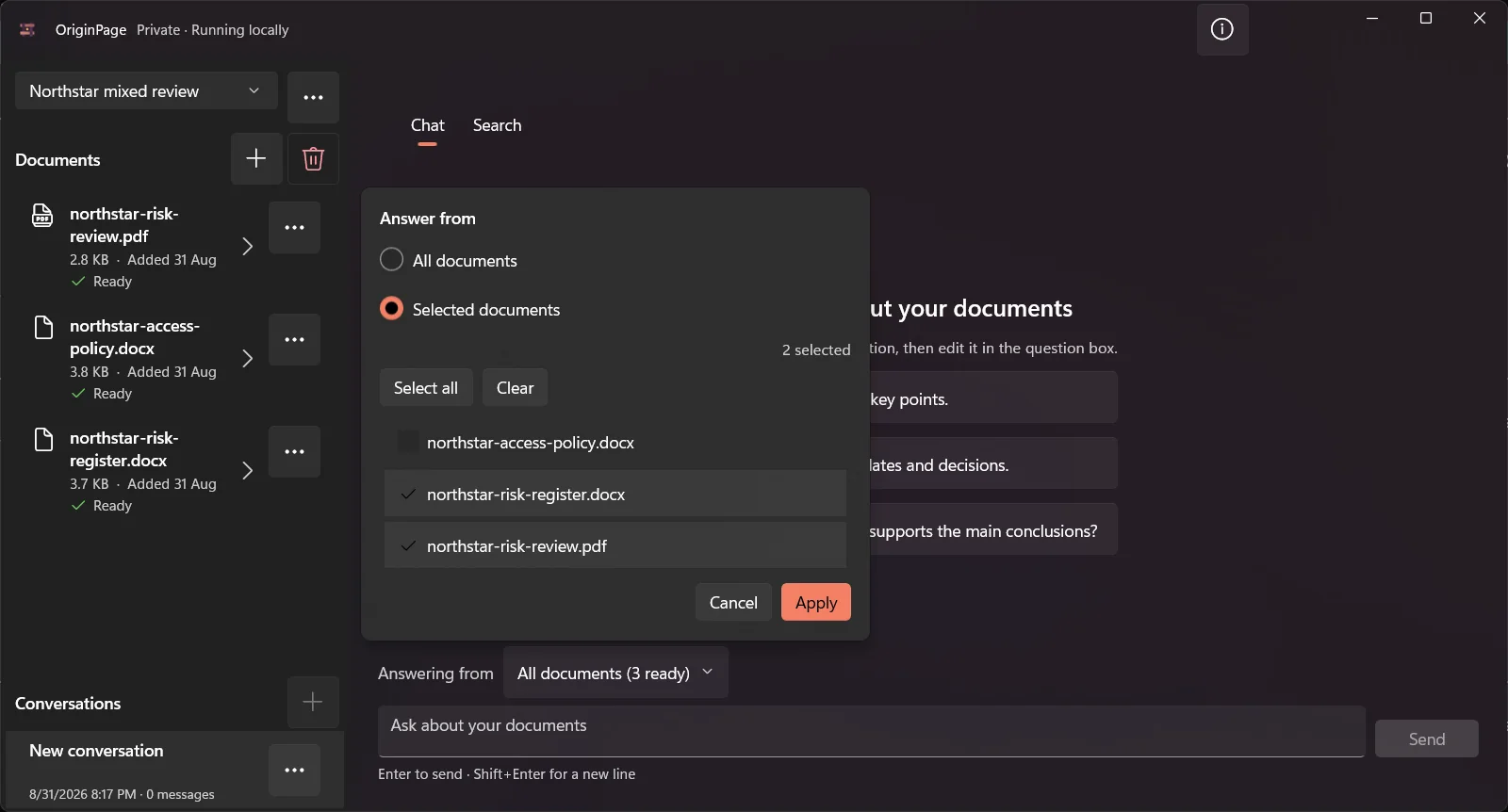
The screenshot illustrates OriginPage’s selection control. It does not establish that another product lacks an equivalent way to constrain context. Test that behavior with the version you intend to use.
Try a deliberate scope mistake
Use a base contract, amendment, and informal operations memo. Ask for the contractual notice period with only the first two eligible. Then add the memo and ask where it differs. Check whether each answer distinguishes the documents and whether every material condition is supported.
For scans, examine retained text and any review or failure state before asking a question. This comparison does not claim that GPT4All silently skips every scan or that OriginPage never makes an OCR error.
Choosing between them
Start with GPT4All if its collection workflow and model choices fit your needs. Start with OriginPage if managed copies, reviewed PDF OCR, Direct Search, and saved question scope are the specific workflow you want on Windows. Test important documents with non-sensitive examples rather than treating a product category as a quality score.
How this comparison was prepared
The OriginPage team publishes this article and sells OriginPage. We reviewed the linked first-party documentation on September 20, 2026. This is a documentation-based comparison, not a hands-on benchmark. Screenshots illustrate OriginPage only. We have not measured comparative speed, memory use, extraction quality, or answer accuracy. A feature not established by a source is a question to test, not proof that the feature is absent.
Use the fictional PDF reading test with each candidate. Check one known fact, an exception, a scanned page, and a question the files cannot answer. Record the version, model, settings, source returned, and any misses before choosing a tool.