
OriginPage vs Adobe Acrobat AI: document review and PDF work
Compare Acrobat’s cloud AI and PDF ecosystem with OriginPage’s local document workflow, without assuming citation quality or privacy from the app interface.
Start with the work you need to finish. If it includes editing, preparing, or sharing PDFs within Acrobat, evaluate the relevant Acrobat plan and AI features together. If it is reading and searching supported documents locally on Windows, OriginPage offers a narrower workflow.
Separate Acrobat’s interface from its AI processing
Adobe states that Acrobat’s generative AI features involve cloud processing. Availability and request limits depend on the plan. A desktop installation does not move that AI processing onto the PC. Adobe usage policy
This is a data-path distinction, not a claim that cloud processing is inherently unlawful or that all Acrobat operations require uploading a file. Review the terms for the exact service and account you intend to use.
Compare the complete job
| Need | Evaluation question |
|---|---|
| PDF preparation | Do you need editing, signing, forms, or conversion in addition to reading? |
| Confidentiality | Does the governing policy permit the service’s processing and retention terms? |
| Source review | Can the result lead you to the exact relevant clause and its context? |
| Scans | Can you inspect extraction errors before relying on a number or condition? |
| Multiple files | Which documents are eligible for the question, and how is that selection visible? |
OriginPage takes a fixed approach: PDF, TXT, and supported DOCX import on Windows 11 x64, reviewed English OCR for PDFs, four Direct Search modes, per-question document selection, and retained evidence passages. It does not provide cloud collaboration, model switching, a server API, or a general agent platform. See the capability guide and privacy boundary.
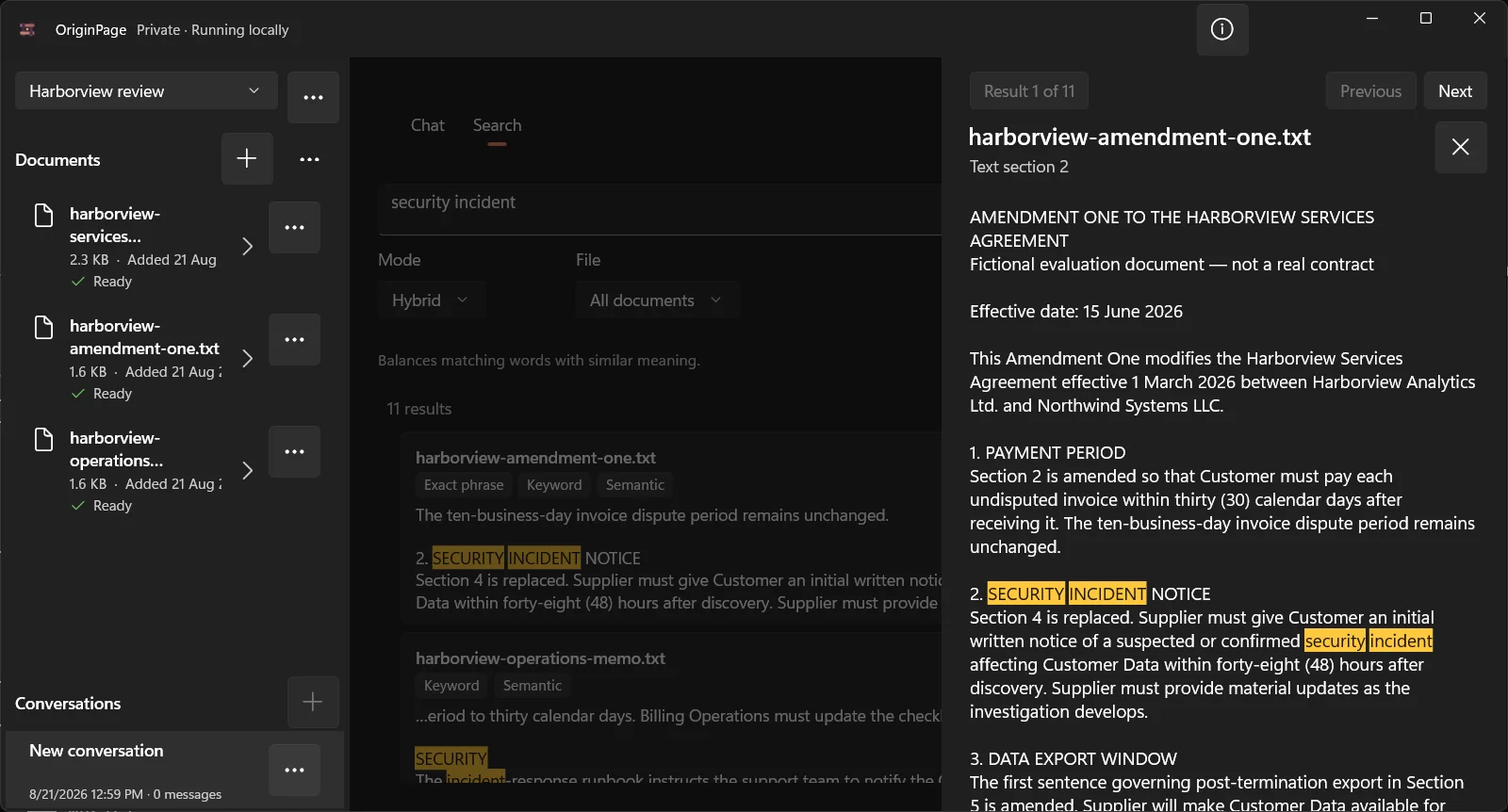
OriginPage’s source view shows retained text. Do not confuse that with editing the original PDF, verifying a signature, or preserving the visual layout of every document.
How to compare citations fairly
Use a fictional agreement with an exception immediately after its main rule. Ask a question that requires both. Open the citations in each tool and check whether the evidence supports the entire answer. Record misses and ambiguous sources without generalizing one result to every document.
Do the same with a scanned page. Manual OCR review is a useful checkpoint in OriginPage, but neither local OCR nor human approval makes transcription infallible.
Choosing a workflow
Evaluate Acrobat when its broader PDF workflow is part of the job and the relevant cloud AI terms are acceptable. Evaluate OriginPage when its local processing and fixed reading tools meet the requirement, recognizing that PDF editing and collaboration remain outside its scope.
How this comparison was prepared
The OriginPage team publishes this article and sells OriginPage. We reviewed the linked first-party documentation on September 20, 2026. This is a documentation-based comparison, not a hands-on benchmark. Screenshots illustrate OriginPage only. We have not measured comparative speed, memory use, extraction quality, or answer accuracy. A feature not established by a source is a question to test, not proof that the feature is absent.
Use the fictional PDF reading test with each candidate. Check one known fact, an exception, a scanned page, and a question the files cannot answer. Record the version, model, settings, source returned, and any misses before choosing a tool.