
Compare controlled-document requirements offline: an illustrative workflow
Use fictional specification and supplier-change records to practice source comparison while keeping export classification and CUI authorization with responsible reviewers.
For controlled technical information, the first question is whether the entire computing environment is authorized for the material. Running a document tool locally is a processing choice within that assessment; it does not grant export authorization or make a workstation compliant.
The question this exercise answers
Use the fictional Aegis pack to practice comparing a prime specification, supplier change notice, and internal review memo. The exercise does not contain real controlled technical data or establish how a real article should be classified.
Download the fictional records
Download the separate records as a ZIP, extract it, and import the TXT files individually:
- Record 1: Prime contract technical specification (excerpt)
- Record 2: Sub-tier supplier engineering change notice (ecn)
- Record 3: Export compliance & empowered official legal audit memo
The combined reading copy remains available. Import either the separate files or the combined copy, not both. Question Scope selects whole imported Documents; headings such as “Record 1” inside a single TXT file cannot be selected independently. Use the separate files for this walkthrough.
These are fictional teaching records, including any future dates, statute references, and professional opinions. They are not authentic filings, standards, advice, or a benchmark of OriginPage’s answer quality.
Locate the passages before asking for a comparison
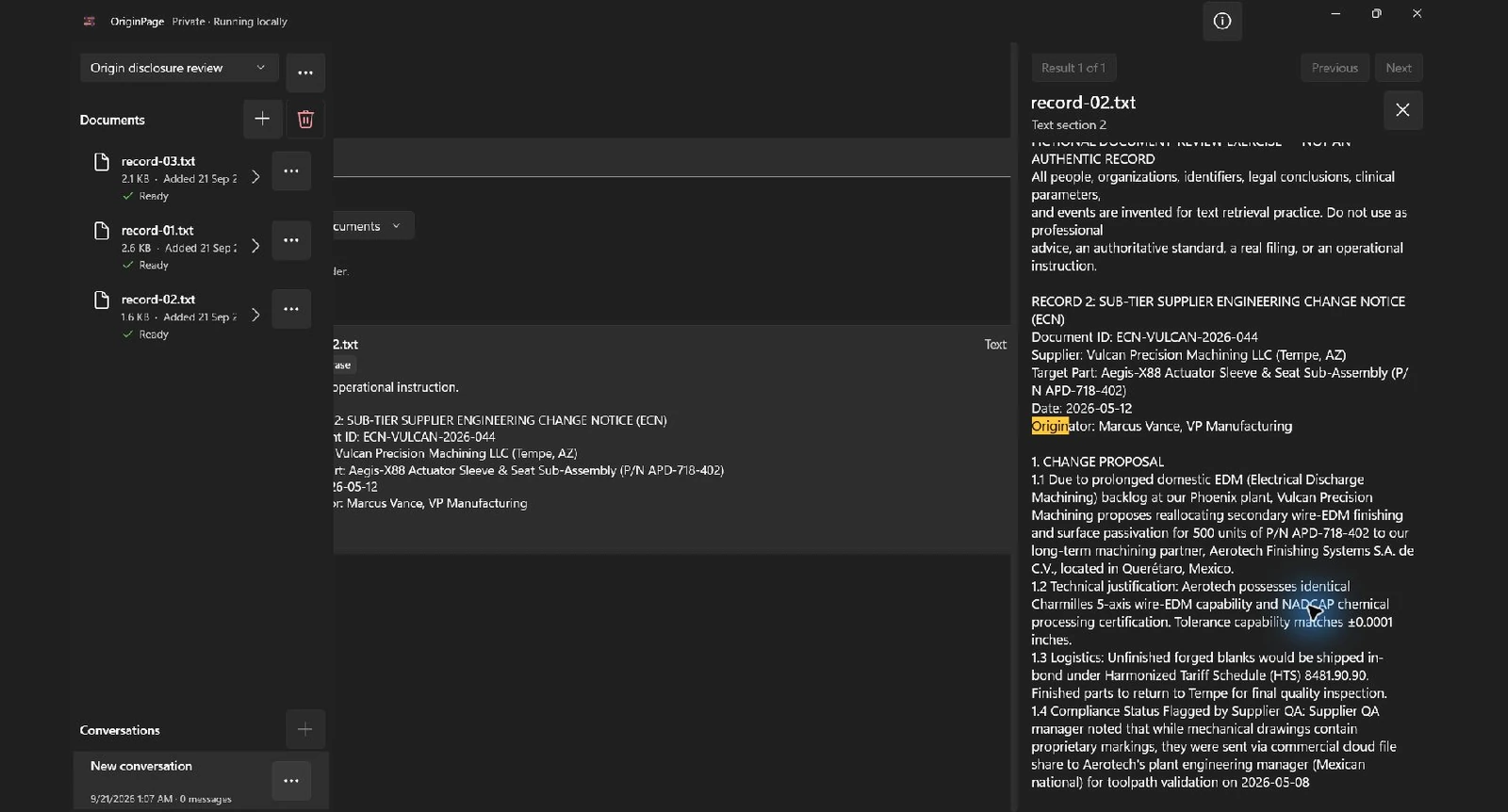
Create a separate Workspace for the exercise. Import the individual records and wait for each to show Ready. Open Document details and check the retained text. These TXT exercises do not demonstrate PDF layout extraction or OCR.
In Search, try origin in Exact phrase mode, without adding quotation marks. Search each relevant file as well as the collection. If wording differs, try Keyword or Hybrid and inspect the returned passages. A missing result is a reason to check wording, scope, and extraction—not proof of absence.
Choose the records allowed to answer
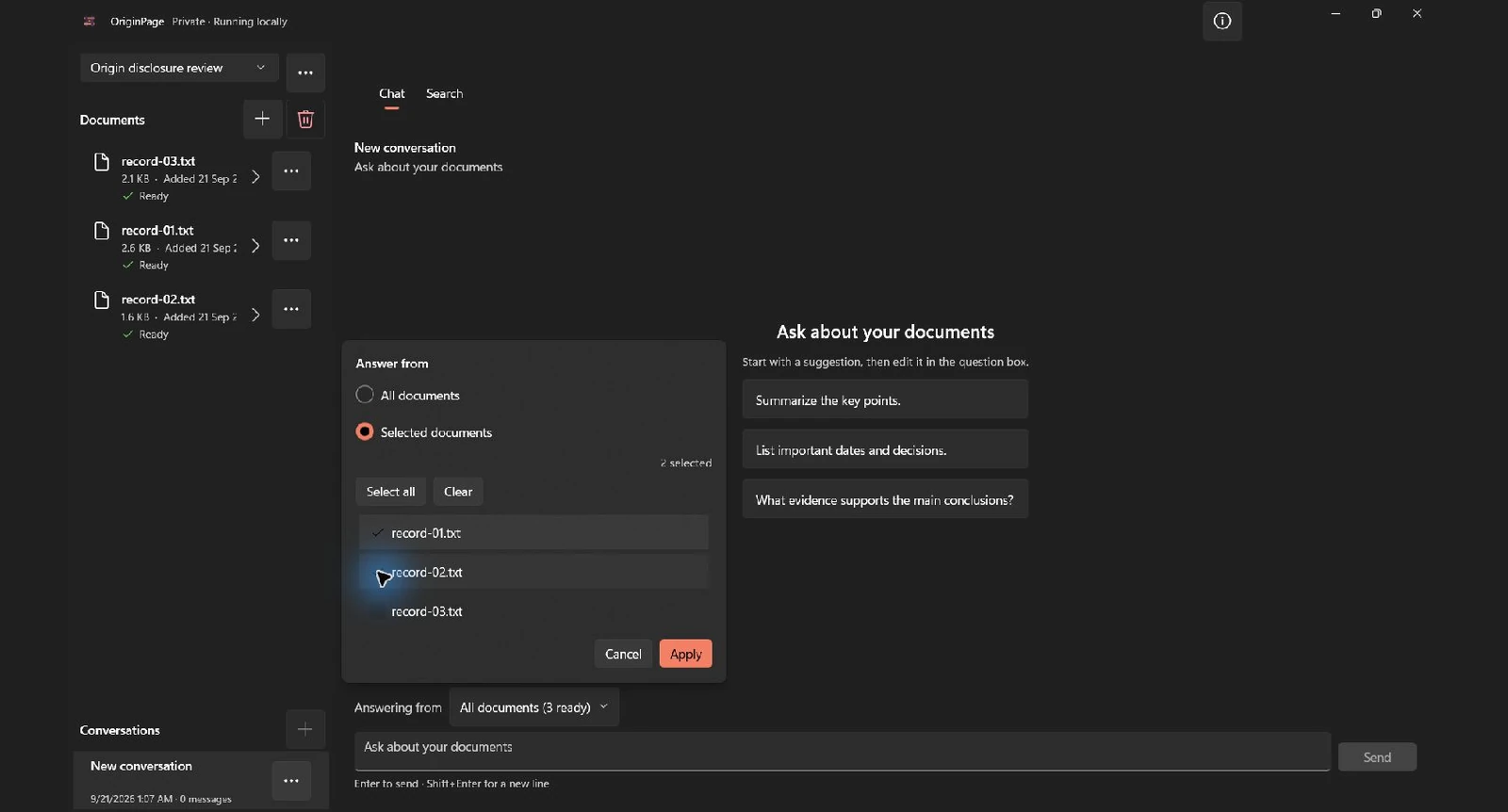
Select record-01.txt and record-02.txt to compare requirements with the supplier proposal. Add record-03.txt separately to review the memo’s interpretation. In Chat, use Answering from → Selected documents. Search filters and Question Scope are separate controls; setting one does not set the other.
Try this focused question:
Compare the sourcing and approval conditions in the prime specification with the supplier change request. Quote relevant passages and distinguish requested changes from approved changes. Do not classify an export or conclude that a violation occurred.
Check the result against the source
The following is an editorial answer key derived from the fictional files, not a recorded model response. Answers may omit relevant evidence; use Direct Search and the original records to complete the review.
| Record | Role in the review | Question |
|---|---|---|
| 1: prime specification | Stated requirements in this invented contract | What approval or sourcing wording is explicit? |
| 2: supplier notice | A proposed engineering change | Does it demonstrate approval, or merely request it? |
| 3: internal memo | A reviewer’s interpretation | Which conclusions are supported by the first two records? |
A part number, country name, or classification label alone cannot establish export jurisdiction, a deemed export, or the recipient’s authorization. Keep those questions for the designated compliance reviewer. Never use a search result as permission to transmit technical information.
Keep a review record
Record the requirement, supplier proposal, approval evidence, unresolved classification question, and responsible reviewer. Use explicit statuses such as “approval not found in supplied documents” instead of “illegal export.”
When a question needs two sides, open evidence from both. Check the filename, retained passage, surrounding conditions, and the original source where layout matters. A saved citation supports inspection; it does not certify the source or the conclusion.
Processing and professional boundaries
OriginPage is a full-trust application, not a hostile-file sandbox, CUI enclave, or certified defense system. Workspaces separate retrieval but do not create OS access boundaries. Use only the synthetic files here unless the real environment has been approved.
OriginPage processes supported documents locally during ordinary use. The privacy statement explains the limits, including Windows services and local account access. For formats and supported behavior, see what OriginPage supports.
Method
Revised September 21, 2026. The two screenshots show the downloadable fictional records imported separately into the locally installed OriginPage 1.0.35.0 candidate. We ran the stated Exact phrase query, opened the shown source passage, and applied the illustrated Selected documents scope. These captures demonstrate retrieval and scope, not generated-answer quality or professional validation. The source inspector clips part of the main pane in this candidate; the screenshots preserve that observed layout. The exercise findings are an editorial answer key, not a captured model response.