
Compare financial disclosures and 10-K footnotes offline
Trace changes in fictional annual disclosures, accounting-policy wording, and litigation notes with separate files, focused searches, and an evidence table.
Start a disclosure review with the same section in each reporting period. Search the relevant footnote, preserve the dates and units, and separate what management reported from what you infer. An AI summary can help organize the comparison; it cannot validate the accounts.
The question this exercise answers
The Apex Meridian exercise contains two invented annual reports and a later diligence memo. Use the annual reports first to establish what changed. Add the memo only when asking what further questions it raises.
Download the fictional records
Download the separate records as a ZIP, extract it, and import the TXT files individually:
- Record 1: Apex meridian systems inc. — form 10-k (excerpt)
- Record 2: Apex meridian systems inc. — form 10-k (excerpt)
- Record 3: Apex meridian systems inc. — confidential cim disclosure memo (excerpt)
The combined reading copy remains available. Import either the separate files or the combined copy, not both. Question Scope selects whole imported Documents; headings such as “Record 1” inside a single TXT file cannot be selected independently. Use the separate files for this walkthrough.
These are fictional teaching records, including any future dates, statute references, and professional opinions. They are not authentic filings, standards, advice, or a benchmark of OriginPage’s answer quality.
Locate the passages before asking for a comparison
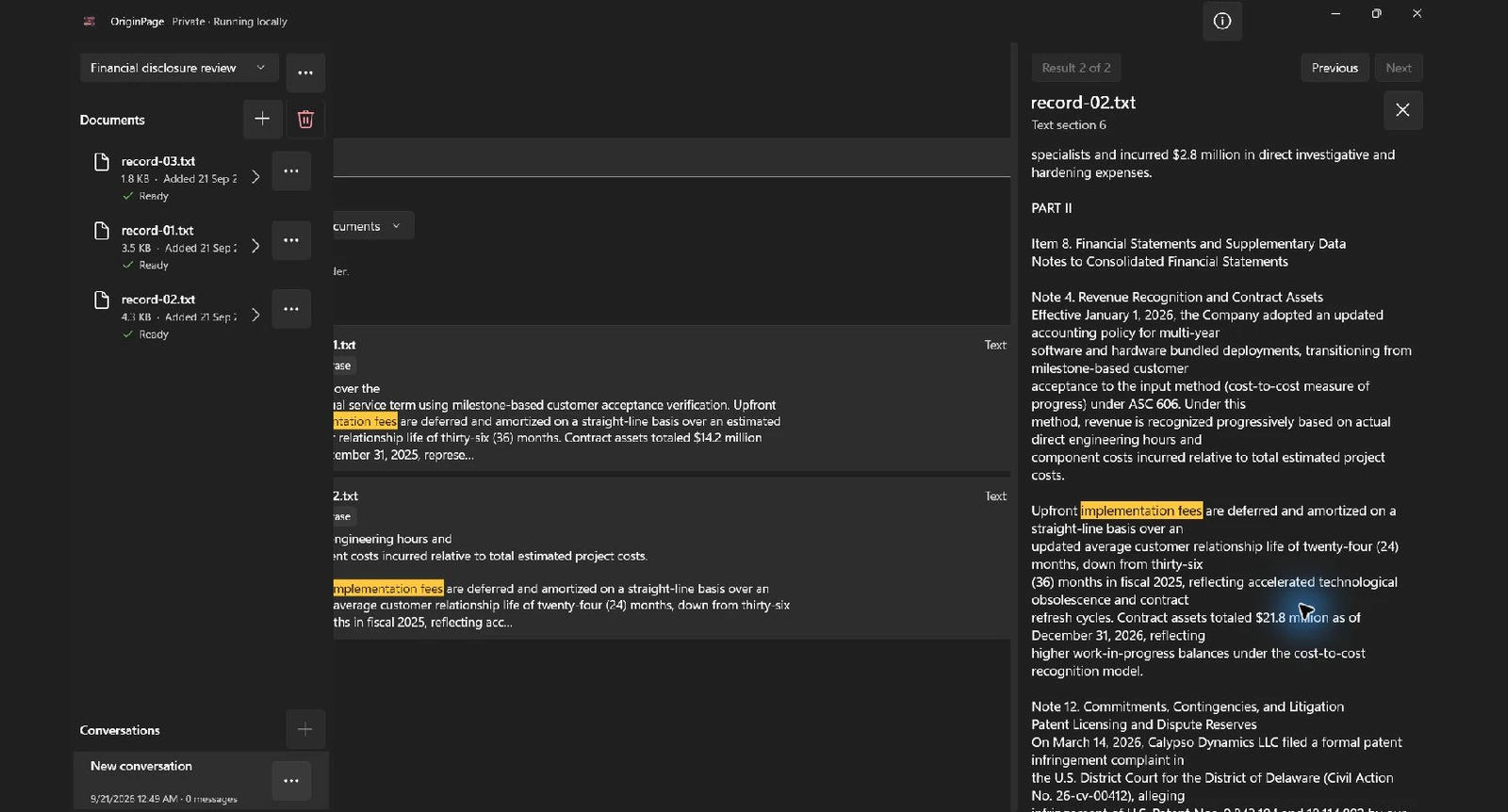
Create a separate Workspace for the exercise. Import the individual records and wait for each to show Ready. Open Document details and check the retained text. These TXT exercises do not demonstrate PDF layout extraction or OCR.
In Search, try implementation fees in Exact phrase mode, without adding quotation marks. Search each relevant file as well as the collection. If wording differs, try Keyword or Hybrid and inspect the returned passages. A missing result is a reason to check wording, scope, and extraction—not proof of absence.
Choose the records allowed to answer
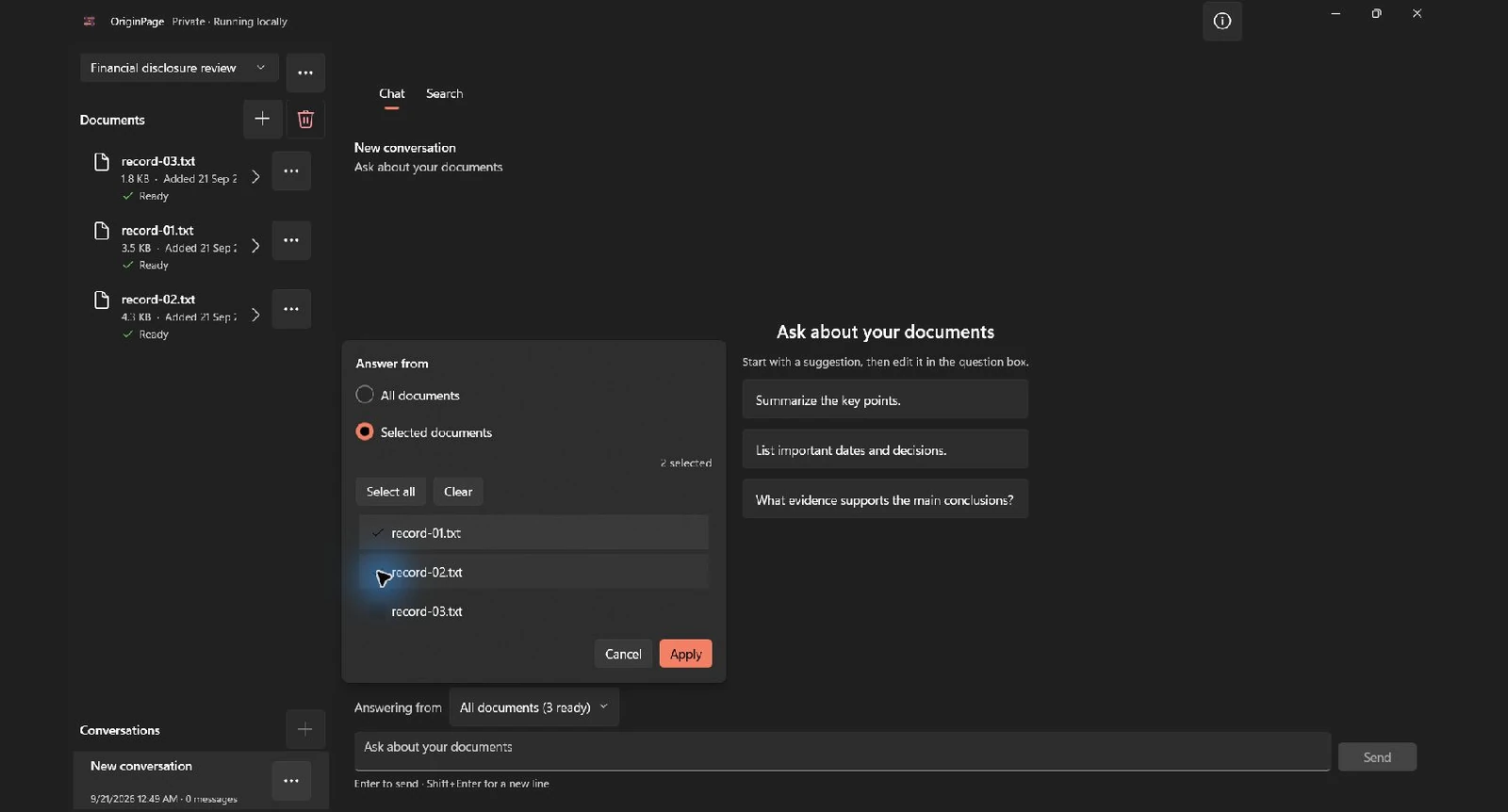
Select record-01.txt and record-02.txt for the annual-report comparison. Exclude record-03.txt initially. In Chat, use Answering from → Selected documents. Search filters and Question Scope are separate controls; setting one does not set the other.
Try this focused question:
Compare Note 4 across the two annual reports. List the stated amortization period and contract-asset balance for each year, citing both records. Do not decide whether the accounting treatment is correct.
Check the result against the source
The following is an editorial answer key derived from the fictional files, not a recorded model response. Answers may omit relevant evidence; use Direct Search and the original records to complete the review.
| Item | Record 1: 2025 | Record 2: 2026 |
|---|---|---|
| Implementation-fee amortization | 36 months | 24 months |
| Contract assets | $14.2 million | $21.8 million |
| Accrued litigation amount in Note 12 | $4.2 million | $12 million |
A shorter amortization period and a larger balance do not, by themselves, establish an accounting error. The source is an invented narrative, not audited evidence. When you add record 3, identify the $14 million settlement term sheet as preliminary and non-binding; do not replace a reported reserve with it.
Keep a review record
Use a schedule with reporting period, section, old wording, new wording, amount and unit, explanation in the source, and unresolved question. Recalculate arithmetic in a spreadsheet and ask the responsible accountant to assess accounting treatment.
When a question needs two sides, open evidence from both. Check the filename, retained passage, surrounding conditions, and the original source where layout matters. A saved citation supports inspection; it does not certify the source or the conclusion.
Processing and professional boundaries
Public filings and confidential deal materials have different handling requirements. Confirm permission for each. Local review is one processing choice, not a prerequisite for complying with securities law or an assessment of whether information is material.
OriginPage processes supported documents locally during ordinary use. The privacy statement explains the limits, including Windows services and local account access. For formats and supported behavior, see what OriginPage supports.
Method
Revised September 21, 2026. The two screenshots show the downloadable fictional records imported separately into the locally installed OriginPage 1.0.35.0 candidate. We ran the stated Exact phrase query, opened the shown source passage, and applied the illustrated Selected documents scope. These captures demonstrate retrieval and scope, not generated-answer quality or professional validation. The source inspector clips part of the main pane in this candidate; the screenshots preserve that observed layout. The exercise findings are an editorial answer key, not a captured model response.